
In this post we cover the new email deliverability guidelines for Gmail and Yahoo.
Starting February 2024, Gmail will require bulk senders to authenticate their emails. Changes will be gradual and progressive, giving businesses time to implement and test these changes.
February 2024: Bulk senders who don’t meet sender requirements will start getting temporary errors (with error codes) on a small percentage of their non-compliant email traffic. These temporary errors are meant to help senders identify email traffic that doesn‘t meet guidelines so that they can resolve issues that result in non-compliance.
April 2024: Google will start rejecting a percentage of non-compliant email traffic, and will gradually increase the rejection rate. For example, if 75% of a sender‘s traffic meets requirements, Google will start rejecting a percentage of the remaining 25% of traffic that isn’t compliant.
June 1, 2024: Bulk senders must implement a clearly visible one-click unsubscribe in the body of the email message for all commercial and promotional messages.
Q1 2024: All bulk senders will be required to to authenticate their email, enable easy one-click unsubscribe (also starting June 2024) and only send emails users want.
The Guidelines
Yahoo
As mentioned earlier, Outlook.com (formerly Hotmail) is also enforcing these policies.
Here’s a quick summary of the guidelines:
Sender Authentication: Senders should implement email authentication protocols like SPF, DKIM, and DMARC to prevent email spoofing and phishing attempts. We’ll cover this in more detail later in this article.
Bulk Senders Requirements: Sending unsolicited bulk emails can lead to deliverability issues (spam filtering) and reputation damage. Email providers have various algorithms and user reports to identify and filter spam. Google will require bulk senders (those sending 5,000+ emails per day to Gmail) to meet stricter requirements for compliance with spam thresholds.
Easy Unsubscribe: Implement easy unsubscribe options (One-click Unsubscribe). Gmail users have tools to report spam, unsubscribe from unwanted emails and control their inbox experience. If it is too difficult to unsubscribe from your emails, customers will be more likely to flag your email as spam. Additional links provided in the ‘References’ section at the end of this article.
Engagement: Avoid misleading subject lines, excessive personalization, or promotional content that triggers spam filters. Focus on providing relevant and valuable information when considering email content.
Special Considerations:
- Keep your email spam rate is less than 0.3%.
- Don’t impersonate email ‘From:’ headers.
- Ensure that sending domains or IPs have valid forward and reverse DNS records, also referred to as PTR records.
- Use a TLS connection for transmitting email.
- Make sure your forward and reverse DNS records are valid.
- Ensure receivers can easily unsubscribe from your marketing messages.
- Format messages according to the ‘Internet Message Format standard’ RFC3322
- If you regularly forward email, including using mailing lists or inbound gateways – add ARC headers to outgoing messages.
- For direct mail, the domain in the sender’s From: header must be aligned with either the SPF domain or the DKIM domain. This is required to pass DMARC alignment.
- Marketing messages and subscribed messages must support one-click unsubscribe, include a clearly visible unsubscribe link in the message body and process recipient unsubscribe requests within 2 days.
- Reference this for the full list.
Sender Authentication
In this section e discuss Email Authentication and how to avoid the spam folder.
There are 3 authentication standards to help protect an organization’s email:
SPF (Sender Policy Framework) specifies the servers and domains allowed to send email for your business. This protects against spoofing and helps prevent your emails from being flagged as spam. This is added as a record on public DNS server that is used to check the source IP of the email and compares it with a DNS TXT record.
v=spf1 ip4:173.236.251.117 include:netblocks.dreamhost.com include:relay.mailchannels.net mx ~all
DKIM (DomainKeys Identified Mail), used to digitally sign every outgoing message sent from your organization. The receiving server uses this to verify that it came from your business. It is a unique key for domain that allows mail servers to verify email authenticity and resist tampering. It is a generated key that is configured on a public DNS server.
v=DKIM1; k=rsa; h=sha256; p=MIIBIjANBgkqhkiG9w0BAQEFAAOCAQ8AMIIBCgKCAQEAmY24P6ntSL6CbVrv++vyTdgVJP4jxAEDoYbpo2vMEpOb2SDnUsiiBnd8rINyMh9BMA5whxKC/w7oqYD9dr5mvfPtkVPBSz9PqFHE2s/QsFnJlBsUJJrLFBlSXw+F95TTZyqNboANJuGCGpbg207KloAd0PZxaHjyBqj9fTfFLUCp/TrEmaMZ1E3LwqXd2jqC2mUCBcIMzIOcT68eU0b5LTlRMPL7k07BOlMGSx8Ez2wYltyDXPQc9IM8rOlMmtO92O/PkyqhyqJF+QxMSAgV6CLhtghmwbRFjvKUbkAtdCYmfRqDiPrrTCZhV7RX6+3gg7F6MPstL+KefKKToFunFQIDAQAB
DMARC (Domain-based Message Authentication, Reporting and Conformance) is an email authentication protocol designed to give domain owners the ability to protect against spoofing, phishing, email scams and other cyber threats. It instructs receiving servers on how to handle outgoing messages from your organization that don’t pass SPF or DKIM.
More specifically, DMARC standardizes how email receivers perform email authentication using the SPF and DKIM authentication mechanisms. The policy is is published in the public Domain Name System (DNS) as text TXT records and used by the receiving email server to authenticate incoming emails based on the name / value tags that are defined:
"v=DMARC1; p=reject; sp=none; fo=1; rua=mailto:[email protected]; ruf=mailto:[email protected]"
DMARC:
-
Reduces email Spoofing & Phishing: Prevents bad actors from impersonating an organization’s domain by verifying which domain the email originated from.
The domain name in the
From:field in the email envelop header is inspected and aligned with other domains authenticated by either SPF or DKIM:From: John Doe <[email protected]> -
Improves Email Deliverability: Sets policies for how the receiving email server should deal with failures.
When emails fail DMARC authentication, the DMARC policy instructs how the receiving email server should handle emails that fail SPF or DKIM checks. The options are: Accept, Reject or Quarantine the email – ensuring senders that their legitimate emails are reaching recipients inboxes.
-
Provides Reporting & Feedback: DMARC provides a reporting mechanism for policy actions performed by the above policy.
These reports provide insights to domain owners about emails sent from their organization (even if they were sent by unauthorized parties). They can be helpful in identifying and addressing email spoofing attempts.
Here’s a simple diagram to help explain the entire email journey:
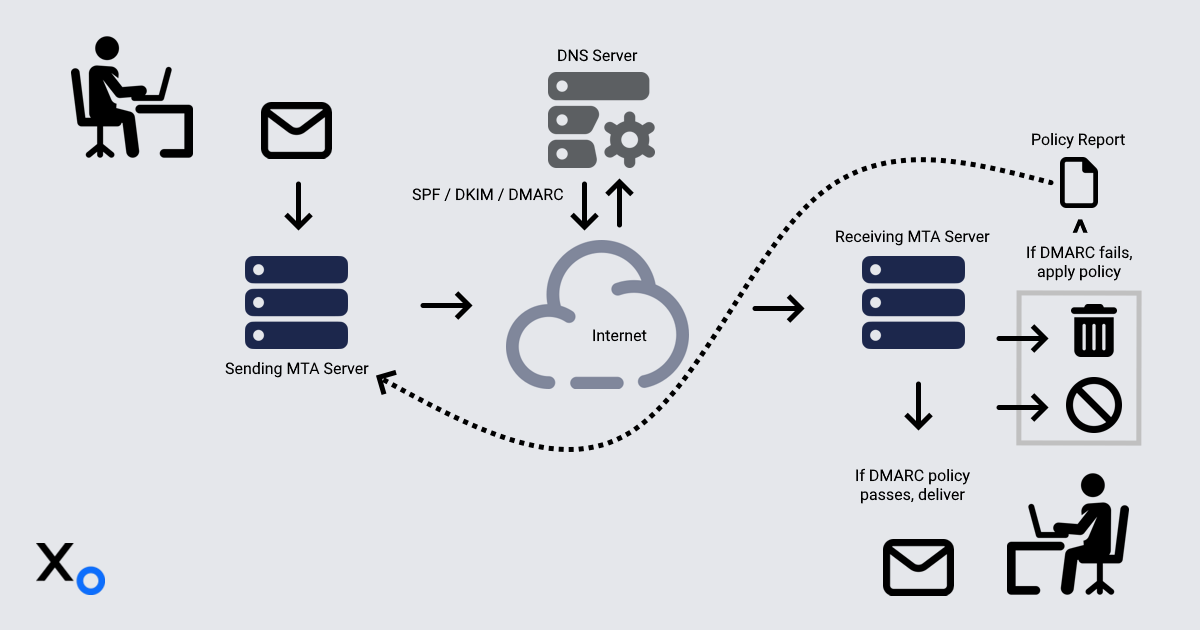
- Sender composes and sends an email.
- Sender’s MTA (Mail Transfer Agent on mail server) adds a DKIM signature to the email header as a special field..
- Recipient’s MTA checks SPF and DKIM records.
DMARC alignment is verified, and the policy is applied:
- If a message passes authentication by the receiving server – Deliver to user's inbox.
If a message fails authentication by the receiving server:
Quarantine (send them to recipients’ spam folder).
NOTE: If the receiving mail server has a quarantine configured, messages might be sent to quarantine, rather than directly to the recipient's spam folder.
Reject messages are never deliver to the recipient. The receiving server usually sends a bounce message to the sender
Here’s an example email envelop from an organization that passes all of the email security guidelines:
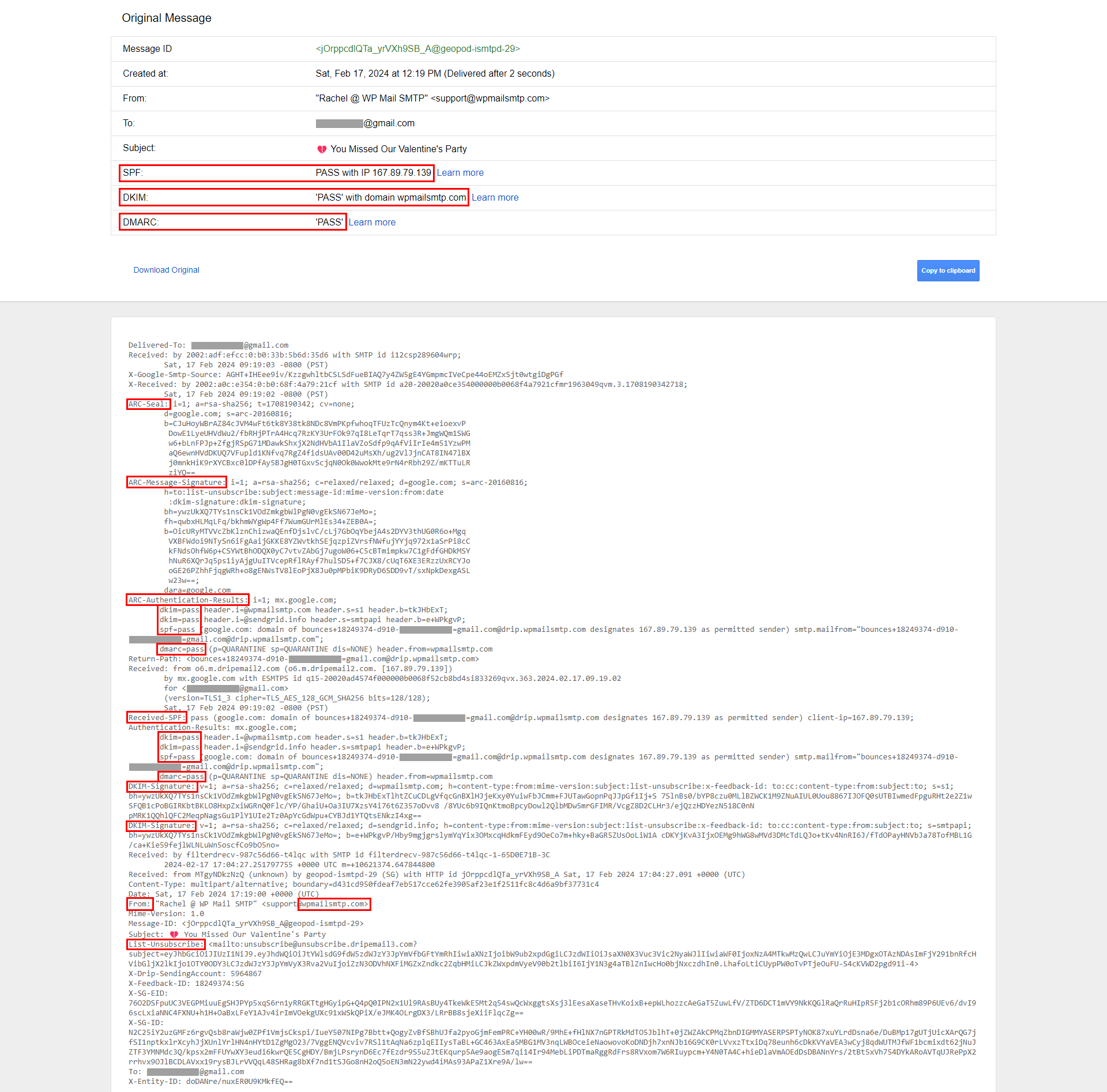
Proper configuration of these standards shields against attacks and increases deliverability so that messages land in inboxes, not spam folders.
Impact
Google continuously updates its algorithms and user-reported data to improve email filtering and user experience. Google’s AI Spam filtering algorithms block 99.9% of spam, phishing and malware attempts from landing in your inbox. For 1.8 billion accounts, 15 billion unwanted emails are being blocked daily.
The following email statistics reveal the impact these new security guidelines will have on deliverability and engagement (especially for email marketing campaigns and newsletters):
- In 2025, the number of email users is expected to reach 4.6 billion (Techjury)
- In 2023, we expect to see an average of over 347 billion emails sent per day (Oberlo)
- There are projected to be an estimated 4.37 billion email users in 2023 (Statistics
- Millennials and Gen Xers rely on their email more than any other generation at 98% (Statista)
- In 2021, an average of just over 2 hours a day are spent on email (Statista)
- 63% of people who open up an email try and find a discount (LXA)
- 99% of email users check their inbox every day, with some checking 20 times a day (HubSpot)
- The image above tells us that email marketing revenue is estimated to reach almost 12.5 billion by the end of 2024 (Statista)
- 58% of consumers check their email first thing in the morning (Optinmonster)
- 84.3% of consumers say they check their emails at least once a day (Mailjet)
Additional email stats from Sixth City Marketing
A list of the most email providers as of 2024 (in millions):
| Provider | Market Share | # of Users | Notes |
|---|---|---|---|
| Gmail | 29.67% | 1800 | Dominant provider, growing market share |
| Apple Mail | 22.82% | 1000 | Apple device users |
| Outlook.com | 4.3% | 500 | formerly Hotmail |
| Yahoo Mail | 2.55% | 150 | Declining market share |
| Yandex.Mail | 1.1% | 65 | Popular in Russia / Eastern Europe |
| QQ Mail | 1% | 60 | Dominant in China |
| GMX | .7% | 42 | Popular in Germany |
| AOL Mail | .6% | 36 | Declining market share |
| Zoho Mail | .3% | 18 | Business-focused provider |
| ProtonMail | .25 | 15 | Privacy-focused provider |
Sources: Oberlo, Litmus, Statista
NOTE: Countless smaller providers and self-hosted (businesses) email solutions exist. Accounting for a collective market share is difficult to accurately assess.
Tools
For convenience, a curated list of free online resources to help you set up, check and maintain your organization’s email hygiene:
Google Safe Browsing site status: A free online site transparency service you can use periodically to determine if your domain has been added to their unsafe site list. Also check any other domains that are linked to yours.
SuperTool: A free online tool to verify your MX, SPF, DKIM and DMARC records. It also has a ‘Blacklist Check’ tool that allows you to verify if your email IP / Domain has been blacklisted on any of the DNS-based blacklist (DNSBL) services.
Email Health Report: A free, comprehensive online email health check that looks for DNS, domain and server issues. It also searches to see if your domain is listed on any blacklist databases. The results of this report can be used to address email related issues for your domain.
IP and Email Blacklist Check: A free online tool to determine if a domain, IP address, or email address is enlisted in the DNSBL and other blacklist databases for suspicious activity. Blacklisted addresses cannot send any emails. It‘s a stricter form being blocked that requires going through an appeals process to be removed from their list.
Email Deliverability Report: Send a test email using this tool and it will: 1)Analyze the headers and blacklist reputation of your outbound IP address, 2) Verify your SPF record and 3) Email link with a comprehensive deliverability report.
DMARC Report Analyzer: This tool will make DMARC Aggregate XML reports human readable by parsing and aggregating them by IP address into readable reports.
DNS Reverse Lookup: Using the MxToolbox SuperTool again, perform an MX lookup from the domain you send emails from to determine your MX IP addresses (usually 2). Use these IPs to perform a DNS ‘Reverse Lookup’ from the MxToolbox SuperTool drop-down menu.
This is a free service that provides valuable insights and diagnostics. If you are a bulk sender (5,000 daily emails), it’s worth setting up to get valuable information about:
- When recipients mark your messages as spam.
- Why your messages might not be delivered.
- If your messages are authenticated.
- Your domain or IP reputation and its impact on message delivery rates.
Implementation
Implementing these guidelines will no doubt pose challenges for smaller organizations with limited resources. As mentioned earlier, many companies faced similar challenges transitioning to HTTPS for the Web, and MFA for online accounts. Email compliance is now rapidly becoming a mandatory standard that every business must become familiar with.
While these efforts may seem daunting, it’s important to understand that adapting to stricter security guidelines brings significant benefits such as stronger email security, customer trust and ensures that your emails are reaching their inboxes. Prioritizing these measures will elevate your brand and pave the way for business success.
To implement email authentication, consult with your service provider’s resources or support. For example, here’s collection of resource links for some well-known service providers:
Adoption is an important first step, being vigilant in the face of evolving security threats is equally important. Businesses will also need to be diligent about keeping up with changing standards.
By leveraging automation, organizations can effortlessly keep pace with shifting standards – ensuring continuous compliance:
- Continuously monitor email provider documentation for policy updates.
- Query and perform DNS record verification and validation.
- Analyze DMARC reports (both aggregate and forensic) for anomalies based on defined keywords.
- Configure an email alert to notify you of any events triggered from the above steps.
Bonus
In this section we’re going to show you a couple of methods hackers employ to exploit email security loopholes. Failing to secure email systems properly exposes your customers to malicious actors who can hijack email domains for nefarious purposes.
Email Spoofing and Phishing are two tactics commonly used to trick recipients:
Spoofing (impersonating): Involves sending emails that appear to be from a legitimate sender, like a bank, a company or even a friend. The goal is to trick the recipient into clicking on a malicious link, opening an infected attachment or revealing personal information. Spoofing is often used in phishing emails that aim to extract personal data from recipients.
Phishing (action): Is a type of cyberattack that uses deceptive emails to trick recipients into revealing sensitive information, clicking on malicious links or downloading infected attachments. The attackers typically impersonate legitimate organizations or individuals to gain the recipient’s trust and make the email appear believable.
The following command line mail utilities are commonly used in scripts to change email envelop header information such as “From:”, “To:” and “Subject:”.
A hacker will also go to great lengths setting up a remote web server with a login page that looks like the login page of a banking institution or social media platform.
These commands are automated using scripts (small programs) that are easily adaptable to impersonate an email from your bank with a link to a fake login page to fool you into entering login credentials. These attacks can be very persistent, crafty and intelligently designed to evade both human and spam detection measures.
The mail / mailx utility:
cat login.php | mail -s "$(echo -e "Test\nContent-Type: text/html")" [email protected] -- -f [email protected]echo "email body" | mailx -s "An email subject" [email protected] -a "From: [email protected]"mutt -H - "$2" <<EOF
From: $1
To: $2
Subject: $3
Importance: high
$4
EOF
Summary
In this article we covered:
- The new mandatory guidelines and best practices that email providers are enforcing in 2024 and the impact it will have on businesses.
- We explained how to implement these guidelines and how to remain compliant.
- We also provided some free online tools to help with implementation and compliance.
Bulk senders are required to authenticate emails, be careful not exceed spam rate thresholds and implement one-click unsubscribes for email marketing campaigns and newsletters.
As email service providers enforce stricter guidelines, organizations need to be proactive with compliance. While implementing these guidelines can be complex, the benefits will be well worth it. Not only will it enhance security, it will boost email deliverability and engagement rates. Ultimately this will drive more sales and revenue, helping you stand out in a crowded digital marketplace.
Just as many companies faced similar challenges transitioning to HTTPS and MFA, email compliance is rapidly becoming a standard that every business must become familiar with. These security benefits will elevate your brand and pave the way for business success by building customer trust and ensuring emails reach their inboxes.
References
Outlook.com (formerly Hotmail)
Important: Sending ‘unsolicited email’, or ‘cold emailing’ are governed by various laws and regulations depending on your target audience and location:
Read the original article

Comments
Given how much weight “Gmail”, “Outlook”, and “Yahoo” email providers pull, I have always wondered about a different type of attack on business entities: “targeted failed deliverability”
Basically in this attack, a victim (particularly a business or mailing list or NGO) is sending out bulk emails to which the attacker owns. Even sourcing this out to shady off shore click farms would work too.
Attacker then marks the victim’s emails as spam in Gmail/Yahoo/Outlook. The “AI spam filters” pick up on this new “spam activity” and will then mark future emails as spam or even delete them before reaching real customers.
After a year, company bleeds money on a quarterly basis. Ad departments wonder why there is decreased engagement through email. Technical departments are bamboozled.
Maybe a big company will be able to weather the storm or just ditch email altogether. But small companies would definitely take a hit. Even smaller NGO or political mailing lists would lose donations (assuming email was a significant source of new donations).
Probably a very low vector of attack tbh, but something that has lingered in my mind.
By Fatnino 2024-04-0117:40 I know of victims who had their legit email template lifted by actual slammers. The spammers would embed the legit template invisibly in their emails and then only have a few short lines visible with the actual scam. The idea being that filters would see the majority of the email is legit looking and let it in. Eventually users would flag enough of these as spam and the template itself would trigger the blocks. Then the spammers would move on to the next victim who's email template still gets through filters.
Meanwhile the first victim is left to pick up the mess where none of their email gets through anywhere.
Yea I've thought about this but not from the "attack on entities" angle but moreso a consumer-rights / boycott angle. I've had a negative enough experience with a large "maximizing shareholder value" company that I went back through my email history and marked every single one of their comms as spam.
Might be a drop in the bucket, but it doesn't take many votes to make a difference in the spam world.
I'm sure this will evolve soon enough and email delivery might increasingly become pay-to-play with all sort of backroom agreements, if it isn't already.
I bought my dad a sweater for our local MLB team. I made the mistake of using my real email. Ever since I’ve gotten a steady drumbeat of marketing emails and other low value content from them.
Spammers want us to think there’s a significant difference between their newsletter or marketing notes we may have technically signed up for (certainly not willingly) and I don’t feel bad about reporting both of them. If this forces spammers to consider whether recipients will want their messages, good.
It sounds like you absolutely did sign up for the emails, though.
I'm not sure how you could "unwillingly technically sign up" for something like that, especially at the scope of an MLB team which is going to have a team of lawyers, marketing policies, etc. They're not just going to spam people the risk is way too high.
That’s why most e-commerce sites send their marketing stuff from a different domain. If it gets flagged they can still send transactional e-mails from their main domain. Assuming that both mail servers are on different ips.
I'd argue transactional email should also be sent on a subdomain, to allow for a migration if that subdomain gets "burnt". I'd also argue that really nothing should send email from your root domain at all for this exact reason, but legacy environments can often make this a non-starter.
By jrockway 2024-04-0118:33 The problem is then the reputation to humans reviewing links. A legitimate company sending from legitimate-company-transactional-emails.com looks exactly like a phishing scam sending from legitimate-company-scam-emails.com. This can be mitigated by not putting anything important in the email ("You have a new message on MyChart, figure out on your own how to view it."), but people will be confused and it will waste support time.
It's honestly really bad no matter which route you choose, which is why everyone is so intent on getting you into their mobile app that can spam you without affecting their reputation.
Also, even if marketing emails are sent from a separate domain, sales people can be sending so much "spam" that your normal humans-at-the-company emails start getting rejected. I think this might have happened at my last startup; email reputation got bad, interview candidates didn't get their interview conformations anymore. But I might be misremembering.
By lancesells 2024-04-0123:05 Subdomains are basically restarting your domain reputation from scratch. I would use the apex domain and a validator in most cases, as long as you're doing the right thing and maintaining list health. Obviously mega-corps might be different and have needs for subdomains.
By inopinatus 2024-04-0111:431 reply This seems kinda deluded given that spam prevention teams have been identifying domain clusters for sender reputation management since at least 1998 to my earliest direct knowledge and probably earlier. Maybe it works for a little while, but don't bet your company on it.
A webforum I know has a rule against marking email notifications they send at spam (You can opt out of receiving them through the site, they just don't want you doing it on the email client end) to avoid this happening to them. For a small org, it's kind of a real risk?
I'm not sure how larger orgs mitigate it.
By bboygravity 2024-04-017:451 reply I run a small org (freelancer) and I have a super advanced bullet proof set of solutions against this. Any 1 of those should do the trick (I do all of these):
1. Don't trick people into signing up for mailinglists.
2. Don't spam.
3. Don't use mailinglists.
My small business is fine.
By spacebanana7 2024-04-018:371 reply Not against a targeted attack like the one described.
A clickfarm marking password reset emails as spam could create real harm.
Even a malicious individual doing this to 2-3 fair transactional emails could cause damage for a small business with low volume.
By uuddlrlrbaba 2024-04-012:321 reply They pay 3rd parties to handle relay duties. A large chunk of reliable delivery is based on those received headers, aka what systems your mail is relayed through.
By awesomeMilou 2024-04-014:432 reply Lol wait, that sounds like e-mail deliverability is almost set up like cartels.
Cartel is maybe overly pejorative, but it's definitely based on relationships.
Postmasters at large ESPs and inbox providers can and will text each other to resolve issues.
This is pretty much how the internet works as well (BGP, etc). It's opaque, but open.
I run webforums, and this is enforced trivially.
I don't send marketing, I only send transactional emails. Notifications are opt-in, and transactional. Logins / signups are done via sending a TOTP to the email, these too are transactional.
If someone marks notifications of new posts in a subscribed thread as spam... fine, but this is self-solving, as this person will trigger no more email ever reaching them for that email address, meaning they also cannot now sign in to the website, and therefore cannot subscribe to more email updates, or visit things to refresh "last viewed", and so would never be notified again.
Emailing a TOTP as a login has increased deliverability by self-selecting the removal of those who hit the spam button. Deliverability of email from the webforums is over 99%.
Reporting email as spam, effectively bans oneself from the website. I didn't even need to do anything.
Isn't that what DMARC policy would prevent? If the emails being sent by the attacker are failing SPF/DKIM, then we can configure the DMARC policy so that Gmail never delivers those fake emails in the first place. So that attack would not be happening.
By bennettnate5 2024-04-0113:592 reply The attacker isn't sending mail spoofed from the domain--they're intentionally signing up for legitimate newsletters from that domain using a ton of email accounts they control, then reporting those newsletters as spam in each email account.
By pc86 2024-04-0114:16 This could be a pretty interesting use case for a botnet as well, compromise computers, compromise email accounts, for the sole purpose of selling the ability to mass-spam your competitors. Obviously immoral but simply from a technical standpoint I'm wondering if it would work and what scale you'd need for it to be effective.
By Sammi 2024-04-0121:24 Moral of the story: Don't send bulk mail to arbitrary lists of email addresses.
By semanticist 2024-04-0110:242 reply I don't think this would work in practice. My employer sends daily deal emails without using a third-party service like SendGrid or SES and what we do is pay a company like Validity who interface with the big email providers for us. They have honeypot emails that get and validate our emails, they get feedback from the providers on how much they like/dislike us, and we get reports on this.
So an attack like this would be very obvious very quickly, even leaving aside that we'd notice a huge spike in email sign-ups and probably kill their accounts (especially since they're not going to be buying anything from those sock puppet accounts!).
By altdataseller 2024-04-0110:472 reply You’re assuming most small companies are as vigilant as your company
By tootie 2024-04-0112:45 If email is business critical, you do it. I work for a pretty small company and we do stuff like this. We have a sender tool that gives us a static sender IP, reports deliverability, click rates and at least estimates open rates. We also have a tool to estimate the quality of a newsletter sign up email address and not collect any disposable emails.
By semanticist 2024-04-0422:59 A small company will use a service like SendGrid, or even MailChimp at the higher level.
Those services will do a lot of checking for you and investigating this kind of weirdness/attack is exactly why you pay them money!
If they're sending directly, then they'll definitely be as vigilant as us, or they'd never get emails into people's inboxes!
If they're not using a third-party service what are they using? Daily deal sounds like it's very high volume...
By semanticist 2024-04-0422:57 We run our own mail servers. I would not recommend it for most people!
By dns_snek 2024-04-0117:43 Do political mailing lists get through in the first place? I don't live in the US, but someone must've sold one of my throwaway gmail addresses thinking I did.
Every couple of months I end up checking its spam folder and it's just a daily barrage of spam from both DNC and RNC, 1-2 emails per day like clockwork. None of them ever got through to the inbox though.
By Neil44 2024-04-019:01 You don't typically use your main email system for bulk sending, you use a third party for that who is used to taking that heat.
This is Google's business model, they throw completely legitimate emails your business sends into spam/marketing, so you're forced to pay them for gmail ads.
If your email can be displayed in a gmail ad, then it is spam/marketing.
Yes, that is what I'm saying so I already agree with you.
My point is Google takes content from Column A and puts in in Column B and collects money in their little toll booth. Google pretends to care about spam only when they can't make any money from it, otherwise they don't give a shit unless its a PR issue. Google ads have long been a malware vector - but they don't care because they make tons of cash from it.
I'm not taking the side of either the business or the user here, but this is a forum for start-ups who often have to send out legitimate business emails - which are not necessarily spam.
By vaylian 2024-04-0118:40 Do you have a source that backs up your claim? If that is really the case, then I would share that information more widely.
By BeFlatXIII 2024-04-0112:491 reply > political mailing lists would lose donations
Now you have me rooting for the bad guys.
If political candidates can’t get small donations then that shifts more power to large donations 1 wealthy companies, people, and unions (maybe not the last in the US)
By flkiwi 2024-04-0117:01 You know what drives me not to be involved? Knowing that buying a mug from a candidate I like virtually guarantees a torrent of emails from every downticket race in markets I’ve never lived in. And because of the way they set up the lists, unsubscribing means unsubscribing only from “Kelleher for Coroner” in a county halfway across the country. The worst part is the incredible entitlement you experience if you mention this to someone involved in a campaign. I continue to vote, but I haven’t donated a penny to a campaign in more than a decade, specifically to avoid the harassment.
Edit: USian speaking
Unions in the US donate hundreds of millions of dollars a year to political candidates.
By bongodongobob 2024-04-014:11 That's just email working as intended. You pay a third party a small monthly fee to handle email blasts via a relay.
This change was necessary and long overdue. Requiring domain owners who send significant volumes of email to properly sign their messages allows receivers to more clearly delineate good from bad based on domain reputation rather than IP address reputation.
As more domains send email through shared IP space on transactional and marketing services, having the ability to attach reputation reliably to the sender domain is incredibly helpful in reducing abuse.
The condition about "significant volumes" is not true.
Google states that the new requirements are mandatory only when you send at least 5000 messages per day.
This is a lie. I send at most a few messages per day and usually less than one per day was towards a gmail account and I had implemented a part of the requirements, but not all of them.
Nevertheless, Google has started to reject my messages, so I was forced to waste time with the implementation of all requirements, even if they are somewhat redundant.
By denton-scratch 2024-04-017:592 reply My domain also sends no more than 10 messages a day. The domain is correctly-configured with SPF, DKIM and DMARC.
At the beginning of March, I started getting temporary rejections from gmail. Not all of my outgoing messages, maybe 1 in 10. Most of these messages were to one individual, to whom I've been sending for years. My domain has existed continously since 2002, and has never sent spam. The rejection message was startling: words to the effect of "Your message has been rejected because of the awful reputation of the sending domain". The reputation of my domain is spotless, according to various testing tools.
There have been no new rejections in the last two weeks.
According to TFA, Google started rejecting a proportion of mail from bulk senders in February. I wonder if I got caught up in some half-baked roll-out of this new (old) policy.
By drdebug 2024-04-019:17 Same here with 20+ years old mail service on the same domain that has never sent spam with correctly configured DNS SPF DKIM DMARC, getting gmail rejections. I noticed a significant improvement after linking the domain to my google account https://support.google.com/mail/answer/9981691
Did you link your domain to Google Webmaster tools? It will let you know what your domain reputation is.
Maybe someone else sent 5000 mails to Gmail users using your unauthenticated domain.
By sdfhbdf 2024-04-0116:05 It also says that you only need to hit this limit once and you’re forever on that list. Also domain is considered as the canonical domain, the part right before the TLD. Subdomains are counted together with the apex domain.
By janosdebugs 2024-04-0112:12 I can confirm this, I have a mail server with extremely low, non-bulk mail traffic and without SPF/DKIM/DMARC nothing works. Even with, Gmail started rejecting mail (probably noisy neighbor), so the only way around that was to use the little-advertized relay service in the paid Google Workspace when sending towards gmail or workspace domains.
By ttul 2024-04-0217:08 The 5,000 message limit adds _extra_ requirements for senders; ALL senders, regardless of volume, must adhere to these standards:
Starting February 1, 2024, all email senders who send email to Gmail accounts must meet the requirements in this section.
- Set up SPF or DKIM email authentication for your sending domains.
- Ensure that sending domains or IPs have valid forward and reverse DNS records, also referred to as PTR records. Learn more
- Use a TLS connection for transmitting email. For steps to set up TLS in Google Workspace, visit Require a secure connection for email.
- Keep spam rates reported in Postmaster Tools below 0.3%. Learn more about spam rates
- Format messages according to the Internet Message Format standard, RFC 5322.
- Don’t impersonate Gmail From: headers. Gmail will begin using a DMARC quarantine enforcement policy, and impersonating Gmail From: headers might impact your email delivery.
- If you manage a forwarding service, including mailing lists or inbound gateways, add ARC headers to outgoing email. ARC headers indicate the message was forwarded and identify you as the forwarder. Mailing list senders should also add a List-id: header, which specifies the mailing list, to outgoing messages.
https://apps.google.com/supportwidget/articlehome?hl=en&arti...
As a sys admin, what do you do when you see 5% of your email hitting spam because the recipient’s Office365 mail server is misconfigured?
Agreed it’s a net positive, but it kills me when the reason emails land in spam is misconfiguration at the recipient’s end. (Like forwarding emails which breaks SPF)
By brightball 2024-04-010:28 As long as DKIM is configured correctly, it shouldn't matter.
By BeFlatXIII 2024-04-0112:54 My employer has had massive issues with this recently. Lots of office chatter from HR about needing to call candidates b/c the response rate is down this year due to spam folders eating the offers.
By ozim 2024-04-0112:30 We also slowly but surely are moving towards IPv6 which will make reputation based on IP somewhat useless when I can have as many new IP addresses as I want. They would have to make all newly seen IPv6 addresses not trusted by default when bad actor could send each email from different IPv6 address.
By xoneill 2024-03-3123:23 Agreed, this is the upside for sure. Despite frustrations, I'm hoping this cleans things up.
Spam is indistinguishable from malicious content.
You did not sign up for the "newsletter". Your email address was harvested and given to malicious actors hell-bent on screwing you. Clicking on anything will take you to a website where your best interest is not at all what the company is going to do with your information. At best you might just remove one source of junk in your inbox. At worst, you end up clicking on something that turns out to install malware on your machine.
So what should you do?
1. Don't click on unsubscribe links.
2. Click the spam report button
3. Stop using big email services that ignore spam reports. Gmail panders to other big businesses by letting them spam you without giving you the option to blacklist the entire domain yourself. Malicious content will continue to enter your inbox until you move to an email provider that takes your privacy and security seriously.
By DeanGadberry 2024-04-0116:431 reply Fair assessment. Which email service provider do you use?