You can now disable all AI features in Zed

2025-07-2315:45577269zed.dev

From the Zed Blog: If you don’t want AI in your workflow, it won’t be there.

Our goal at Zed has always been to build the world’s best code editor.

For many, the best editing experience must include first-class agentic AI. That’s why we’ve made Zed the world’s fastest AI code editor and launched the Agentic Engineering series to explore how programmers can use AI effectively.

But we’ve heard from others on GitHub discussions and issues who either cannot or would prefer not to use Zed's AI features. We’re here for you, too. You’re now able add a global setting to disable Zed AI to your settings.json file:

This change hits Preview today and will be in our Stable release next week.

And soon new users can also disable all AI features in Zed with a single switch during onboarding.
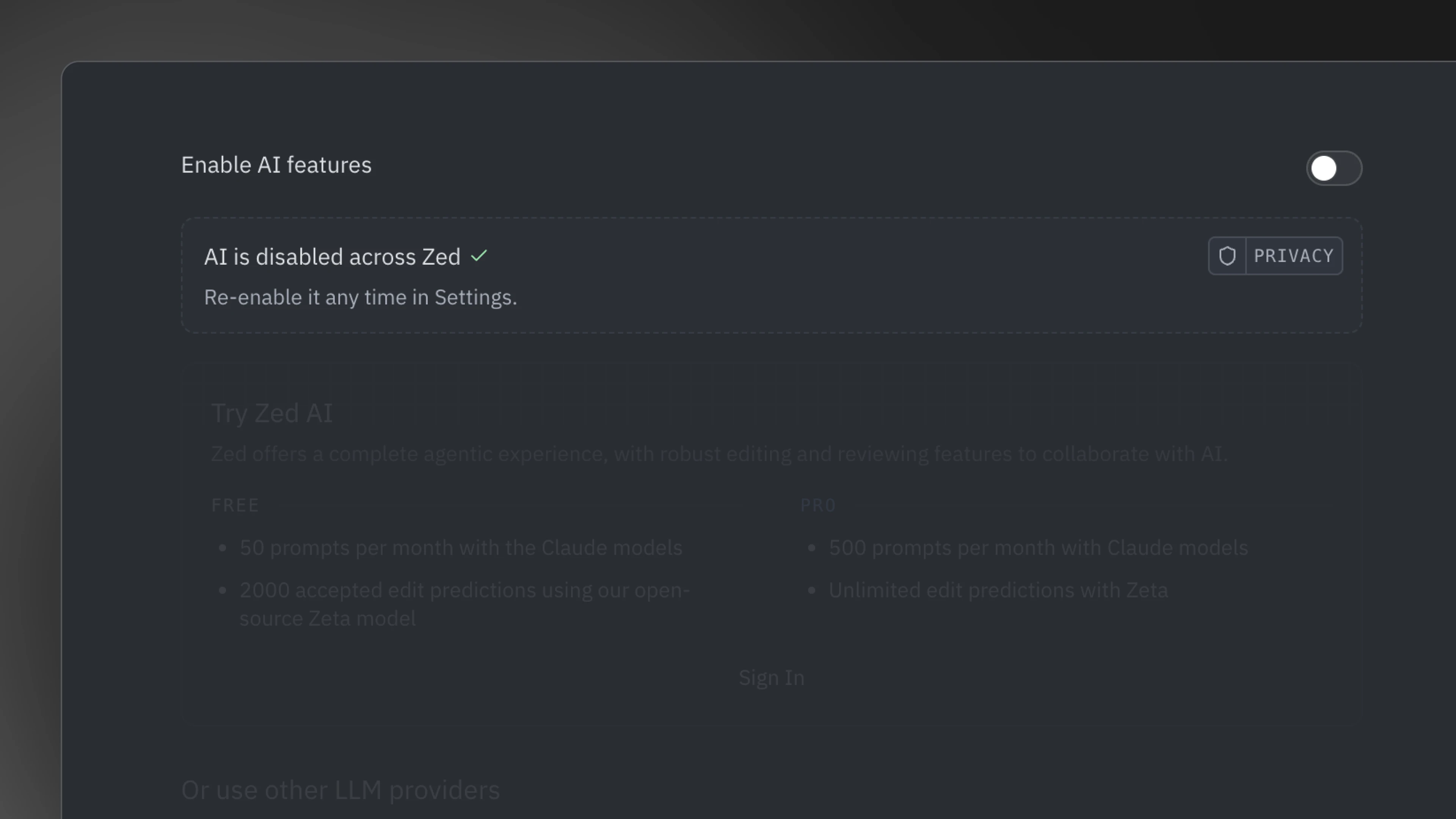
The disable AI switch during onboarding.

Why disable AI?

Some developers have fundamental objections to AI in their coding process—whether it's concerns about training data, environmental impact, or philosophical reasons about machine-generated code. You may prefer the predictability and control that comes with traditional development tools, without any AI suggestions interfering with your workflow.

Many organizations restrict AI tool usage, especially when working with proprietary code, and legal teams may require AI-free development environments. Other companies have approved specific AI vendors that aren't available in Zed yet, or in editors generally.

We've heard these concerns from our users, and we agree these are valid engineering decisions. Zed is built to respect your intent. If you don’t want AI in your workflow, it won’t be there.

Privacy-first alternatives to disabling AI

If your concerns are only about data privacy, we offer several ways to stay secure:

  • Bring your own keys: Easily connect to AI providers you trust using your own API keys, giving you direct control over the vendor relationship.

  • Keep it local: Zed also supports local AI models that keep your code completely on your machine, so nothing ever leaves your development environment.

When you use our Zed AI service, your code and prompts are discarded after each request, never stored persistently, and never used for training. We also maintain zero-retention agreements with Anthropic to ensure your code stays private.

For the skeptics

We understand the apprehension around AI tools. They can be overhyped and inconsistent, and sometimes create questionable results.

You don't have to love it. But understanding it (so you can use it effectively, or choose not to) is becoming part of the craft. That's why we launched our Agentic Engineering series. We're hoping to create a space for us to discuss and learn about practical techniques for maintaining craftsmanship while leveraging AI.

Even if you're skeptical, these tools are quickly becoming part of how software gets built. Understanding them helps you make informed decisions about when and how to use them—or not use them.

Your editor, your choice

Zed is built for engineers who care about their tools. That means giving you control over your development environment, including the choice to work without AI if that's what works best for you. Zed is also open-source under the GPL license, so if you'd like to customize it even further, you are completely empowered to do so!

We'll continue to work towards our goal of making Zed the world's best code editor. This means adding support for Windows, improving our AI experience, and continuing to improve our experience for those who won't be using AI at all.


Read the original article

Comments

  • By koito17 2025-07-2318:436 reply

    Started using Zed about a year ago and, besides Magit, it has managed to completely replace Emacs for me. I was missing a good debugger for a long time, but that also went GA a month ago or so.

    One thing that goes underappreciated is the input latency and how light on resources the editor is overall. Whenever I switch tabs to a web browser (or any web app), I can feel the lag in typing now, despite the fact I use an M3 Max MacBook Pro. Zed's built-in terminal used to feel high-latency too, but they recently shipped a bunch of performance improvements, and it's just amazing how clunky inputs feel in web apps feel after using Zed for a long time.

    Two things I find interesting about this development.

    1. This is a long-standing feature request ever since Zed added any AI capability. Adding AI-related functionality at all was a very controversial move at the time. See https://news.ycombinator.com/item?id=41302782

    2. Text threads in Zed came out only 11 months ago. At the time, it felt revolutionary being able to effortlessly paste terminal output and entire folders into context. Additionally, being able to stop the LLM, correct part of its output, and have it continue code generation. Around 4 months ago, agentic coding released, and now this once-revolutionary workflow feels quite primitive. In the meantime, Zed also added screensharing, Linux support for collaboration, a Git UI, a debugger, and performance improvements to the editor.

    • By anamexis 2025-07-2318:47

      I use Zed too, and as a longtime magit devotee, I've really been enjoying using gitu [0] in Zed. gitu doesn't have everything magit does, but there's not much I find myself missing.

      I have it nicely integrated with Zed by defining the following task, which you can then add a keybinding for if you want:

          {
              "label": "gitu",
              "command": "gitu",
              "reveal_target": "center",
              "hide": "always",
              "env": {
                "VISUAL": "zed",
                "GIT_EDITOR": "vim"
              }
          }
      
      
      [0] https://github.com/altsem/gitu

    • By cosmic_cheese 2025-07-2320:482 reply

      Not currently using Zed but low input latency is one of the things that’s kept me on Sublime Text over the years. Might give Zed a shot and see how it stacks up.

      The other two editors I use a lot are Xcode and Android Studio, and while the first is usually fine, Android Studio (IntelliJ) feels servicable but a touch sluggish in comparison. Given the popularity of JetBrains IDEs I’m a bit surprised that there’s not more demand from customers to make it more responsive.

      • By Aurornis 2025-07-2320:55

        JetBrains IDEs with their zero-latency typing mode are actually some of the most responsive editors for typing performance: https://pavelfatin.com/typing-with-pleasure/

        They can definitely feel a bit sluggish navigating around once you have a giant codebase and you’re using a lot of features, but code editing has been very responsive for me.

      • By v3ss0n 2025-07-244:221 reply

        Low latency isn't working well on Linux for zer

        • By mmmmbbbhb 2025-07-247:41

          Agree . Zed has the worst input latency of any app I've used on Linux.

    • By Alupis 2025-07-2322:271 reply

      I took Zed for a test drive about a year ago, and absolutely loved how butter smooth it felt to use. It's impossible to describe to others... you must experience it to understand what you're missing.

      However, at least at the time, Zed's extension/plugin ecosystem prevented me from making the jump off vscode. Just like it took me a long while to ween myself off JetBrains and their workflow/plugins, it'll take a long while to do the same here - that's if an equivalent plugin exists (yet).

      It seems to me, it would be a killer feature for new IDE's to just embrace vscode's extensions and make them "just work". It would remove a lot of the barriers people have with switching IDE's.

      Maybe that's an impossible ask... I have no idea, but it would be pretty sweet.

      • By jrvieira 2025-07-2323:071 reply

        how does it compare to neovim in terms of input lag?

        • By Alupis 2025-07-2323:131 reply

          I have not tried neovim, admittedly. Compared to Eclipse, IntelliJ, and now VScode, it's a completely different animal in terms of fluidity and smoothness.

          Usually when I've attempted to explain it to others, people counter with things like "but my IDE already feels smooth", etc. I thought so too, until I tried Zed.

          My only "complaint" was/is(?) the plugin ecosystem. It's a fairly new editor, so things might change in time.

          • By v3ss0n 2025-07-244:241 reply

            Which platform? Input and UIlag is worse than vscode In Linux. Vscode is quite smooth for me

            • By Alupis 2025-07-2416:03

              I'm on Fedora (kinoite). It was vastly better than vscode - especially when opening and scrolling large files, etc.

    • By adham-omran 2025-07-2411:21

      What about other Emacs functions such as org-mode? Or did you never use them to begin with?

    • By taude 2025-07-2319:20

      These were the comments I came looking for. What existing users of Zed migrated from. I'm pretty curious to try it, but lacking some time to tool yak-shave at the moment.

    • By yahoozoo 2025-07-2412:141 reply

      Why was adding AI integration controversial? You go to their website and it seems the AI integration is the whole point.

  • By gwking 2025-07-2317:197 reply

    I went from VS Code to Cursor, then got frustrated with Cursor breaking keybindings and other things, tried to go back to VS Code but missed the superior tab completion. Then I gave Zed a long hard try, but after over a month of daily usage I went back to Cursor again, just for the tab completion quality.

    I don't use any of the chat or agent features, but for me Cursor's tab completion is a step forward in work efficiency that Zeta and Copilot were not. Sometimes it's subtle, and sometimes it is very obvious. Cursor seems to have sources of context that the others don't, like file names from the directory tree, and maybe even the relevant .pyi type annotations and docs for python modules. It also jumps to the next relevant problem site very effectively. It feels like the Cursor devs have done a ton of practical work that will be hard to match with anything other than a full-on competitive effort.

    I want to see Zed succeed. I think it's very important that VS Code and its ultra-funded derivatives not dominate the modern editor landscape too thoroughly. Tab completion used to seem like a straightforward thing, but if the state of the art requires a very elaborate, whole-workspace-as-context environment to operate in, then I wonder if it's going to become a go big or go home kind of feature.

    I can't help wonder what the actual internal API for this kind of thing is going to look like in the future. It used to be something like, what's the current token behind the cursor, and look in a big prefix tree of indexed words. Then maybe it got more elaborate with things like tree-sitter, like what's the incomplete parse tree up to this point. Then when editors started using AI, I stopped having any idea of what the actual inputs are. I'd love to hear about real implementation experience at any stage of this evolution.

    • By singhrac 2025-07-2317:462 reply

      I think we don’t talk enough about tab completion model quality. Recently Copilot’s model got a lot better (probably trying to catch up to Cursor) but I feel like there’s still so much room here (and I assume Zeds is worse from your description).

      Smart context / big context is a really interesting question, I’m kind of surprised Google isn’t building here given how much effort they’ve put into big context (they have Jules and Gemini CLI but no tab completion UX).

      On further thought I think one of the big 3 (OpenAI, Google, Anthropic) should partner (ideally not buy) with Zed to get a foothold.

      • By dgunay 2025-07-2322:261 reply

        For Copilot the quality of the tab complete is less of an issue for me than the fact that it is often very slow, or doesn't trigger at all when I would expect it to. I'll sit there feeling like an idiot for 10 seconds and then glance at the bottom bar to discover that it's not even doing inference, and have to randomly move the cursor, or delete and retype code until it finally works.

        • By the_duke 2025-07-2323:52

          I found Copilot tab completion completion to be VERY slow in Zed, for some reason.

          It's fast in neovim.

          Maybe they artificially slow down non-official clients somehow? (official neovim plugin, VS Code)

      • By the_duke 2025-07-2317:48

        I have the opposite experience, tab completion by Copilot just got significantly worse for me recently (the last week or so), both for Rust and Python code.

    • By kevmo314 2025-07-2317:531 reply

      I've been working on a better tab completion model that stays as an extension: https://ninetyfive.gg/

      The main feature I really care about is low latency, which is my main gripe about Copilot. There's still a ways to go to match Cursor's quality but I'm chipping away at it!

      • By dingdingdang 2025-07-248:28

        Good work dude! It's way more functional to integrate the overall ecosystem rather than re-forking vscode ad infinitum!

    • By dkersten 2025-07-2317:531 reply

      I went slightly differently:

      I used Zed for about a year and a half exclusively, without using any AI features, and then switched to cursor to try AI features out. When Zed released its agent mode, I switched back to Zed.

      I absolutely agree that Cursor’s tab completion is far superior to Zeds. The difference is night and day. Cursor’s really is that good. But the Zed agent mode works very well for me and Zed is, IMHO just so much better than an editor. I really hate having to use vscode or a vscode-based editor after using Zed so much (I used vscode exclusively before switching to Zed). And that’s enough for me to give up on the superior tab completion.

      I hope Zed eventually improve theirs to a similar experience to cursor, but regardless, I love Zed.

      • By madacol 2025-07-2712:27

        nah, I've been using zed exclusively for a couple of months and Zed's agent mode is still worse than Cursor's, but I do agree the quality gap is smaller than on tab completion

    • By tripplyons 2025-07-2321:05

      I'm in a very similar position, using Cursor just for their Tab model. My ideal choice would be Neovim, but I can't replicate the productivity I have with Cursor Tab.

    • By hombre_fatal 2025-07-2319:501 reply

      The tab completion is the only thing that keeps me on Cursor.

      I never cared for the LLM sidebar.

      But the tab completion is basically mind-reading.

      • By hollowturtle 2025-07-2320:591 reply

        Same. I wish there was an option for enabling just tab completion and disable everything else

        • By Myrmornis 2025-07-241:18

          You can hide all sidebars in vscode and you don't have to use any AI chat features.

    • By atonse 2025-07-2317:48

      I’m in the exact same situation. Prefer Zed’s snappiness overall but the tab completion in cursor is the only reason I keep coming back.

      But at the same time, I’m also doing more vibe coding instead of manual coding as time goes on, so Zed might eventually win out.

    • By blurbleblurble 2025-07-2317:241 reply

      What kind of configuration did you use for tab completion? Did you try hooking up different LLMs?

      • By gwking 2025-07-2318:38

        I paid for a subscription to both cursor and zed, without configuring any different LLMs or other options as far as I recall.

  • By bachittle 2025-07-2316:36

    This is why I still use VS Code with AI features off and none of the AI integrated IDEs. It's not that I don't use AI. It's just that having the AI de-coupled from editor makes it much easier to separate concerns. Some days I don't feel like using AI and just need to edit one line. Other days I want to do a major sprint and test the latest AI and see if it will accomplish the task.

HackerNews