
Playwright and Puppeteer are great for making QA tests and automation scripts short and readable, but as AI browser companies have been learning the hard way over the last year, sometimes these…
Playwright and Puppeteer are great for making QA tests and automation scripts short and readable, but as AI browser companies have been learning the hard way over the last year, sometimes these adapters obscure important details about the underlying browsers.
We decided to peek behind the curtain and figure out what the browser was really doing, and it made us decide to drop playwright entirely and just speak the browser's native tongue: CDP.
By switcing to raw CDP we've massively increased the speed of element extraction, screenshots, and all our default actions. We've also managed to add new async reaction capabilities to the agent, and proper cross-origin iframe support.
Obviously we ignored the (wise) advice in the header of the getting-started-with-cdp docs 👌
The Curse of Abstraction
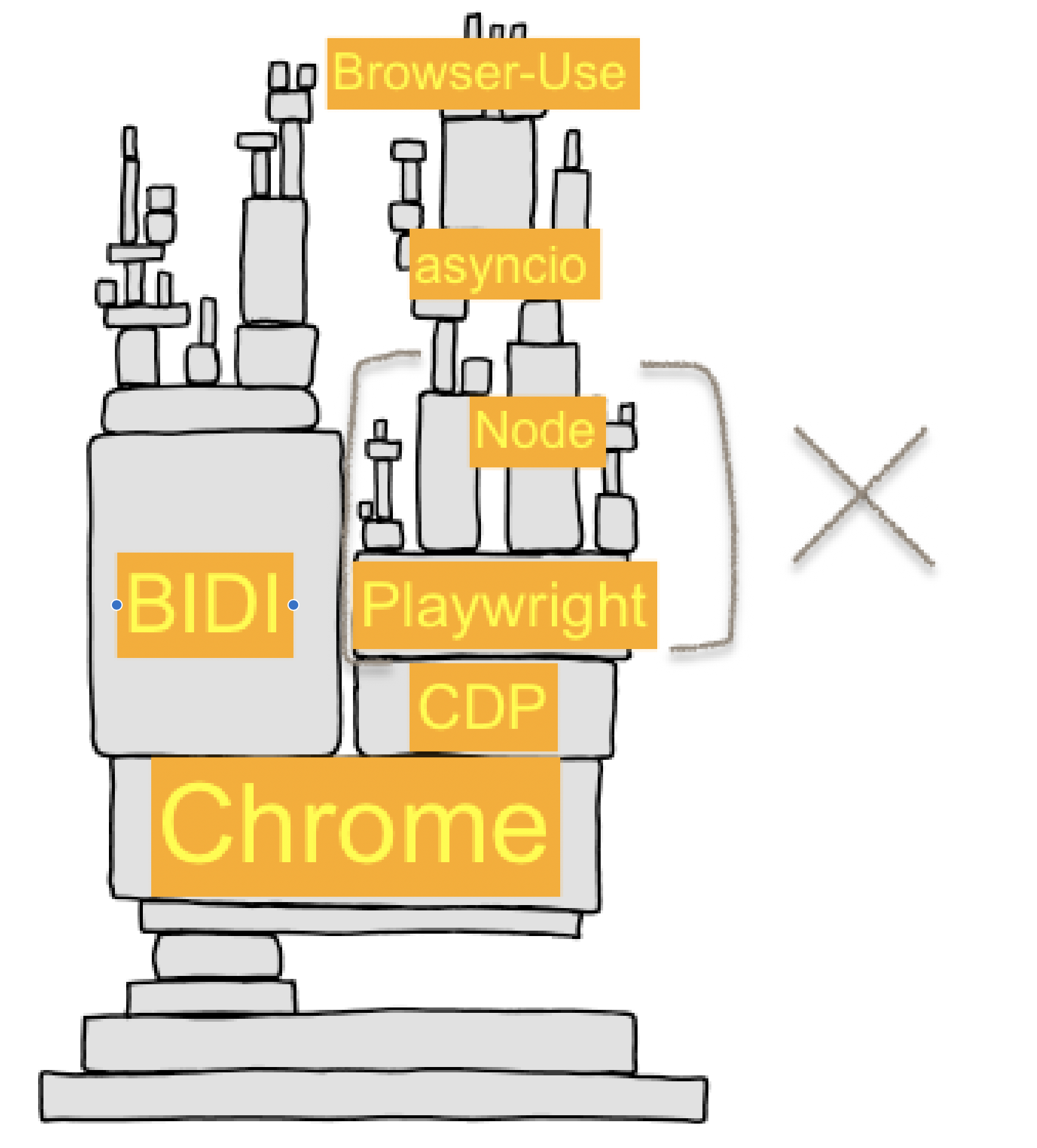
Building AI browser automation is like building on top of a jenga tower of complexity. Every layer presents its own leaky abstractions, its own subtle crashes, and its own resource constraints.
If you've ever heavily depended on an adapter library and build up a large codebase around it, you know the feeling that eventually comes when you realize the adapter library is no longer saving you any time by "hiding the true complexity". In our case that time has finally come for Browser-Use and playwright-python, the library that we've historically used to drive our browsers with LLM-powered tool calls like click, input_text, go_to_url.
At first glance it may seem foolish to throw out such a mature adapter library and reinvent the wheel, but luckily the needs of AI browser agents are much narrower than the entire surface area that playwright provides, and we believe we can implement the calls we need with more specialized logic to better suit AI drivers.
Playwright also introduces a 2nd network hop going through a node.js playwright server websocket, which incurs a meaningful amount of latency when we do thousands of CDP calls to check for element position, opacity, paint order, JS event listeners, aria properties, etc.
📜 A Quick History of Browser Automation
To really understand why the browser automation is in the state it's in today, we have to look back at some history.
The Dark Ages
- 2011–2017 — Before headless Chrome, PhantomJS (a headless WebKit-based browser) filled the gap for scripting “like a browser,” with mixed reliability.
- 2011 — Chrome ships remote debugging; work happens “upstream” in WebKit so other ports can adopt it (post by Pavel Feldman).
- 2012 — WebKit Remote Debugging Protocol v1.0 announced; early docs/talks outline the domains/events model that CDP still uses.
- 2013–2014 — Blink forks from WebKit; the protocol solidifies on the Chromium side and becomes known as the Chrome DevTools Protocol (CDP). Extensions can tunnel it via
chrome.debuggerand--remote-debuggingflag. - 2014 — Chrome’s
chrome.automation(accessibility/automation) extension API appears (exposes the accessibility tree; separate from CDP).
Headless Chrome & CDP Era
- Apr 2017 — Headless Chrome announced; Puppeteer introduced as a Chrome team Node library to drive Chrome (headless/full) via CDP.
- Jan 2018 — Puppeteer 1.0 ships.
- Jun 2018 — WebDriver becomes a W3C Recommendation (cross-browser standard). ChromeDriver implements W3C WebDriver (and later BiDi) and is tightly coupled to Chrome releases.
- 2019 — Google I/O talk by Andrey Lushnikov & Joel Einbinder (DevTools/Puppeteer team) popularizes modern testing with Puppeteer.
Multi-Browser Standardization Era
- 2019–early 2020 — Several core Puppeteer engineers leave Google for Microsoft and start Playwright (cross-browser automation/test framework) 🎭 (oooo drama)
- Jan 31, 2020 — Playwright 0.x public release.
- May 6, 2020 — Playwright 1.0 ships.
- Sep–Oct 2020 → — Multi-language support begins (e.g., Playwright for Python announced Sep 30, 2020).
- 2023 — ChromeDriver adds WebDriver BiDi support (alongside classic WebDriver).
- 2024 — Puppeteer adds WebDriver BiDi support; Selenium “welcomes Puppeteer to the WebDriver world.”
Modern Times: A Multitude of Choice
Now in 2025 we are lucky to have many high quality driver libraries to choose between, our favorites include:
- ⭐️
pydoll(best python-first playwright replacement) - ⭐️
go-rod(best CDP reference implementation),chromedp(great CDP debug tooling) puppeteer(best native chrome behavior),playwright(best cross-browser support)selenium,cypress(automate with old-school WebDrivers)appiumautomate via system-level accessibility APIs on Android, iOS, macOS, Windows
So why did we feel the need to write our own with cdp-use? Well for all the same reasons as everyone else: everlasting desire to be closer to the metal and have more detailed control over every step.
How do Browser Drivers Work?
So what APIs does the browser actually expose anyway? What sits underneath all these "drivers"?
🔌 What are the automation APIs that Chromium actually exposes?
All these adapter libraries, drivers, and AI helper extensions really just exist to pass messages and make RPC calls to these underlying browser APIs:
-
Chrome Extension APIs
chrome.tabs.captureVisibleTab()chrome.automation.getTree()chrome.scripting.executeScript()chrome.debugger.sendCommand({tabId: 123}, "Page.navigate", {url})Chrome Extension APIs appear to be the most powerful at first glance because they encompass CDP with
chrome.debugger, but raw CDP lets you access some calls that are not available throughchrome.debugger, and allows parallel connections to multiple targets.
-
CDP APIs (via pure CDP Websocket or WebDriver BIDI socket)
Page.navigate({url})Target.createTarget()Page.handleJavaScriptDialog({accept: true})Browser.setDownloadBehavior()
-
OS-Level Accessibility & screenreader APIs (NVDA/Voice Over/AppleScript/Appium/etc.)
- get a tree/rotor view of all elements shown to screenreaders (links, buttons, inputs, ...)
- script copy/paste, mouse, keypress, and element rotor/tab-based navigation
-
Internal Chromium C++ APIs (within Chromium source code)
- you can call arbitrary helpers
content/browser/devtools/protocol/*_handler.cc - you can edit the CDP spec and add commands to call custom C++ APIs
third_party/blink/public/devtools_protocol/browser_protocol.pdl - ... anything is possible when the call is coming from inside the house ...
- you can call arbitrary helpers
Ignoring These for Now
-
Classic WebDriver W3C / ChromeDriver REST APIs
/session/{id}/url/session/{id}/element/{eid}/click/session/{id}/actions- ... etc. These are not actually exposed by any browser directly, rather they are the W3C standardized REST API shape recommended for drivers (ChromeDriver, GeckoDriver, WebKitDriver, selenium) to provide to clients above raw browser calls via CDP/BIDI.
-
Webdriver BIDI (websocket)
- merger of the old REST-API based WebDriver system + CDP in a single websocket, official release delayed for years now, not feature complete yet. check back in 2027
🎭 How does Playwright work?
Playwright achieves multi-languge support by using a client-server model between clients in various languages and a single core implementation that runs as a node.js websocket server.
The playwright node.js relay server accepts standardized "playwright protocol" RPC calls from playwright clients, and then sends out CDP or BIDI calls to the browser to execute them.
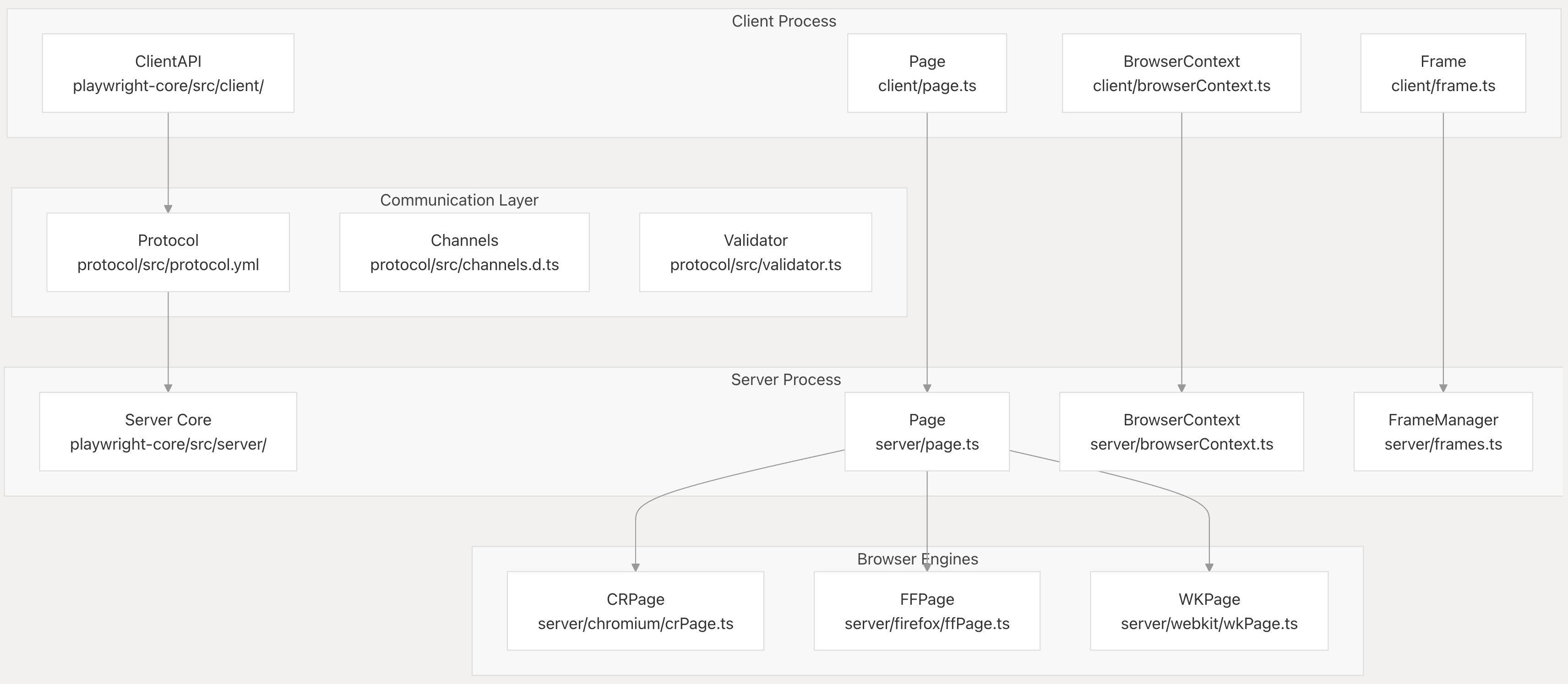
This API is elegant in some ways, the "playwright protocol" of commands provides a nicely typed RPC interface and standardizes behavior across languages. Playwright also nicely abstracts lower-level browser ideas like targets, frames, and sessions into simple Page and BrowserContext handles and (usually) manages to keep those handles in sync and not deadlocked across node.js, the browser, and python.
Unfortunately the double RPC through the node.js relay means some state inevitably drifts across the 3 places (and across three different languages and runtimes):
- live browser
- playwright node.js relay process
- python client process
When a tab crashes in the browser or some operation is performed without focusing a page correctly, there are edge cases where the node.js process can hang indefinitely waiting for a browser reply, meanwhile the python client needs to send the CDP call the browser is expecting in order to proceed. Currently we have no recourse but to kill -9 and attempt to reconnect to the browser from scratch with a new playwright instance.
There are numerous cases like that only crop up in 1% of cases with specific slow network conditions, but edge cases can quickly drag down overall success scores when we run thousands of steps per eval.
🩸 Playwright's Sharp Edges
The playwright happy paths usually work fine, but the devil is in the details:
fullPage=Truescreenshot on pages longer than>16,000pxhigh (reliably crashes playwright)alert()/confirm()/onbeforeunloadhandling- attempting to keyboard/mouse/dialog input without focusing a page
- file upload & download handling on remote browsers
about:*,chrome://*,chrome-error://,chrome-extension://, PDF tab handling- chrome preferences and enterprise/registry configuration management
- crashed tab handling for
DEBUG=pw:api helps but it only goes so far, at a certain point it doens't make sense to build workarounds around a relay layer that we're fighting to customize and control anyway.
Sometimes when you are forced to thoroughly stretch every nook and cranny of an adapter layer, you start to see the ugly truths of the underlying resource, and you no longer want the "pretty version" as a veil pulled over your eyes, you'd rather see the ugly truth.
🍳 Starting From Scratch: Out of the frying pan and into the fire
Delivering a reliable experience when so many of the underlying components are inherently unreliable (or actively adversarial) is a monumental engineering challenge.
Did you know there are at least 10 different ways a tab can crash in Chrome?
- all targets start in a briefly semi-"crashed"/unresponsive state while initial requests are inflight, before the main page JS thread starts
- chrome zygote/root process can crash (slow user_data_dir/filesystem io, oom, cpu lag, etc.)
- GPU process can crash, there's even a helpful CDP call
Browser.crashGpuProcess - page renderers can crash due to exceptions raised within chrome source (sigsev, oom, etc.)
- page renderers can crash because the page exceeds allowed resources (
Page.crash()) - page can spinlock/oom due to infinite loops or crypto mining in its JS main thread
- scrolling/input/screenshot before
activateTargetfocus can crash targets (5sec delayed!) - handling a JS popup before activateTarget or attempting to handle it after already closing
- parent frame navigation during child
onbeforeunload"are you sure you want to leave?" - any of the above crashes in a nested OOPIF leading to subtle issues in the parent target
Playwright handled about half of these well, and presented impassible barrier to solving the other half, so we made the call to switch. But now we're faced with the difficult challenge of solving 100% of these cases ourself.
We take on this challenge with glee, we'd rather lose sleep thinking about these things so you can build reliable apps on top of us 💪.
Case Studies: Key Changes in the Migration
New CDP-USE Library Providing Python Type Bindings
A type-safe Python client generator for the Chrome DevTools Protocol (CDP). This library automatically generates Python bindings with full TypeScript-like type safety from the official CDP protocol specifications. It's only shallow type bindings, no complex logic for session management, pages, elements, etc. just 100% direct access.
Check out the library here: github.com/browser-use/cdp-use ➡️
New Event-Driven Architecturre
We used to only update our view of the world between actions, right before sending the next state summary to the LLM. This makes sense when your assumption is that the page contents will only change as a result of actions, but this is not always true!
Take for example a slowly loading list of results that stream in, an animated carousel, or a bit of JS that runs every 3s. All of these are examples of things that can happen at any point in the agent action/runloop cycle.
We've introduced a new event-driven architecture to better fit the underlying event-driven architecture of CDP. Now we can subscribe to and respond to CDP events, which we set up in "watchdog" services that monitor for various things.
For example, our downloads_watchdog watches for any file downloads that start spontaneously, whether triggered by a click, js executing, or any other method. crash_watchdog.py can now watch for page crashes in a single place by just subscribing to a crash event, and we no longer have to scatter crash detection and retry logic all over the rest of the codebase.
Check out the library powering this: github.com/browser-use/bubus ➡️
New Extracted Element Handle that works across OOPIFs
A tab is not a page; it’s a constellation of targets (root + cross-origin iframes + workers), each hosting frames, each containing nodes. Abstract that away and you lose the ability to route input, correlate events, and re-find elements after DOM churn.
We now represent nodes with "super-selectors" that include targetId, frameId, backendNodeId, x/y position, and fallback selectors:
@dataclass(frozen=True)
class EnhancedDOMTreeNode:
    target_id: str                 # which DevTools target owns the renderer
    frame_id: str                  # which frame inside that target
    backend_node_id: int           # renderer-local node handle
    frame_path: Tuple[str, ...]    # root → ... → leaf, useful for sanity checks
    element_index: int             # LLM-friendly stable ordinal for UX
    ...
Minimal routing helpers
class BrowserSession:
    # caches are kept warm by watchers listening to Target.* and Page.*
    def cdp_client_for_frame(self, frame_id: str):
        target_id = self.target_id_by_frame_id(frame_id)
        return self.cdp_clients_for_target(target_id)[0]  # long-lived session

    def route_to_node(self, ref: EnhancedDOMRef):
        client = self.cdp_client_for_frame(ref.frame_id)
        return client, {"session_id": self.session_id_by_frame_id(ref.frame_id)}
Outcome: zero guessing about who owns the node or where input should land, even with nested cross-origin iframes and DOM element shifts after actions.
Time is a Flat Circle
Back in my first startup job in 2014 we were using PhantomJS and some RPC between python and JS, and in a way it's surprising how little has changed since then. Now it's 2025 I'm still dealing with all the same issues: tab crash handling, page load retrying, JS+Python RPC translation issues, python asyncio headaches, mouse movement fuzzing, etc.
Luckily a lot has improved since 2014, and we finally have a big light at end of the tunnel leading out of the manual QA automation mines: AI.
We aim to continue solving all the complexities of browser automation and CDP for our users. Our agents shouldn't have to know the nuances of CDP Targets in order to Get Stuff Done™️, and neither should you.
Try out our new libraries and beta releases with cdp-use and let us know your feedback!
Read the original article

Comments
By dataviz1000 2025-08-2016:345 reply I made this comment yesterday but really applies to this conversation.
> In the past 3 weeks I ported Playwright to run completely inside a Chrome extension without Chrome DevTools Protocol (CDP) using purely DOM APIs and Chrome extension APIs, I ported a TypeScript port of Browser Use to run in a Chrome extension side panel using my port of Playwright, in 2 days I ported Selenium ChromeDriver to run inside a Chrome Extension using chrome.debugger APIs which I call ChromeExtensionDriver, and today I'm porting Stagehand to also run in a Chrome extension using the Playwright port. This is following using VSCode's core libraries in a Chrome extension and having them drive a Chrome extension instead of an electron app.
The most difficult part is managing the lifecycle of Windows, Pages, and Frames and handling race conditions, in the case of automating a user's browser, where, for example, the user switches to another tab or closes the tab.
By nikisweeting 2025-08-2018:062 reply Extensions are ok but they have limitations too, for example you cannot use extensions to automate other extensions.
We need the agent to be able to drive 1password, Privacy.com, etc. to request per-task credentials, change adblock settings, get 2fa codes, and more.
The holy grail really is CDP + control over browser launch flags + an extension bridge to get to the more ergonomic `chrome.*` APIs. We're also working on a custom Chromium fork.
By dataviz1000 2025-08-2019:062 reply Use an Electron app to spawn a child process to open a Chrome browser using the launch flags including `--remote-debugging-pipe` -- instead of exposing a websockets connection on port 9226 or something -- which, if coupled with `--user-data-dir=<path>`, will not show the security CDP bar warning at the top of the page as long as the user data directory is not the default user directory.
1. Get all the things you want.
2. Can create as many 'browser context' personas as you want
3. Use the Electron app renderer for UI to manage profiles, proxies for each profile, automate making gmail accounts for each profile, ect.
4. Forgot, it is very nice using the `--load-extension=/path/to/extension` flag to ship chrome extension files inside the Electron app bundle so that the launched browser will have a cool copilot side panel.
> Extensions are ok but they have limitations too, for example you cannot use extensions to automate other extensions.
5. If you know the extension ids it is easy to set up communication between the two. I already drive a Chrome extension using VSCode's core libraries and it would be a week or two of work to implement a light port of the VSCode host extension API but for a Chrome extension. Nonetheless, I'd rather have an Electron app to manage extensions the same way a VSCode does.
By nikisweeting 2025-08-2020:071 reply Yeah I started building this in my first week at the company haha: https://github.com/browser-use/desktop
Shipping a whole electron app is not a priority at the moment though, our revenue comes from cloud API users, and there we only need our custom chrome fork, no point messing with electron and extension bridges when we can add custom CDP commands to talk to `chrome.*` APIs directly.
By dataviz1000 2025-08-2021:331 reply I like the Chrome fork idea. I imagine in the next couple years, hardware companies, i.e. Apple, Lenovo, will start to ship extremely power local inference hardware as the models become sufficient which your browser will be able to leverage.
I built a prototype using native messaging (the same way apps password managers interact with browsers and drive actions with pure js).
I have a lot of actions done but not full there yet. Essentially the goal is to use a cli or an external desktop app to drive your already logged‑in Chrome profile without navigator.webdriver, or enabling --remote‑debugging‑port. In all my testing never got flagged with captcha/bot protect. The cli can interact with LLMs, local file system(despite opfs this is easier).
CLI(host app) <-> Native messaging daemon <-> Chrome extension
Extenion just executes pure js for extraction, navigation. Ive gotten basic google searching, image downloading working. Looking at complex form interactions.
By nikisweeting 2025-08-2121:47 native messaging is a huge headache to set up reliably across all the OSs and (often headless) chrome setups in our experience, that's why we've avoided it.
Just using some remote endpoint message bus service is an easier solution, or something like ElectricSQL/RxDB/Replicache/etc.
We also can't really use in-page JS for much because it's easily detected by bot-blockers, though isolated worlds help in CDP.
By vasusen 2025-08-2022:34 Yes an electron app helps tremendously, especially for managing lifecycle of tabs independently. We use that for creating our AI browser automations at Donobu (https://donobu.com). However, we do have the luxury of just focusing on a narrow AI QA use case vs. Browser-Use and others who need to support broad usecases in potentially adversarial environments.
What is the benefit of porting all those tools to extensions? Have you ran into any other extension-based challenges besides lifecycles and race conditions?
By dataviz1000 2025-08-2017:112 reply Some benefits (without using Chrome.debugger or Chrome DevTools Protocol):
1. There are 3,500,000,000 instances of Chrome desktop being used. [0]
2. A Chrome Extension can be installed with a click from the Chrome Web Store.
3. It is closer to the metal so runs extremely fast.
4. Can run completely contained on the users machine
5. It's just one user automating their web based workflows making it harder for bot protections to stop and with a human-in-the-loop any hang ups and snags can be solved by the human
6. Chrome extensions now have a side panel that is stationary in the window during navigation and tab switching. It is exactly like using the Cursor or VSCode side panel copilots
Some limitations:
1. Can't automate ChatGPT console because they check for user agent events by testing if the `isTrusted` property on event objects is true. (The bypass is using Chrome.debugger and the ChromeExtensionDriver I created.)
2. Can't take full page screen captions however it is possible to very quickly take visible scree captions of the viewport. Currently I scroll and stitch the images together if a full page screen is required. There are other APIs which allow this in a Chrome Extension and can capture video and audio but they require the user to click on some button so it isn't useful for computer vision automation. (The bypass is once again using the Chrome.debugger and ChromeExtensionDriver I created.)
3. Chrome DevTool Protocol allows intercepting and rewriting scripts and web pages before they are evaluated. With manifest v2 this was possible but they removed this ability in manifest v3 which we still hear about today with the adblock extensions.
I feel like with the limitations having a popup dialog that directs the user to do an action will work as long as it automates 98% of the user's workflows. Moreover, a lot of this automation should require explicit user acknowledgments before preceding.
By mh- 2025-08-2022:30 > Currently I scroll and stitch the images together if a full page screen is required.
Actually, I wish this was exposed as an alternative full-page screenshot method in CDP. The dev tools approach very frequently does not work with SPAs that lazy load/unload, etc.
By textlapse 2025-08-215:45 Biggest drawback is the distribution medium: Chrome web store has lots of limitations (manifest v3) so the first point is moot.
Installing untrusted extensions requires a leap of faith that most users won’t and shouldn’t have.
Fortunately or unfortunately.
By diggan 2025-08-2016:55 > What is the benefit of porting all those tools to extensions?
Personally, I have a browser extension running in my user/personal browser instance that my agent use (with rate-limits) in order to avoid all the captchas and blocks basically. Everything else I've tried ultimately ends up getting blocked. But then I'm also doing some heavy caching so most agent "browse" calls end up not even reaching out to the internet as it's finding and using stuff already stored locally.
By Tsarp 2025-08-2017:31 Wouldnt having chrome.debugger=true also flag your requests?
By sandGorgon 2025-08-2020:271 reply is this open source ? just curious to see this. sounds fascinating!
By dataviz1000 2025-08-2023:592 reply What I have so far needs a lot of work and is flaky. Everyday it is getting tighter and better.
Microsoft pulled out the lifecycle management code from Puppeteer and put it into Playwright with Google's copyright still at the top of the several files. They both use CDP. I'm using the Chrome extension analogue for every CDP message and listener. I need a couple days to remove all the code from the Page, Frame, FrameManager, and Browser classes and methodically make a state machine with it to track lifecycle and race conditions. It is a huge task and I don't want to share it without accomplishing that.
For example, there is a system that listens for all navigation requests in a Page's / Tab's Frames in Playwright. Embedded frames can navigate to urls which the parent Frame is still loading such as advertising resources, all that needs to be tracked.
There are a lot of companies that are talking about building solutions using CDP without Playwright and I'm curious how well they are going to handle the lifecycle management. Maybe if they don't intercept requests and responses it is very straight forward and simple.
One idea I have is just evaluate '1+1' in the frame's content script in a loop with a backoff strategy and if it returns 2 then continue with code execution or if it times out fail instead of tracking hundreds of navigations with with 30 different embedded frames in a page like CNN. I'm still tinkering. Stagehand calls Locator.evaluate() which is what I'm building because I haven't implemented it yet.
By nikisweeting 2025-08-210:301 reply Yes the key is we don't intercept requests and responses, that saves 60% of the headache of lifecycle management.
We do exactly what you described with a 1+1 check in a loop for every target, it pops any crashed sessions from the pool, and we don't keep any state beyond that about what tabs are alive. We really try to derive everything fresh from the browser on every call, with minimal in-memory state.
https://github.com/browser-use/browser-use/blob/2a0f4bd93a43...
By dataviz1000 2025-08-211:46 Ha, I got that idea from you! Sitting there in the back of my mind.
By sandGorgon 2025-08-215:421 reply very cool! software never gets done ....so would have loved to see it (and contributed to it). But totally respect that. Would love to see it when ur done!
for context, i contribute to an opensource mobile browser (built on top of chromium), where im actually building out the extension system. Chrome doesnt have extensions on mobile! would have loved to see if this works on android...with android's lifecycle on top of your own !!!
By dataviz1000 2025-08-2111:40 > so would have loved to see it (and contributed to it)
Hopefully, I can get it to a point where developers look at it and want to contribute. I'm pretty disciplined writing clean organized code even if it is hacking of PoC, on the other hand, all the thousand tests that run when pressing a button in the UI are created by AI and overall are a mess.
With the code, the biggest problem is lifecycle management (tracking all the Windows, Pages, Frames, and embedded Frames), however, it is only 4 files and can be solved with a thought out state chart. There are event listeners attached to Frames that aren't being removed under certain conditions. If I run the tests, they will work. If I start clicking links, switching tabs, ect., the extension will fail requiring a reload.
> would have loved to see if this works on android
It is dependent on chrome.* APIs like chrome.tabs.*. If I had to summarize Puppeteer / Playwright, they do two things, track Page / Frame lifecycle and evaluate JavaScript expressions using "Runtime.evaluate", mostly the latter because it gives access to the all the DOM APIs, i.e. () => { return window.document.location }.
I don't know if Android Chrome has similar functionality or if you are able to build it. Nonetheless, if you have a way to evaluate code inside the content script world, either the MAIN or ISOLATED, you might only need a limited set of features to manage and track Pages, Frames, Tabs, ect.. If your interest is browser automation you might not need a lot of devtools features or can later add them.
By keepamovin 2025-08-218:04 Yes, that is the most difficult part. But none of the frameworks adequately handle that and that was a major reason I’ve used CDP since the beginning.
From day one with BrowserBox, we have been using CDP, unadulterated by any higher abstractions. Despite the apparent risk that terrifying changes in the tip-of-tree protocol would lead to disastrous code migrations, none of that ever occurred. The most rewritten code in the application is consistently user interface and core features.
Over the nearly 8 years of BrowserBox’s existence, CDP-related changes due to domain and method deprecations, or subtle changes in parameters or behavior, have been only a very minor maintenance burden. A similar parallel could probably be drawn by examining the Chrome DevTools front-end, another gold-standard CDP-based application, and even digging into its commit history to see how often changes regarding CDP were actually due to protocol-breaking changes.
That was my sense when I began this project: that the protocol is not going to change that much, and we can handle it. My other reason for not choosing Puppeteer or Playwright was that I was dissatisfied with the abstractions they imposed atop CDP, and I found them insufficiently expressive or flexible for the actual demanding use cases of virtualizing a browser in all its aspects — including multiple tabs, managing and bookkeeping all of that state required to do that.
The CDP protocol is still the gold standard for browser instrumentation. It would be nice if Firefox had not deprecated support, and it would be even nicer if WebDriver BiDi was a sufficient and adequate replacement for CDP, which for now it is not. The behavior, logic, and abstractions of CDP are well thought out and highly appropriate for its problem domain. It’s like separating a browser’s engine from its user interface, which is one of the core things BrowserBox accomplishes.
Working with CDP is apparently “difficult,” but that’s just another myth. It’s incredibly easy to write a hundred-or-so-line promise-resolving logic library to ensure you get responses. I’ve done this, and it works. I have used CDP alone in two major, thousands-of-stars, thousands-of-users, significant browser-related projects (the other is DiskerNet), and I have never regretted that choice, nor ever wished that I had switched to Puppeteer or Playwright.
That said, I think the sweet spot for Puppeteer and Playwright is quickly putting together not-overly-complex automation tasks, or other specific browser-instrumentation-related tasks with a fairly narrow scope. The main reason I used CDP was because I wanted the power of access to the full protocol, and I knew that would be the best choice — and it was.
So if your browser-related project is going to require deep integration with the browser and access to everything that’s exposed, don’t even think twice about using CDP. Just use it. The only caveat I would make to that is: keep an eye on whether WebDriver BiDi capabilities become sufficient for your use case, and seriously consider a WebDriver BiDi implementation, because that gives you a broader swath of browsers you’ll be able to use as the engine.
[1] https://chromedevtools.github.io/devtools-protocol/
[2] https://github.com/ChromeDevTools/devtools-frontend
Ah, yes, the classic "Playwright isn't fast enough so we're reinventing Puppeteer" trope. I'd be lying if I haven't seen this done a few times already.
Now that I got my snarky remark out of the way:
Puppeteer uses CDP under the hood. Just use Puppeteer.
I've seen a team implement Go workers that would download the HTML from a target, then download some of the referenced JavaScript files, then run these JavaScript files in an embedded JavaScript engine so that they could consume less resources to get the specific things that they needed without using a full browser. It's like a browser homunculus! Of course, each new site would require custom code. This was for quant stuff. Quite cool!
By odo1242 2025-08-2016:53 This exact homunculus is actually supported in Node.JS by the `jsdom` library: https://www.npmjs.com/package/jsdom
I don't know how well it would work for that use-case, but I've used it before, for example, to write a web-crawler that could handle client-side rendering.
By nikisweeting 2025-08-2017:56 our use primary use-case with the AI stuff is not really scraping, we're mostly going after RPA
By boredtofears 2025-08-2016:145 reply Is the case for playwright over puppeteer just in it's crossbrowser support?
We're currently using Cypress for some automated testing on a recent project and its extremely brittle. Considering moving to playwright or puppeteer but not sure if that will fix the brittleness.
By rising-sky 2025-08-2016:17 In my experience Playwright provided a much more stable or reliable experience with multiple browser support and asynchronous operations (which is the entire point) over Puppeteer. ymmv
By nikisweeting 2025-08-2017:581 reply I would definitely recommend puppeteer if you can, it's maintained by the Chrome team and always does things the "approved way". The only reason we did playwright is because we're a python library and pyppeteer was abandoned.
Most of the Puppeteer team left and joined Playwright under Microsoft.
By nikisweeting 2025-08-212:441 reply While that is the origin story of Playwright in 2020, that's no longer really true. Puppeteer is alive and well and arguably moving faster than Playwright these days because it's updated in lockstep with https://github.com/ChromeDevTools/devtools-frontend
By tbrockman 2025-08-215:03 Also recently found it unnecessarily difficult to do profiling of page workers using Playwright's CDPSession wrapper (and they don't seem to have any plans to improve it: https://github.com/microsoft/playwright/issues/22992#issueco...), whereas it was pretty painless in Puppeteer.
So, definitely more useful if you care about more than just your main thread.
By jonkoops 2025-08-2021:36 I have converted several large E2E test suites from Cypress to Playwright, and I can vouch that it is the better option. Cypress seems to work well at first, but it is extremely legacy heavy, its API is convoluted and unintuitive, and stacks a bunch of libraries/frameworks together. In comparison, Playwright's API is much more intuitive, yes you must 'await' a lot, but it is a lot easier to handle side effects (e.g. making API calls), it can all just be promises.
It is also just really easy to write a performant test suite with Playwright, it is easy to parallelize, which is terrible in Cypress, almost intentionally so to sell their cloud products, which you do not need. The way Playwright works just feels more intuitive and stable to me.
Playwright also offers nice sugar like HTML test reports and trace viewing.
From my experience with Playwright RR-Web recordings are MUCH better than Playwright’s replay traces, so we usually just use those.
By nikisweeting 2025-08-2017:521 reply That can be integrated with Playwright, or did you mean to say it is already used under the hood for their reports?
By nikisweeting 2025-08-210:36 Gregor was saying it works without needing playwright, and provides more detailed trace recordings than playwright does.
we plan to use rr-web and maybe browsertrix for our website archival / replay system for deterministic evals.
By benoau 2025-08-2023:32 They're all brittle in my experience but Playwright has a lovely test recorder and test runner which is also integrated into VSCode, and it tidies up a lot of the exceptions that would occur in puppeteer if the page state wasn't meticulously-ready for some operation.
Playwright's "trace" viewer is also fantastic providing periodic snapshots and performance debugging.
By nikisweeting 2025-08-2017:282 reply sir we are a python library, puppeteer-python was abandoned, how exactly do you propose we use puppeteer?
By hugs 2025-08-2017:53 yeah, i continue to be amazed at how google dropped the ball on this one.
By nikisweeting 2025-08-2017:521 reply yes I know, I wrote the post
By arm32 2025-08-2018:30 Have you considered just using Playwright? ;)
By wredcoll 2025-08-214:34 Wait, does playwright not use cdp? What does it do?!
By steveklabnik 2025-08-2016:154 reply Describing "2011–2017" as "the dark ages" makes me feel so old.
There was a ton of this stuff before Chrome or WebKit even existed! Back in my day, we used Selenium and hated it. (I was lucky enough to start after Mercury...)
By steveklabnik 2025-08-2017:531 reply Hi! Sorry, I was trying to be a bit tongue in cheek here. This space, in my experience, has always been frustrating, because it's a hard problem. I myself am fighting with Playwright these days, just like I used to fight with Selenium. (And, to my understanding, you created Selenium due to frustrations with Mercury, hence the name... I'm curious if that's true or just something I heard!)
I still deeply appreciate these tools, even though I also find them a bit frustrating.
it's all good, man. if it makes you feel better, i don't like rust. ;-) my eldest son loves it, though!
fun-fact: i've never used mercury. when i came up with "selenium" -- it was because a colleague saw an early demo and said it had the potential to "kill mercury". (spoiler alert!)
but in that moment, i hadn't heard of mercury before, so i had to google it. i then also spent a few extra cycles googling around for a "cure for mercury poisoning" just so i could continue the conversation with that colleague with a proto-dad-joke... and landed on a page about selenium supplements. things obviously got out of hand.
i didn't want to call the project "selenium". i preferred the name "check engine", but people started calling it "selenium" anyway. i only wish nice things for the mercury team -- the only thing i know about them is that hp acquired mercury for $4.5B. so i hope they blissfully don't care about me or my bad dad-jokes.
but again... i didn't realize there was an entire testing tools industry at that moment. all i knew was that i had a testing problem for my complicated web app -- and the consensus professional advice at the time was "yeah, no. don't use javascript in the browser -- it's too hard to test". (another spoiler.) also, (if i'm remembering correctly) mercury was ie/windows only... and i needed something that supported apple and mozilla/firefox. it felt like zero vendors at the time cared about anything that wasn't internet explorer or wasn't windows. so i had to chart my own course pretty quickly.
long story long: "you either die a hero, or you live long enough to see yourself become the villain" - harvey dent
By steveklabnik 2025-08-2019:201 reply > it's all good, man. if it makes you feel better, i don't like rust. ;-) my eldest son loves it, though!
Ha! Yeah, it's no worries at all, I think it's fine to not like things. Everybody is different. And for these sorts of things, it's kind of a "there are two kinds of tools, the ones people complain about, and the ones they don't use" sort of situation: if I didn't think it was valuable, I just wouldn't use it. But it's valuable enough to use despite the griping at times.
Thank you for the story!
By rudasn 2025-08-2019:58 Off topic, but it's threads like these that keep me on HN. Gold :)
By hu3 2025-08-2016:37 selenium helped my team so much back in the days. Thank you for it!
We had a complex user registration workflow that supported multiple nationalities and languages in a international bank website.
I setup selenium tests to detect breakages because it was almost humanly impossible to retest all workflows after every sprint.
It brought back sanity to the team and QA folks.
Tools that came after certainly benefitted from selenium lessons.
By nikisweeting 2025-08-2017:41 Wow hi! Thanks so much for building selenium! I've used it many times in my career, and I looked at Selenium Grid for inspiration for browser devops in my last job.
By Aurornis 2025-08-2017:00 I always enjoyed Selenium, for what it’s worth.
By nikisweeting 2025-08-210:28 I tweaked the article text a bit, if anyone has more history to fill in I'd love to collect browser automation lore!
https://github.com/browser-use/website/blob/main/posts/playw...
Hi, the first version of Browser Use was actually built on Selenium but we quite quickly switched to Playwright
yeah, i noticed that. apologies if i missed a post about it... what do you wish didn't suck about selenium?
Scrolling to an element doesn’t always work because somehow the element might not be ready. You need to add ids to the element and select by that to ensure it works properly.
thanks! yeah, playwright was a huge improvement there -- waiting until an element was actually ready. the official posture from the selenium project ("figure it out, be explicit") wasn't always the most user friendly messaging.
having to add ids to elements is one of those classic tradeoffs -- the alternative was to use css or xpath selectors, which can be even worse, maintenance-wise. i'm secretly hoping ai code-gen apps pumped out by things like Lovable or Claude Code automagically generate element test-ids and the tests for you and we never have to worry about it again.
By moi2388 2025-08-215:39 It’s literally the only issue I’ve ever encountered with selenium, and having ids would be good for more reasons than just testing, so for me it wasn’t even an actual issue.
By nikisweeting 2025-08-2017:511 reply whats the downside of using frameId/targetId+backendNodeId as the stable element ids?
i'm at the edge of my chrome internals knowledge here, but i'd answer the question with a question: isn't backendnodeid only stable within a single session?
that might not matter if the agent is re-finding the element between sessions anyway, but then you're paying a lookup cost (time + tokens) each time. compared to just using document.getelementbyid() on an explicit id.
By nikisweeting 2025-08-2020:04 iirc it's stable across sessions until the tab closes, even though their docs dont guarantee it.
we cant modify the dom to add IDs because we'd get detected by block-blockers very quickly. we're gradually trying to get rid of all DOM tampering entirely for that reason.
By moi2388 2025-08-2017:22 I just wanted to say I absolutely love your product. Thank you!
By hugs 2025-08-2016:25 that's what i thought. :) personal life accomplishment was seeing wikipedia add a disambiguation link on the element's page. you know, because it's right up there in importance as the periodic table, obviously.
By hungryhobbit 2025-08-2020:58 You have to love how the OP completely left Selenium out of their "history".
By vasusen 2025-08-2022:14 2011 were definitely not the dark ages!! I used to use Selenium for everything back in the day. I was able to scrape all of Wikipedia in 2011 entirely on my laptop and pipe it to Stanford NLTK to create a very cool adjective recommender for nouns.
Lol I came here to write this exact comment about the dark ages and selenium. I, too, feel old.
By hugs 2025-08-2018:56 i suspect this is how vim and emacs developers feel every time someone announces a new vscode fork.
