
Ask Claude to explain a concept or analyze your data, and it can respond with interactive charts, diagrams, and visualizations — rendered inline as part of the conversation.
Last fall, we previewed Imagine with Claude: a new way for Claude to build visuals in real time, without any code. We’re now bringing a version of this feature, in beta, to Claude’s chat conversations. Claude can create custom charts, diagrams and other visualizations in-line in its responses—and then tweak and modify its creations as the conversation develops.
Claude’s conversations already include artifacts: permanent tools and documents created by Claude, designed to be shared or downloaded as more polished work. By contrast, these charts, diagrams and visualizations serve a different purpose: Claude builds them to aid users’ understanding as it’s discussing the topic at hand. They appear in-line, rather than in a side panel, and they’re temporary—they change or disappear as the conversation evolves.
Here are a couple of examples. You can ask Claude how compound interest works, and it’ll give you a curve to play around with. Or you can ask about the periodic table, and it’ll build an interactive visualization in which you can click around for more details, as in the example below:
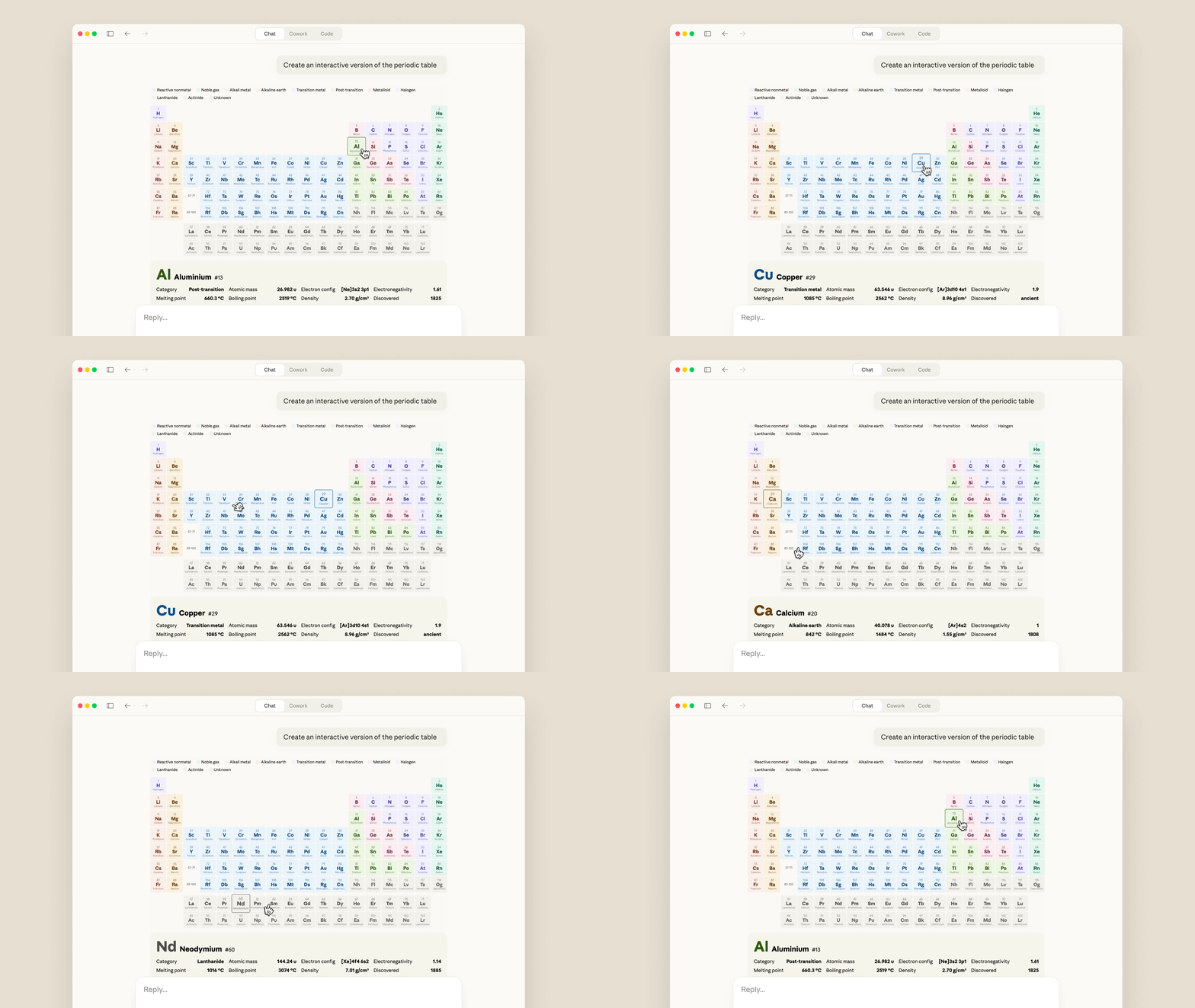
This feature will be on by default. Claude will decide when to build a visual for something, or you can ask it to do so directly (with a query like “draw this as a diagram” or “visualize how this might change over time”). Once Claude has created something, you can ask for adjustments or to dig in deeper.
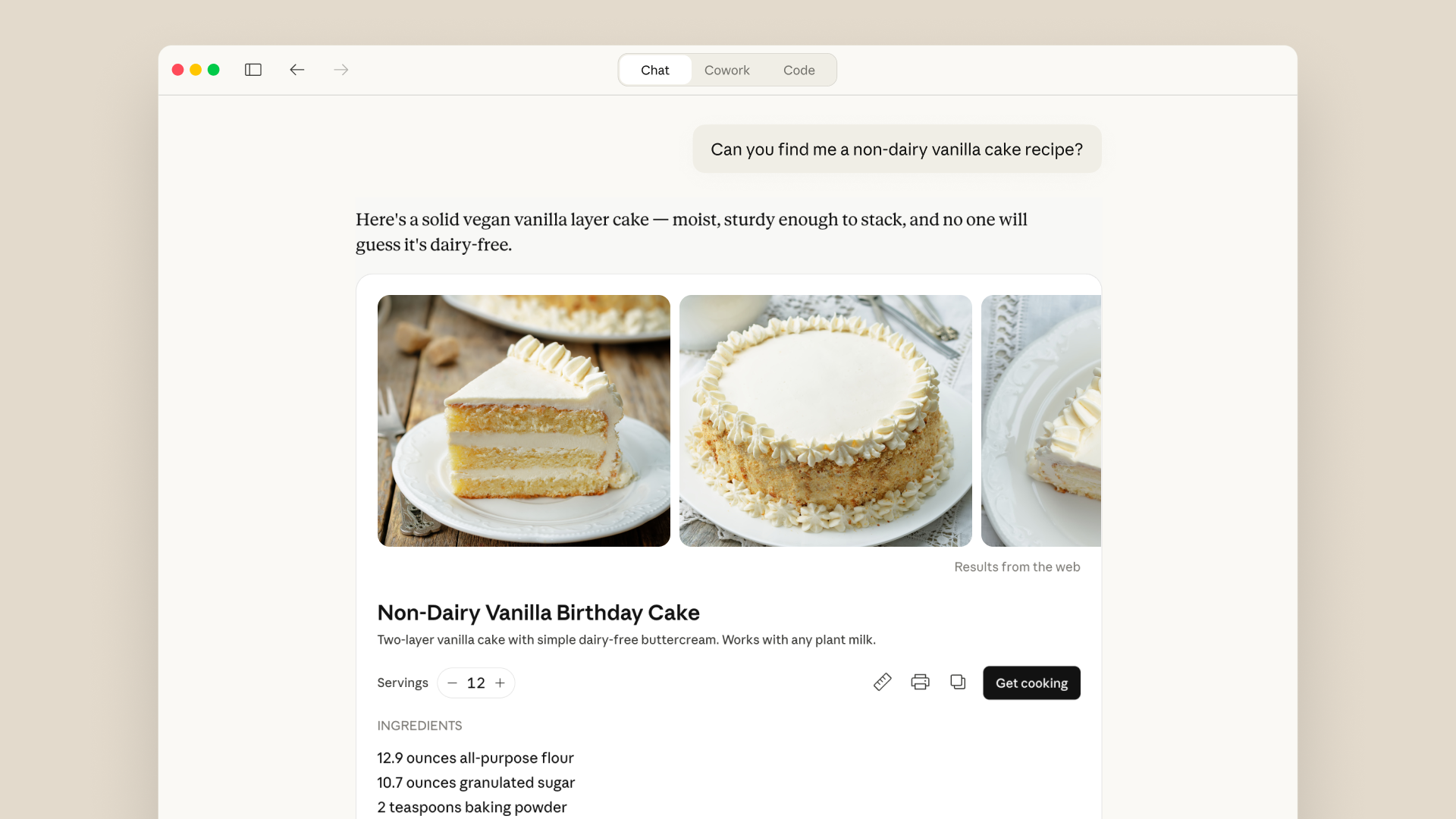
These visuals are part of a broader set of improvements we’ve made to Claude’s responses recently. Earlier this year, Claude began using purpose-designed formats for some topics: recipes, for example, now appear with ingredients and steps, and Claude provides a visual when you ask it for the weather. You can also interact directly with apps like Figma, Canva, and Slack within your discussions.
Try it today. This feature is available on all plan types.
Read the original article

Comments
I tried the periodic table in their examples using sonnet 4.6 on the $20/mo plan. After a few minutes Claude told me it reached the max message length and bailed. I pressed continue and eventually it generated the table, but it wasn't inline, it was a jsx artifact, and I've now hit my daily usage limit.
By googlehater 2026-03-131:27 Same specs/prompt, but with Max plan.
Rendered it in the right pane, instead of inline. Dark theme. 2% of Daily limit.
By data-ottawa 2026-03-1218:06 I’m intermittently getting artifacts vs the new visuals api, depending on which version of the Claude app I use. iOS/iPadOS apps are not yet supporting the visualization API, and I don’t see an app-store update yet.
By karussell 2026-03-1221:00 It wasn't quick but I still found it fast enough. In my case I could even download it as an html file: https://gist.github.com/karussell/289aeb621a71597babd6f97eb2...
edit: claude just confirmed the initial version has a bug and 104-117 are not visible
By ptak_dev 2026-03-1223:59 [flagged]
I asked it to do some portfolio analysis for me and it created BEAUTIFUL, tabbed, interactive charts UNPROMPTED. This is kind of magical. The charts were not just beautiful, but actually super useful in understanding the data faster. I honestly could not have produced those in a week if you asked me to.
By steve_adams_86 2026-03-138:01 Likewise, it created a couple visualizations for me that weren't requested but were very useful. That's a nice surprise. My takeaway was essentially the same in that I'd take much longer to make something comparable. I'll take advantage of this quite a bit, I think. I spend a lot of time visualizing data
By techieguyon 2026-03-1221:33 [dead]
By darepublic 2026-03-1218:136 reply When I ask chatgpt to create a mermaid diagram for me it regularly will add new lines to certain labels that will break the parse. If you then feed the parse error back to it the second version is always correct And it seems to exactly know the problem. There are some other examples where it will almost always get it wrong the first time but right if nudged to correct itself. I wonder what the underlying cause is
By overfeed 2026-03-1218:34 > I wonder what the underlying cause is
It responds with the statistically most probable text based on its training data, which happens to be different with the errors vs without. I suspect high-fidelity diagramming requires a different attention architecture from the common ones used in sentence-optimized models.
I think the problem should be defined as "why does it not loop back the errors from the first attempt so it can fix it on the second attempt" rather than why it fails to produce a fully correct implementation on the first pass.
By karmajunkie 2026-03-133:17 you’ve got to give it a way (eg rendering with playwright and friends) and tell it to use that way to verify correctness. it’s not going to create the guard rail for you but if you provide it with one the output is much better.
By quintu5 2026-03-1220:35 This is one of the issues I’ve attempted to tackle with the Mermaid Studio plugin for IntelliJ.
It provides both syntax guides and syntax/semantic analysis as MCP Tools, so you can have an agent iteratively refine diagrams with good context for patterns like multi-line text and comments (LLMs love end-of-line comments, but Mermaid.js often doesn’t).
"Prompt Repetition Improves Non-Reasoning LLMs " - https://arxiv.org/pdf/2512.14982
What instance of ChatGPT are you doing that with? (Reasoning?)
By alex_duf 2026-03-1221:12 I don't think it's about repeating the instructions, but rather providing feedback as to why it's not working.
I've noticed the same thing when creating an agentic loop, if the model outputs a syntax error, just automatically feed it back to the LLM and give it a second chance. It dramatically increases the success rate.
By darepublic 2026-03-1219:56 Observed from 5.2, on chatgpt.com. earlier versions did worse.. as in, they might take a few prompts to generate a parseable syntax. Newer versions just usually deliver one unparseable version then get it right second try. Likely I could prompt engineer to one shot but I think I would always need the specific warning about newlines.
By deckar01 2026-03-1219:06 Mermaid is really bad about cutting off text after spaces, so you have to insert <br>s everywhere. I’m guessing this is getting rendered instead of escaped by your interface. Or just lost in translation at the tokenizer.
Today I asked Claude to create me a squidward looking out the window meme and it started generating HTML & CSS to draw squidward in a style best described as "4 year old preschooler". Not quite it yet.
By qingcharles 2026-03-1220:44 The issue for Claude is that Anthropic don't have an imagen that I know of, so the only tool available for the LLM to draw something is to start doing vector stuff in CSS, which is very hard for it (see the pelicans).
Gemini, ChatGPT or Grok would find this a lot easier as they could gen an image inline, although IP restrictions might bite you. Even Grok wants to lecture on IP these days, but at least it's fairly trivial to jailbreak.
