
This is a follow-up to my previous article, Terminal Emulators Battle Royale – Unicode Edition! from 2023, in which I documented Unicode support across terminal emulators. Since then, the ucs-detect…
This is a follow-up to my previous article, Terminal Emulators Battle Royale – Unicode Edition! from 2023, in which I documented Unicode support across terminal emulators. Since then, the ucs-detect tool and its supporting blessed library have been extended to automatically detect support of DEC Private Modes, sixel graphics, pixel size, and software version.
The ucs-detect program tests terminal cursor positioning by sending visible text followed by control sequences that request the cursor position. The terminal responds by writing the cursor location as simulated keyboard input. The ucs-detect program reads and compares these values against the Python wcwidth library result, logging any discrepancies.
Terminal emulators face a fundamental challenge: mapping the vast breadth of Unicode scripts into a fixed-width grid while maintaining legibility. A terminal must predict whether each character occupies one cell or two, whether combining marks overlay previous characters, and how emoji sequences collapse into single glyphs.
These predictions fail routinely. Zero-width joiners, variation selectors, and grapheme clustering compound in complexity. When terminals and CLI applications guess wrong, text becomes unreadable - cursors misalign and corrupt output and so then also corrupt the location of our input.
Our results share which terminals have the best "Unicode support" -- the least likely to exhibit these kinds of problems.
Before presenting the latest results, Ghostty warrants particular attention, not only because it scored the highest among all terminals tested, but that it was publicly released only this year by Mitchell Hashimoto. It is a significant advancement. Developed from scratch in zig, the Unicode support implementation is thoroughly correct.
In 2023, Mitchell published Grapheme Clusters and Terminal Emulators, demonstrating a commitment to understanding and implementing the fundamentals. His recent announcement of libghostty provides a welcome alternative to libvte, potentially enabling a new generation of terminals on a foundation of strong Unicode support.
Kovid Goyal's Kitty scored just as well, only outranked by the arbitrary weights that are not necessarily fair. More important than scoring is Kovid's publication of a text-splitting algorithm description that closely matches the Python wcwidth specification. This is unsurprising since both are derived from careful interpretation of Unicode.org standards and that it scores so highly in our test.
Kitty and Ghostty are the only terminals that correctly support Variation Selector 15, I have not written much about it because it is not likely to see any practical use, but, it will be added to a future release of Python wcwidth now that there are multiple standards and reference implementations in agreement.
The first table, General Tabulated Summary describes unicode features of each terminal, then, a brief summary of DEC Private Modes, sixel support, and testing time.
The second table, DEC Private Modes Support (not pictured), contains the first feature capability matrix of DEC Private Modes for Terminals of any length. I hope this is useful most especially to developers of CLI libraries and applications.
The most notable finding relates to performance. That many terminals perform so slowly was surprising, so I have included the elapsed time in the results.
iTerm2 and Extraterm consume a majority of the CPU and perform so slowly that the test parameters were reduced to finish within the hour what many other terminals manage in a few minutes.
GNOME Terminal and its VTE-based derivatives also perform too slowly for a full test, taking over 5 hours while consuming very little CPU. Many terminals exhibit stalls or inefficiencies in their event loops that result in slow automatic responses, but we should be forgiving; nobody really considered the need to handle hundreds of automatic sequence replies per second!
I expected Python wcwidth to consume the most CPU resources during testing, as it is frequently called and always the "highest-level" language in the mix, but it keeps up pretty well for most terminals.
Earlier this year, I dedicated effort to optimizing the Python wcwidth implementation using techniques including bit vectors, bloom filters, and varying sizes of LRU caches. The results confirmed that the existing implementation performed best: a binary search with a functools.lru_cache decorator.
The LRU cache is effective because human languages typically use a small, repetitive subset of Unicode. The ucs-detect tool tests hundreds of languages from the UDHR dataset, excluding only those without any interesting zero or wide characters. This dataset provides an extreme but practical demonstration of LRU cache benefits when processing Unicode.
I previously considered distributing a C module with Python wcwidth for greater performance, but the existing Python implementation keeps up well enough with the fastest terminals. When fully exhausted the text scroll speed is fast enough to produce screen tearing artifacts.
Terminology produces inconsistent results between executions. Our tests are designed to be deterministic, so these kinds of results suggest possible state corruption. Despite this issue, Terminology offers interesting visual effects that would be a welcome feature in other terminals.
iTerm2 reports "supported, but disabled, and cannot be changed" status for all DEC Private Modes queried, including fictional modes like 9876543. For this reason, the summary of DEC Private Modes shows only those modes that are changeable.
Konsole does not reply to queries about DEC Private modes, but does support several modes when they are enabled. For this reason, ucs-detect cannot automatically infer which DEC Modes Konsole supports.
Similarly, ucs-detect reports "No DEC Private Mode Support" for Contour. I investigated this discrepancy because Contour's author also authored a Mode 2027 specification dependent on this functionality. The issue was that Contour responded with a different mode number than the one queried. While developing a fix, Contour's latest release from December 2024 presented an additional complication: a bad escape key configuration. Each instance of being stuck in vi required typing CTRL + [ as a workaround!
Terminals based on libvte with software version label VTE/7600 continue to show identical performance with low scores in our tests, unchanged from 2023.
My attempt to discuss improving Unicode support in libvte received substantial criticism. However, recent libvte project issue Support Emoji Sequences is a positive indicator for improved language and Emoji support in 2026.
I included DEC Private Mode 2027 in the results to accompany Mitchell's table from his article, Grapheme Clusters and Terminal Emulators, and to verify for myself that it has limited utility.
In theory, a CLI program can query this mode to classify a terminal as "reasonably supporting" unicode, but not which specific features or version level. Since other terminals with similar capabilities do not respond to Mode 2027 queries, this binary indicator has limited utility.
The only practical approach to determining Unicode support of a terminal is to interactively test for specific features, codepoints, and at the Unicode version levels of interest, as ucs-detect does.
Terminals cannot reproduce many of the world's languages legibly when constrained to monospace cells. The measurements dictated by rapidly expanding Unicode standards and varying implementation levels create inherent tension.
The text sizing protocol published early this year represents a significant development. Kovid Goyal describes the motivation in a recent interview:
And then my next windmill that I'm looking at is variable-sized text in the terminal. So when I'm catting a markdown file, I want to see the headings big.
While this feature may enable more advanced typesetting-like capabilities in terminal apps, it also promises to increase accessibility. Allowing text to escape monospace constraints enables legible support of the diverse set of the world's languages.
For example, using Contour with ucs-detect --stop-at-error=lang, stopping to take a look at a result of the language Khün:
In this case Contour and Python wcwidth disagree on measurement, but more important is the legibility. We can compare this given Khün text to the Kate editor:
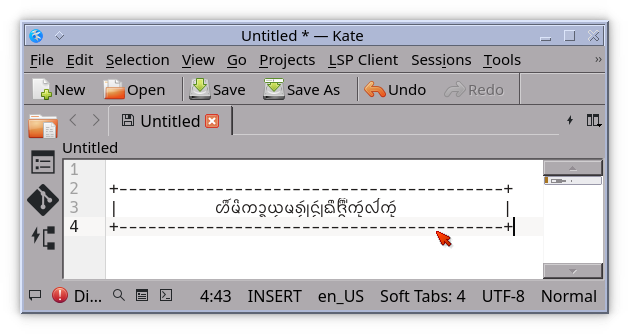
They are clearly different. I regret I cannot study it more carefully, but I suggest that terminals could more easily display complex scripts by switching to a variable size text mode, allowing the font engine to drive the text without careful processing of cell and cursor movement.
Although I have yet to experiment with it, I am encouraged to see some resolution to this problem by the progressive changes suggested by the text sizing protocol.
Read the original article

Comments
Work had me using the Windows Terminal for the first time ever after a life of developing on Linux. I got immediately hooked on the smart Ctrl+C and Ctrl+V (without needing to use Shift like on Linux!)
For those not knowing, Windows Terminal uses Ctrl+C to abort the current process (as we'd expect) when nothing is selected, but copies when there is a selection. Similarly, Ctrl+V just pastes. So convenient!
By cosmic_cheese 2025-11-041:324 reply Mac terminals yield a similar benefit, with the systemwide copy/paste Cmd+C/V not overlapping with Ctrl+C/V.
Being used to that, Linux terminals become rather annoying. Yes there's other ways under Linux, but they don't have 25+ years of muscle memory associated with them, and so when the key shortcuts don't work as expected it's like nails on a chalkboard.
Heh, shortcut muscle memory is the reason I returned my Mac mini one week after trying it. I sure am not gonna remap my brain for apple after 20 years of Linux and windows.
Maybe you mean it's too much effort, because I'm sure you could. I was taught touch typing on a QWERTY keyboard in the summer between 6th and 7th grade. Last year I switched to Colemak after nearly 30 years of QWERTY.
By jack_pp 2025-11-0414:29 Oh I have no doubt that I could but I don't see why since linux already does what I need and I don't see any compelling reason to switch. I was just curious to see what all the hype was about with the new m1 CPUs and give it a shot.
By computably 2025-11-043:291 reply It's easy and reasonably quick to set up key remapping (via Karabiner).
Yes, but specifically in the context of Terminals (as discussed in the original article), it's really convenient to be able send Ctrl-C (break) differently than Cmd-C (copy).
So yes keyboard remapping is an option. But there's just differences you can't remap because of the extra meta keys on Mac (and I guess on Windows too, with the Copilot or Start keys in play).
> it's really convenient to be able send Ctrl-C (break) differently than Cmd-C (copy)
Right, and even on Linux you can do it by using the four-fifths forgotten CUA shortcut Ctrl-Insert for copy (and Shift-Insert for paste.) Although I'll admit to using Ctrl-Shift-C/V most of the time.
By Ghoelian 2025-11-0415:55 My keyboard doesn't even have an insert key.
By kps 2025-11-0414:15 There are *nix terminals that will let you bind shortcuts that don't conflict with terminal control keys. Konsole and KDE stuff in general will let you set Mac-style bindings (with some config effort), though I personally use mlterm.
By sunshowers 2025-11-0423:03 The tradeoff here is that Macs don't have a system key that most applications don't interpret in some way. On Windows and Linux, system key shortcuts are much easier to set up.
I really do like Cmd key usage for any terminal in Mac. The ability to send Ctrl+C differently than Cmd+C in a Mac is joyous.
However, for most all other applications in Mac, I dislike the Mac command key. Especially in IDEs like vscode, etc.
And I really hate that the actual Ctrl key on a Mac is in the wrong place, having swapped places with Fn. It's like the first thing I have to remember to do on each Mac setup, swap those two keys.
Because I'm toggling between mac/windows/linux all day long, my poor muscle memory is always confused. And it would be nice if this could be unified. Unfortunately, I'm guessing it would have to be solved more by Apple than by Microsoft or Linux.
What do you dislike about cmd placement?
I feel the opposite, the near-thumb position for the most used modifier is a godsend vs pinky strain.
Ctrl in caps lock is debatably better but that key is arguably better used for esc in vim setups (or the harder to setup “ctrl if held, esc if tapped”).
By phantasmish 2025-11-0416:011 reply cmd is brilliant. I have to shift my entire hand downward a little to hit ctr+c/ctrl-v, and make a pinkie-stretch that I can feel straining my hand. Cmd+c/v keeps three fingers on the home row, and involves just a slide-over of the thumb by maybe a centimeter. It's great.
caps-as-an-extra-ctrl helps with all of that, but leaves you with the problem of overlapping shortcuts in the terminal. Cmd also fixes that.
I hate how hard it is to get anything remotely like it working in Linux. All the solutions are partial and very janky.
By cosmic_cheese 2025-11-0416:101 reply It’s a sentiment I’ve expressed many times here on HN, but I’d love to see a DE and matching set of apps designed to embrace Mac-like UX, including meta-based key shortcuts. It being like that out of the box instead of requiring a patchwork of spotty config changes and hacks brings massive value.
By kace91 2025-11-0516:51 This is the closest thing I know, not ideal but decent:
By cosmic_cheese 2025-11-046:26 On all my machines I remap Caps Lock to Control, and since I still use Control from time to time under macOS, I have muscle memory for it, and so switching between Control/Command dominance is low friction.
Control in its typical position however drives me crazy.
Not sure if this was available from the beginning, but Ghostty has the ability to do exactly that with what they call "performable" keybindings
Oh wow, I'm already using ghostty and didn't know about this. It works great, thanks!
Ooh, seconded, will try right away.
[EDIT]: so ... tried it ... very, very nice BUT:
what of CTRL-V ???
By ur-whale 2025-11-0419:47 > You can do the same with ctrl+v, just use paste_from_clipboard
Yeah, but CTRL+V is actually used e.g. in VIM.
And I can't see a way for ghostty to "guess" what to do based on context like it does in the case something is selected.
Sorry, should have explained better.
Kitty also has it, I didn't know prior to today
By mongol 2025-11-0413:41 fantastic!
In Linux (Wayland) you can copy text from the terminal without pressing Ctrl+C at all. Just select the text. To paste it in another Window, press the middle mouse button.
This is called the Primary Selection and is separate from the Clipboard (Ctrl+C/Ctrl+V). IMO the Primary Selection is more convenient than the Clipboard.
That's an X11 thing that Wayland had to reimplement because it's so convenient. The problem is when pasting into the terminal something that another program copied into the clipboard. That's ctrl-shift-c.
I thought about remapping copy and paste to their own keys, possibly a single one. Maybe on the number pad, which I never use. Or remapping ctrl-c.
There's always Ctrl+Insert for copy and Shift+Insert for paste. I know that there's some laptops lacking an insert key, which is terrible, but for keyboard with an insert key the Ctrl/Shift + Insert combos are useful at times.
Especially because one does not have to push three keys with the same hand, which is not nice to tendons. I think I did that for a while time ago, then forgot about it. Thanks.
By tmtvl 2025-11-0421:55 I always use the opposite modifier key(s) (e.g. right control + a), which I was told to do when I learned to type Dvorak; but you're welcome.
By DaSHacka 2025-11-044:22 Isn't this an X11-ism? I dont believe this is Wayland-specific
By j1elo 2025-11-041:05 Yeah I know. I missed this for the first couple days, but didn't take much before forgetting it after the change to Windows. (anyway I keep using Linux at home)
By lelandbatey 2025-11-046:26 This is also a thing in X, not only Wayland.
By dzaima 2025-11-0413:04 But that doesn't go into clipboard history. And severely restricts what you can do between copying and pasting in general (very importantly makes it a pain to do replace (i.e. select+(implicit-delete+)paste)) as any intermediate selection before pasting destroys your Primary Selection. And if you realize you did that, recopying takes manually reselecting the text, or the otherwise-never-used ctrl+insert to recopy, instead of just repeating the same old ctrl+c as you always do with the clipboard in any sane application.
Of course still a nice option (esp. in terminals where the proper copy/paste are nerfed and selecting for editing is annoyingly not a thing), but far from a replacement for the proper clipboard.
By bytehowl 2025-11-0413:27 How do you paste the selected text if you want to replace a text selection in the other window?
By bluebarbet 2025-11-049:46 >middle mouse button
Speaking for myself (although I suspect many others), I haven't used a mouse in well over a decade. To be clear, I am in the terminal all the time. So this is not a universal solution.
I really wish PC manufacturers didn't kill Insert button. It worked just fine for decades with Ctrl-Ins/Shift-Ins, and in every terminal I've tried. But now the button is missing more and more often (thanks HP, I appreciate useless call and share buttons in its place, which don't work anywhere), and fixes need to be invented for a solved problem.
By indigodaddy 2025-11-0415:16 Yeah shift-ins really is the way
It doesn't look so convenient to me. If Ctrl+v is bound to paste, how do you insert a verbatim character in the shell? How do you start a block visual selection in Vim? How do you scroll down in emacs?
By throw0101c 2025-11-0414:11 > If Ctrl+v is bound to paste, how do you insert a verbatim character in the shell?
For those unaware:
> Unix interactive terminals use Control-V to mean "the next character should be treated literally" (the mnemonic here is "V is for verbatim"). This allows a user to insert a literal Control-C or Control-H or similar control characters that would otherwise be handled by the terminal. This behavior was copied by text editors like vi and Unix shells like bash and tcsh, which offer text editing on the command line.[3]
You don't but you don't notice if you never did anything like that. Half of the keybinds listed by 'stty -a' are a mystery to mankind.
By tom_ 2025-11-0415:33 You can unbind the Ctrl+V keymapping if you want, and it behaves as expected in emacs -nw at least. (There's a Ctrl+Shift+V binding set up by default, same as many Unix terminal emulators, so you won't miss out.)
By j1elo 2025-11-0419:16 Seems to me a reasonable concern but I'd bet it's only for a minority of users... so perfect candidate to have implemented, but given as a disabled by default setting.
By usrbinbash 2025-11-0415:202 reply > So convenient!
Running in tmux, marking anything on my terminal immediately puts it into the tmux buffer, without me having to click anything on the keyboard. Pressing middle-mouse pastes it.
THAT is convenience.
By rovingeye 2025-11-0416:05 I have that turned on in Windows Terminal but still use ctrl+c because it's how all other software works
> immediately puts it into the tmux buffer
Can you paste in a non-terminal app though (like a web browser) ?
By usrbinbash 2025-11-0615:13 Yes, of course I can. I have a separate binding in my tmux config to copy to the clipboard.
windows terminal is awesome and i wish it shipped with windows by default instead of having to go to the store and install it. everyone who uses it has only good things to say, and it is updated regularly by Microsoft.
By DHowett 2025-11-045:35 It comes with Windows, and has since 2022! Alas, if you mean Windows 10 then you can use some DISM magic to add it to an install image.
By zadjii 2025-11-053:34 It's shipped with Windows since Windows 11. Updates come via the Store (since that's a lot faster than OS updates), but it's definitely preinstalled these days
By Iwan-Zotow 2025-11-044:33 It is default in w11 25h2
By mongol 2025-11-044:21 This is genious. It is one of the most annoying things remaining in the Linux desktop and I often press Shift-Ctrl-C in the browser by mistake, opening up the dev tools in the process, while intending to copy.
Are there any legitimate reasons to send Ctrl-C except to abort, that this could interfer with?
I have to warning everyone: Windows terminal with true color , possibly with tmux, is very slow. There is a half second delay from key press to response. I am in a vdi. Your miles varies.
By ciberado 2025-11-0414:49 This doesn't correspond to my experience. The terminal is not faster than light, but good enough for my requirements, and I use it both locally and through VNC. May it be a problem with your VDI setup?
By thayne 2025-11-044:42 FWIW, in zsh, and probably other terminals, you can bind ctrl+v to be paste. Many terminal emulators also allow you to bind ctrl+v to paste, although that may interfere with applications that use ctrl-v for something else.
Kitty has a copy_or_interrupt action that behaves like you describe. Although, I think it would interfere with apps where ctrl-c is handled specially.
Edit: kitty also has a copy_or_noop action that passes through the ctrl+c if there is no selection.
By biehl 2025-11-0416:04 That sounds like an awesome concept. However, I'm restarting Linux usage after 10 years on Mac, and I am surprised on how much less annoying the Shift-ctrl-v is compared to what I expected.
By fithisux 2025-11-056:49 Yori is also a very capable replacement.
> I got immediately hooked on the smart Ctrl+C and Ctrl+V (without needing to use Shift like on Linux!)
You, uh, never tried middle clicking?
I mean ctrl+c/v is just muscle memory, obviously there are tons of other way but ctrl+c/v are just the default and the one everyone knows.
By ajross 2025-11-0413:04 It depends on the semantics of "everyone" and "knows". The X11 selection bindings predate CUA clipboard usage by a few years, actually. But in any case, the contention was that they were simpler, not that they are standard. And they aren't.
By nitinreddy88 2025-11-044:163 reply So now we are moving away from Keyboard only Vim/Terminal thing to mouse for pasting?
By pmontra 2025-11-047:01 Yeah, that slows down typing a lot. Luckily people on a laptop can use the touchpad which lies just below the space bar. I have a laptop with physical keys around the touchpad so I even have a button to paste. No need to tap, double tap, etc. I think that I never used a mouse in the last 20 years.
By ajross 2025-11-044:35 You can cut/paste within your editor just fine. The subject at hand is window-system level clipboard/selection interaction, and in particular the presence of standard key bindings for them in various environments. While some terminal and editor apps do have keyboard bindings that interact with the OS clipboard, none are standard.
Basically, yeah: you had to use the mouse to select it in the first place. Using the mouse to paste it is easier, not harder.
By officeplant 2025-11-0415:55 I can hit the middle click for my Trackpoint without leaving the keyboard :3
By eschatology 2025-11-046:571 reply While the article title is true (errant is a very specific and concise word), to me it did not convey clear enough that this is just ucs-detect / unicode support (compliance?) ranking. The article title "State of Terminal Emulators in 2025" implied a larger comparison of terminal emulators than just ucs-detect.
Personally I also question the practicality or usefulness of this table because why should I care about having "the best unicode support"?
Curious, I briefly compared top ranked emulator (ghostty) on how fast it can print 10000 lines and it took 432ms compared to alacritty, ranked 18 (50ms), and Terminal.app, ranked 29 (50ms). If this is the trade-off to have the best unicode support, why should I want it? Why does it matter?
By bardsore 2025-11-0412:18 How fast my terminal can print 10000 lines is pretty far down the list of requirements I have, who cares as long as it is fast enough? To me it is as irrelevant as who has the best unicode support.
It's interesting that none of the programs commonly known as "terminal emulators" actually emulate a terminal.. we can do that now though. https://zork.net/~st/jottings/Real-VT102-emulation-with-MAME...
I would avoid doing the PTY thing and instead do this (works on WSL if MAME is the windows version):
You can do the same thing with a vt220.$ sudo socat TCP-LISTEN:1234,reuseaddr,fork EXEC:"/sbin/agetty -L - 9600 vt102",pty,setsid,ctty,stderr $ mame -nomouse vt102 -rs232 null_modem -bitb socket.localhost:1234I've had an idea to try to write a sort of high-level-ish VT220 emulator that pokes and patches the ROMs and the system to let you control it with the mouse, paste and stuff, lets you just doubleclick it to get a terminal, etc... I forgot about that until seeing this. Nobody would use it for more than 5 minutes but it would be funny.
By blueflow 2025-11-049:21 They do emulate a terminal, not just the kind of emulation you have in mind. "Wine is not an emulator" again.
By anthk 2025-11-048:53 Forget MAME; I'd love a forked project for this minus the shaders for old machines. Where you just get the terminal emulation with a good TTF font and that's it. There are similar projects for the Altair 8800 where they scrapped their code from SIMH (now I prefer simh-classic) to just emulate a CP/M 2.2 Altair machine and that's it, because these people don't need to emulate PDP10's with ITS, old BSD's, current VAX NetBSD releases or the rest of the DEC machines...
> You can do the same thing with a vt220.
Can you? The last I looked at it (a year or two ago), the vt220 in MAME was just the beginning skeleton of an implementation, and it doesn't seem to have been touched much since then. A shame, because AFAIK no "terminal emulator" implements vt220-style sixels (which are different than than the widely-implemented vt4xx-style sixels).
By unleaded 2025-11-0410:39 I checked and it was actually the vt240. That one works.
If MAME could support the VT525 (nearly the last terminal DEC made and unlike the previous DEC models it supports ANSI color) people might use it a bit more. It would be very useful for compatibility testing as there aren't many people with a real VT525! Last I looked someone had dumped the ROMs but there wasn't any support code.
VT5xx was the budget line with limited functionality, that's why only 525 among them supports ANSI color. The only fancy stuff was multisession (TD/SMP if you have all bits to support it) and "desktop accessories" like clock and calculator.
The really interesting ones are VT340 variants with ReGIS and full SIXEL graphics
The VT3xx ones that were color did not support ANSI SGR to set them. I don't think VT5xx was a budget line, it has more escape sequences than the previous ones (including interesting ones like changing cursor shape, which modern terminals implement too). It's more that they never made a graphical version of the VT5xx (this was the early 90s, whether physical VTs made sense anymore is debatable, but terminal graphics likely didn't).
VT340 is definitely interesting and if someone were to emulate one that would also be great! (there's been some good research, e.g.: https://github.com/hackerb9/vt340test, which you might be surprised to learn has been used to make Windows Terminal one of the more conformant terminals...)
By p_l 2025-11-0611:31 The references to "budget line" were from contemporary sources, and that it was heavily reduced in cost - while terminal sequences were more of "simple matter of programming" ;-) My understanding that some of the features like changing cursor shape were related to the rudimentary custom font feature which was retained from more expensive 3xx line and which accepted IIRC sixel-encoded bitmap fonts.
Funnily enough, the one VT510 I had for some time actually came from a VHS rental place that for reasons unknown to me ran Blockbuster Video customized VAX 6.1 on Alpha (which I also grabbed). BBV was not very well known in Poland, but this specific machine had unwiped disks and logs showing it was used from 1996 to 2000, then it was found lying in a corner when a moving service was asked to clean out a location after a tenant that came in after the video rental.
There was probably a DECserver missing somewhere in the pile before I got my hands on it ;)
By mmastrac 2025-11-0515:58 I've started working on a VT420 emulator which is about 70% complete: https://github.com/mmastrac/blaze
By kevin_thibedeau 2025-11-043:52 This also looks closer to the original with some shaders to add pincushion distortion and Gaussian scanlines.
