Claude Code: connect to a local model when your quota runs out

2026-02-0112:43386212boxc.net

If you're on one of the cheaper Anthropic plans like me, it's a pretty common scenario when you're deep into Claude coding an idea, to hit a daily or weekly

  • Install and run LM Studio
  • Find the model search button to install a model (see image above). LM Studio recommends running the model with a context of > 25K.
  • Open a new terminal session to:
    a. start the server: lms server start --port 1234b. configure environment variables to point CC at LM Studio:

    export ANTHROPIC_BASE_URL=http://localhost:1234


    export ANTHROPIC_AUTH_TOKEN=lmstudio
    c. start CC pointing at your server: claude --model openai/gpt-oss-20b
  • Reduce your expectations about speed and performance!
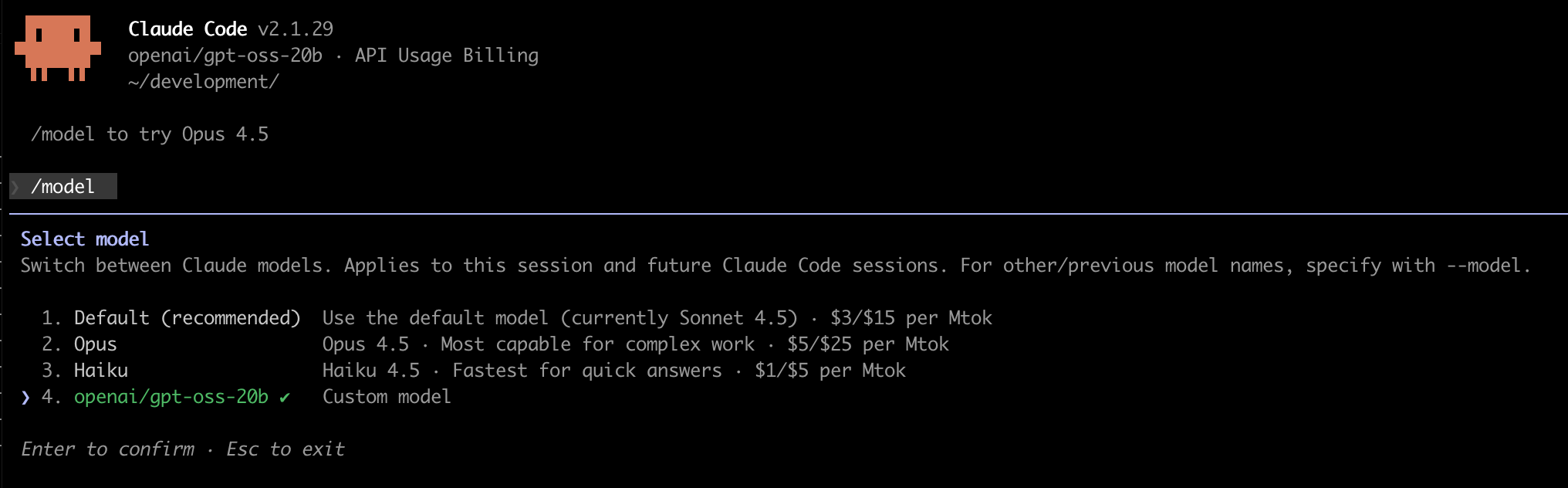
  • To confirm which model you are using or when you want to switch back, type /model
  • Enter /model to confirm which model you are using or to switch back

    LM Studio is built on top of the open source project llama.cpp.
    If you prefer not to use LM Studio, you can install and run the project directly and connect Claude Code to it but honestly, unless you are fine tuning a model, or have really specific needs, probably LM Studio is going to be a quicker setup.

    For the moment, this is a backup solution. Unless you have a monster of a machine, you’re going to notice the time it takes to do things and a drop in code quality but it works(!) and it’s easy enough to switch between your local OSS model and Claude when you’re quota limit is back, so it’s a good way to keep coding when you’re stuck or you just want to save some quota. If you try it let me know how you go and which model works for you.


    Read the original article

    Comments

    • By paxys 2026-02-0421:5921 reply

      > Reduce your expectations about speed and performance!

      Wildly understating this part.

      Even the best local models (ones you run on beefy 128GB+ RAM machines) get nowhere close to the sheer intelligence of Claude/Gemini/Codex. At worst these models will move you backwards and just increase the amount of work Claude has to do when your limits reset.

      • By andai 2026-02-051:125 reply

        Yeah this is why I ended up getting Claude subscription in the first place.

        I was using GLM on ZAI coding plan (jerry rigged Claude Code for $3/month), but finding myself asking Sonnet to rewrite 90% of the code GLM was giving me. At some point I was like "what the hell am I doing" and just switched.

        To clarify, the code I was getting before mostly worked, it was just a lot less pleasant to look at and work with. Might be a matter of taste, but I found it had a big impact on my morale and productivity.

        • By Aurornis 2026-02-052:103 reply

          > but finding myself asking Sonnet to rewrite 90% of the code GLM was giving me. At some point I was like "what the hell am I doing" and just switched.

          This is a very common sequence of events.

          The frontier hosted models are so much better than everything else that it's not worth messing around with anything lesser if doing this professionally. The $20/month plans go a long way if context is managed carefully. For a professional developer or consultant, the $200/month plan is peanuts relative to compensation.

          • By deaux 2026-02-052:553 reply

            Until last week, you would've been right. Kimi K2.5 is absolutely competitive for coding.

            Unless you include it in "frontier", but that has usually been used to refer to "Big 3".

            • By bigiain 2026-02-053:191 reply

              Looks like you need at least a quarter terabyte or so of ram to run that though?

              (At todays ram prices upgrading to that for me would pay for a _lot_ of tokens...)

              • By tkz1312 2026-02-0515:421 reply

                unfortunately running anything locally for serious personal use makes no financial sense at all right now.

                4x rtx 6000 pro is probably the minimum you need to have something reasonable for coding work.

                • By deaux 2026-02-0516:031 reply

                  That's the setup you want for serious work yes, so probably $60kish all-in(?). Which is a big chunk of money for an individual, but potentially quite reasonable for a company. Being able to get effectively _frontier-level local performance_ for that money was completely unthinkable so far. Correct me if I'm wrong, but I think Deepseek R1 hardware requirements were far costlier on release, and it had a much bigger gap to market lead than Kimi K2.5. If this trend continues the big 3 are absolutely finished when it comes to enterprise and they'll only have consumer left. Altman and Amodei will be praying to the gods that China doesn't keep this rate of performance/$ improvement up while also releasing all as open weights.

                  • By tracker1 2026-02-0517:391 reply

                    I'm not so sure on that... even if one $60k machine can handle the load of 5 developers at a time, you're still looking at 5 years of service to recoup $200/mo/dev and that doesn't even consider other improvements to hardware or the models service providers offer over that same period of time.

                    I'd probably rather save the capex, and use the rented service until something much more compelling comes along.

                    • By deaux 2026-02-063:221 reply

                      At this point in time, 100% agreed. But what matters is the trend line. Two years ago nothing came close, if you wanted frontier-level "private" hosting you'd need an enterprise contract with OpenAI for many $millions. Then R1 came, it was incredibly expensive and still quite off. Now it's $60k and basically frontier.

                      • By tracker1 2026-02-0616:13

                        Of course... it's definitely interesting. I'm also thinking that there are times where you insource vs outsource to a SaaS that's going to do the job for you and you have one less thing to really worry about. Comparing cost to begin with was just a point I was curious about, so I ran the numbers. I can totally see a point where you have that power in a local developer workstation (power requirements notwithstanding), good luck getting that much power to an outlet in your home office. Let alone other issues.

                        Right now, I think we've probably got 3-5 years of manufacturing woes to work through and another 3-5 years beyond that to get power infrastructure where it needs to be to support it... and even then, I don't think all the resources we can reasonably throw at a combination of mostly nuclear and solar will get there as quickly as it's needed.

                        That also doesn't consider the bubble itself, or the level of poor to mediocre results altogether even at the frontier level. I mean for certain tasks, it's very close to human efforts in a really diminished timeframe, for others it isn't... and even then, people/review/qa/qc will become the bottleneck for most things in practice.

                        I've managed to get weeks of work done in a day with AI, but then still have to follow-up for a couple days of iteration on following features... still valuable, but it's mixed. I'm more bullish today than even a few months ago all the same.

            • By Aurornis 2026-02-053:282 reply

              > Kimi K2.5 is absolutely competitive for coding.

              Kimi K2.5 is good, but it's still behind the main models like Claude's offerings and GPT-5.2. Yes, I know what the benchmarks say, but the benchmarks for open weight models have been overpromising for a long time and Kimi K2.5 is no exception.

              Kimi K2.5 is also not something you can easily run locally without investing $5-10K or more. There are hosted options you can pay for, but like the parent commenter observed: By the time you're pinching pennies on LLM costs, what are you even achieving? I could see how it could make sense for students or people who aren't doing this professionally, but anyone doing this professionally really should skip straight to the best models available.

              Unless you're billing hourly and looking for excuses to generate more work I guess?

              • By deaux 2026-02-055:102 reply

                I disagree, based on having used it extensively over the last week. I find it to be at least as strong as Sonnet 4.5 and 5.2-Codex on the majority of tasks, often better. Note that even among the big 3, each of them has a domain where they're better than the other two. It's not better than Codex (x-)high at debugging non-UI code - but neither is Opus or Gemini. It's not better than Gemini at UI design - but neither is Opus or Codex. It's not better than Opus at tool usage and delegation - but neither is Gemini or Codex.

                • By ianlevesque 2026-02-058:031 reply

                  Yeah Kimi-K2.5 is the first open weights model that actually feels competitive with the closed models, and I've tried a lot of them now.

                  • By deaux 2026-02-0516:06

                    Same, I'm still not sure where it shines though. In each of the three big domains I named, the respective top performing closed model still seems to have the edge. That keeps me from reaching for it more often. Fantastic all-rounder for sure.

                • By VladVladikoff 2026-02-0517:591 reply

                  What hardware are you running it on?

                  • By deaux 2026-02-063:37

                    I'm not running it locally, just using cloud inference. The people I know who do use RTX 6000s, picking the quant based on how many of them they've got. Chained M3 ultra setups are fine to play around with but too slow for actual use as a dev.

              • By triage8004 2026-02-058:11

                Disagree it's behind gpt top models. It's just slightly behind opus

            • By miroljub 2026-02-0512:43

              I've been using MiniMax-M2.1 lately. Although benchmarks show it comparable with Kimi 2.5 and Sonnet 4.5, I find it more pleasant to use.

              I still have to occasionally switch to Opus in Opencode planning mode, but not having to rely on Sonnet anymore makes my Claude subscription last much longer.

          • By bushbaba 2026-02-055:391 reply

            For many companies. They’d be better to pay $200/month and layoff 1% of the workforce to pay for it.

            • By apercu 2026-02-0512:08

              The issue is they often choose the wrong 1%.

          • By undeveloper 2026-02-056:38

            what tools / processes do you use to manage context

        • By PeterStuer 2026-02-058:43

          My very first tests of local Qwen-coder-next yesterday found it quite capable of acceptably improving Python functions when given clear objectives.

          I'm not looking for a vibe coding "one-shot" full project model. I'm not looking to replace GPT 5.2 or Opus 4.5. But having a local instance running some Ralph loop overnight on a specific aspect for the price of electricity is alluring.

        • By davidwritesbugs 2026-02-057:55

          Similar experience to me. I tend to let glm-4.7 have a go at the problem then if it keeps having to try I'll switch to Sonnet or Opus to solve it. Glm is good for the low hanging fruit and planning

        • By icedchai 2026-02-053:44

          Same. I messed around with a bunch of local models on a box with 128GB of VRAM and the code quality was always meh. Local AI is a fun hobby though. But if you want to just get stuff done it’s not the way to go.

        • By MuffinFlavored 2026-02-051:222 reply

          Did you eventually move to a $20/mo Claude plan, $100/mo Claude plan, $200/mo, or API based? if API based, how much are you averaging a month?

          • By andai 2026-02-052:161 reply

            The $20 one, but it's hobby use for me, would probably need the $200 one if I was full time. Ran into the 5 hour limit in like 30 minutes the other day.

            I've also been testing OpenClaw. It burned 8M tokens during my half hour of testing, which would have been like $50 with Opus on the API. (Which is why everyone was using it with the sub, until Anthropic apparently banned that.)

            I was using GLM on Cerebras instead, so it was only $10 per half hour ;) Tried to get their Coding plan ("unlimited" for $50/mo) but sold out...

            (My fallback is I got a whole year of GLM from ZAI for $20 for the year, it's just a bit too slow for interactive use.)

            • By lostmsu 2026-02-0515:13

              Try Codex. It's better (subjectively, but objectively they are in the same ballpark), and its $20 plan is way more generous. I can use gpt-5.2 on high (prefer overall smarter models to -codex coding ones) almost nonstop, sometimes a few in parallel before I hit any limits (if ever).

          • By holoduke 2026-02-058:321 reply

            I now have 3 x 100 plans. Only then I an able to full time use it. Otherwise I hit the limits. I am q heavy user. Often work on 5 apps at the same time.

            • By auggierose 2026-02-059:381 reply

              Shouldn't the 200 plan give you 4x?? Why 3 x 100 then?

              • By holoduke 2026-02-0513:36

                Good point. Need to look into that one. Pricing is also changing constantly with Claude

      • By zozbot234 2026-02-0422:056 reply

        The best open models such as Kimi 2.5 are about as smart today as the big proprietary models were one year ago. That's not "nothing" and is plenty good enough for everyday work.

        • By Aurornis 2026-02-052:07

          > The best open models such as Kimi 2.5 are about as smart today as the big proprietary models were one year ago

          Kimi K2.5 is a trillion parameter model. You can't run it locally on anything other than extremely well equipped hardware. Even heavily quantized you'd still need 512GB of unified memory, and the quantization would impact the performance.

          Also the proprietary models a year ago were not that good for anything beyond basic tasks.

        • By reilly3000 2026-02-0422:117 reply

          Which takes a $20k thunderbolt cluster of 2 512GB RAM Mac Studio Ultras to run at full quality…

          • By 0xbadcafebee 2026-02-050:461 reply

            Most benchmarks show very little improvement of "full quality" over a quantized lower-bit model. You can shrink the model to a fraction of its "full" size and get 92-95% same performance, with less VRAM use.

            • By MuffinFlavored 2026-02-051:231 reply

              > You can shrink the model to a fraction of its "full" size and get 92-95% same performance, with less VRAM use.

              Are there a lot of options how "how far" do you quantize? How much VRAM does it take to get the 92-95% you are speaking of?

              • By bigyabai 2026-02-051:331 reply

                > Are there a lot of options how "how far" do you quantize?

                So many: https://www.reddit.com/r/LocalLLaMA/comments/1ba55rj/overvie...

                > How much VRAM does it take to get the 92-95% you are speaking of?

                For inference, it's heavily dependent on the size of the weights (plus context). Quantizing an f32 or f16 model to q4/mxfp4 won't necessarily use 92-95% less VRAM, but it's pretty close for smaller contexts.

                • By MuffinFlavored 2026-02-052:011 reply

                  Thank you. Could you give a tl;dr on "the full model needs ____ this much VRAM and if you do _____ the most common quantization method it will run in ____ this much VRAM" rough estimate please?

                  • By omneity 2026-02-055:07

                    It’s a trivial calculation to make (+/- 10%).

                    Number of params == “variables” in memory

                    VRAM footprint ~= number of params * size of a param

                    A 4B model at 8 bits will result in 4GB vram give or take, same as params. At 4 bits ~= 2GB and so on. Kimi is about 512GB at 4 bits.

          • By polynomial 2026-02-056:231 reply

            Depending on what your usage requirements are, Mac Minis running UMA over RDMA is becoming a feasible option. At roughly 1/10 of the cost you're getting much much more than 1/10 the performance. (YMMV)

            https://buildai.substack.com/i/181542049/the-mac-mini-moment

            • By danw1979 2026-02-0512:262 reply

              I did not expect this to be a limiting factor in the mac mini RDMA setup ! -

              > Thermal throttling: Thunderbolt 5 cables get hot under sustained 15GB/s load. After 10 minutes, bandwidth drops to 12GB/s. After 20 minutes, 10GB/s. Your 5.36 tokens/sec becomes 4.1 tokens/sec. Active cooling on cables helps but you’re fighting physics.

              Thermal throttling of network cables is a new thing to me…

              • By cat_plus_plus 2026-02-0515:48

                I admire patience of anyone who runs dense models on unified memory. Personally, I would rather feed an entire programming book or code directory to a sparse model and get an answer in 30 seconds and then use cloud in rare cases it's not enough.

              • By polynomial 2026-02-0517:26

                Luckily we're having a record cold winter and your setup can double as a personal space heater.

          • By deaux 2026-02-052:59

            And that's at unusable speeds - it takes about triple that amount to run it decently fast at int4.

            Now as the other replies say, you should very likely run a quantized version anyway.

          • By bigyabai 2026-02-050:23

            "Full quality" being a relative assessment, here. You're still deeply compute constrained, that machine would crawl at longer contexts.

          • By PlatoIsADisease 2026-02-0423:463 reply

            [flagged]

            • By zozbot234 2026-02-0423:531 reply

              70B dense models are way behind SOTA. Even the aforementioned Kimi 2.5 has fewer active parameters than that, and then quantized at int4. We're at a point where some near-frontier models may run out of the box on Mac Mini-grade hardware, with perhaps no real need to even upgrade to the Mac Studio.

              • By PlatoIsADisease 2026-02-050:002 reply

                >may

                I'm completely over these hypotheticals and 'testing grade'.

                I know Nvidia VRAM works, not some marketing about 'integrated ram'. Heck look at /r/locallama/ There is a reason its entirely Nvidia.

                • By hnfong 2026-02-052:091 reply

                  > Heck look at /r/locallama/ There is a reason its entirely Nvidia.

                  That's simply not true. NVidia may be relatively popular, but people use all sorts of hardware there. Just a random couple of recent self-reported hardware from comments:

                  - https://www.reddit.com/r/LocalLLaMA/comments/1qw15gl/comment...

                  - https://www.reddit.com/r/LocalLLaMA/comments/1qw0ogw/analysi...

                  - https://www.reddit.com/r/LocalLLaMA/comments/1qvwi21/need_he...

                  - https://www.reddit.com/r/LocalLLaMA/comments/1qvvf8y/demysti...

                  • By PlatoIsADisease 2026-02-0512:001 reply

                    I specifically mentioned "hypotheticals and 'testing grade'."

                    Then you sent over links describing such.

                    In real world use, Nvidia is probably over 90%.

                    • By hnfong 2026-02-0516:40

                      r/locallamma/ is not entirely Nvidia.

                      You have a point that at scale everybody except maybe Google is using Nvidia. But r/locallama is not your evidence of that, unless you apply your priors, filter out all the hardware that don't fit your so called "hypotheticals and 'testing grade'" criteria, and engage in circular logic.

                      PS: In fact locallamma does not even cover your "real world use". Most mentions of Nvidia are people who have older GPUs eg. 3090s lying around, or are looking at the Chinese VRAM mods to allow them run larger models. Nobody is discussing how to run a cluster of H200s there.

                • By K0balt 2026-02-051:441 reply

                  Mmmm, not really. I have both a4x 3090 box and a Mac m1 with 64 gb. I find that the Mac performs about the same as a 2x 3090. That’s nothing stellar, but you can run 70b models at decent quants with moderate context windows. Definitely useful for a lot of stuff.

                  • By PlatoIsADisease 2026-02-0511:581 reply

                    >quants

                    >moderate context windows

                    Really had to modify the problem to make it seem equal? Not that quants are that bad, but the context windows thing is the difference between useful and not useful.

                    • By K0balt 2026-02-0619:08

                      Equal to the 2x3090? Yeah it’s about equal in every way, context windows included.

                      As for useful at that scale?

                      I use mine for coding a fair bit, and I don’t find it a detractor overall. It enforces proper API discipline, modularity, and hierarchal abstraction. Perhaps the field of application makes that more important though. (Writing firmware and hardware drivers).

                      It also brings the advantage of focusing exclusively on the problems that are presented in the limited context, and not wandering off on side quests that it makes up.

                      I find it works well up to about 1KLOC at a time.

                      I wouldn’t imply they were equal to commercial models, but I would definitely say that local models are very useful tools.

                      They are also stable, which is not something I can say for SOTA models. You cal learn how to get the best results from a model and the ground doesn’t move underneath you just when you’re on a roll.

            • By sealeck 2026-02-050:031 reply

              Are you an NVIDIA fanboy?

              This is a _remarkably_ aggressive comment!

              • By PlatoIsADisease 2026-02-051:11

                Not at all. I don't even know why someone would be incentivized by promoting Nvidia outside of holding large amounts of stock. Although, I did stick my neck out suggesting we buy A6000s after the Apple M series didn't work. To 0 people's surprise, the 2xA6000s did work.

          • By teaearlgraycold 2026-02-0422:132 reply

            Which while expensive is dirt cheap compared to a comparable NVidia or AMD system.

            • By SchemaLoad 2026-02-0422:392 reply

              It's still very expensive compared to using the hosted models which are currently massively subsidised. Have to wonder what the fair market price for these hosted models will be after the free money dries up.

              • By whatsupdog 2026-02-053:23

                I wonder if the "distributed AI computing" touted by some of the new crypto projects [0] works and is relatively cheaper.

                0. https://www.daifi.ai/

              • By cactusplant7374 2026-02-0423:012 reply

                Inference is profitable. Maybe we hit a limit and we don't need as many expensive training runs in the future.

                • By paxys 2026-02-050:181 reply

                  Inference APIs are probably profitable, but I doubt the $20-$100 monthly plans are.

                  • By cactusplant7374 2026-02-0522:47

                    I wouldn’t be so sure. Most users aren’t going to use up their quota every week.

                • By teaearlgraycold 2026-02-050:081 reply

                  For sure Claude Code isn’t profitable

                  • By bdangubic 2026-02-050:501 reply

                    Neither was Uber and … and …

                    • By plagiarist 2026-02-051:501 reply

                      Businesses will desire me for my insomnia once Anthropics starts charging congestion pricing.

                      • By bdangubic 2026-02-0513:32

                        that is coming for sure to replace the "500" errors

            • By blharr 2026-02-0422:35

              What speed are you getting at that level of hardware though?

        • By paxys 2026-02-0422:242 reply

          LOCAL models. No one is running Kimi 2.5 on their Macbook or RTX 4090.

          • By deaux 2026-02-053:01

            Some people spend $50k on a new car, others spend it on running Kimi K2.5 at good speeds locally.

            No one's running Sonnet/Gemini/GPT-5 locally though.

          • By DennisP 2026-02-050:122 reply

            On Macbooks, no. But there are a few lunatics like this guy:

            https://www.youtube.com/watch?v=bFgTxr5yst0

            • By HarHarVeryFunny 2026-02-0512:52

              Wow!

              I've never heard of this guy before, but I see he's got 5M YouTube subscribers, which I guess is the clout you need to have Apple loan (I assume) you $50K worth of Mac Studios!

              I'll be interesting to see how model sizes, capability, and local compute prices evolve.

              A bit off topic, but I was in best buy the other day and was shocked to see 65" TVs selling for $300 ... I can remember the first large flat screen TVs (plasma?) selling for 100x that ($30K) when they first came out.

            • By danw1979 2026-02-0513:02

              He must be mad, accepting $50k of free (probably loaned?) hardware from Apple !

              Great demo video though. Nice to see some benchmarks of Exo with this cluster across various models.

        • By corysama 2026-02-0423:381 reply

          The article mentions https://unsloth.ai/docs/basics/claude-codex

          I'll add on https://unsloth.ai/docs/models/qwen3-coder-next

          The full model is supposedly comparable to Sonnet 4.5 But, you can run the 4 bit quant on consumer hardware as long as your RAM + VRAM has room to hold 46GB. 8 bit needs 85.

        • By teaearlgraycold 2026-02-0422:12

          Having used K2.5 I’d judge it to be a little better than that. Maybe as good as proprietary models from last June?

        • By 0xbadcafebee 2026-02-050:43

          Kimi K2.5 is fourth place for intelligence right now. And it's not as good as the top frontier models at coding, but it's better than Claude 4.5 Sonnet. https://artificialanalysis.ai/models

      • By EagnaIonat 2026-02-057:542 reply

        The secret is to not run out of quota.

        Instead have Claude know when to offload work to local models and what model is best suited for the job. It will shape the prompt for the model. Then have Claude review the results. Massive reduction in costs.

        btw, at least on Macbooks you can run good models with just M1 32GB of memory.

        • By BuildTheRobots 2026-02-058:122 reply

          I don't suppose you could point to any resources on where I could get started. I have a M2 with 64gb of unified memory and it'd be nice to make it work rather than burning Github credits.

          • By EagnaIonat 2026-02-058:361 reply

            https://ollama.com

            Although I'm starting to like LMStudio more, as it has more features that Ollama is missing.

            https://lmstudio.ai

            You can then get Claude to create the MCP server to talk to either. Then a CLAUDE.md that tells it to read the models you have downloaded, determine their use and when to offload. Claude will make all that for you as well.

            • By shen 2026-02-0516:391 reply

              Which local models are you using for the 32gb MacBooks?

              • By EagnaIonat 2026-02-064:23

                Mainly gpt-oss-20b as the thinking mode is really good. I occasionally use granite4 as it is a very fast model. But any 4GB model should easily be used.

          • By eek2121 2026-02-0515:58

            LM Studio is fantastic for playing with local models.

        • By kilroy123 2026-02-0513:00

          I strongly think you're on to something here. I wish Apple would invest heavily in something like this.

          The big powerful models think about tasks, then offload some stuff to a drastically cheaper cloud model or the model running on your hardware.

      • By dheera 2026-02-0422:541 reply

        Maybe add to the Claude system prompt that it should work efficiently or else its unfinished work will be handed off to to a stupider junior LLM when its limits run out, and it will be forced to deal with the fallout the next day.

        That might incentivize it to perform slightly better from the get go.

        • By kridsdale3 2026-02-0423:38

          "You must always take two steps forward, for when you are off the clock, your adversary will take one step back."

      • By tracker1 2026-02-0517:33

        For my relatively limited exposure, I'm not sure if I'd be able to tolerate it. I've found Claude/Opus to e pretty nice to work with... by contrast, I find Github Copilot to be the most annoying thing I've ever tried to work with.

        Because of how the plugin works in VS code, on my third day of testing with Claude Code, I didn't click the Claude button and was accidentally working with CoPilot for about three hours of torture when I realized I wasn't in Claude Code. Will NEVER make that mistake again... I can only imagine anything I can run at any decent speed lcoally will be closer to the latter. I pretty quickly reach a "I can do this faster/better myself" point... even a few times with Claude/Opus, so my patience isn't always the greatest.

        That said, I love how easy it is to build up a scaffold of a boilerplate app for the sole reason to test a single library/function in isolation from a larger application. In 5-10 minutes, I've got enough test harness around what I'm trying to work on/solve that it lets me focus on the problem at hand, while not worrying about doing this on the integrated larger project.

        I've still got some thinking and experimenting to do with improving some of my workflows... but I will say that AI Assist has definitely been a multiplier in terms of my own productivity. At this point, there's literally no excuse not to have actual code running experiments when learning something new, connecting to something you haven't used before... etc. in terms of working on a solution to a problem. Assuming you have at least a rudimentary understanding of what you're actually trying to accomplish in the piece you are working on. I still don't have enough trust to use AI to build a larger system, or for that matter to truly just vibe code anything.

      • By cat_plus_plus 2026-02-0515:30

        Depends on whether you want a programmer or a therapist. Given clear description of class structure and key algorithms, Qwen3-Code is way more likely to do exactly what is being asked than any Gemini model. If you want to turn a vague idea into a design, yeah cloud bot is better. Let's not forget that cloud bots have web search, if you hook up a local model to GPT Researcher or Onyx frontend, you will see reasonable performance, although open ended research is where cloud model scale does pay off. Provided it actually bothers to search rather than hallucinating to save backend costs. Also local uncensored model is way better at doing proper security analysis of your app / network.

      • By bityard 2026-02-0423:403 reply

        Correct, a rack full of datacenter equipment is not going to compete with anything that fits on your desk or lap. Well spotted.

        But as a counterpoint: there are whole communities of people in this space who get significant value from models they run locally. I am one of them.

        • By kamov 2026-02-0423:531 reply

          What do you use local models for? I'm asking generally about possible applications of these smaller models

          • By Lio 2026-02-057:49

            Well for starters you get a real guarantee of privacy.

            If you’re worried about others being able to clone your business processes if you share them with a frontier provider then the cost of a Mac Studio to run Kimi is probably a justifiable tax right off.

        • By Gravey 2026-02-0423:502 reply

          Would you mind sharing your hardware setup and use case(s)?

          • By CamperBob2 2026-02-0423:553 reply

            Not the GP but the new Qwen-Coder-Next release feels like a step change, at 60 tokens per second on a single 96GB Blackwell. And that's at full 8-bit quantization and 256K context, which I wasn't sure was going to work at all.

            It is probably enough to handle a lot of what people use the big-3 closed models for. Somewhat slower and somewhat dumber, granted, but still extraordinarily capable. It punches way above its weight class for an 80B model.

            • By redwood_ 2026-02-050:04

              Agree, these new models are a game changer. I switched from Claude to Qwen3-Coder-Next for day-to-day on dev projects and don't see a big difference. Just use Claude when I need comprehensive planning or review. Running Qwen3-Coder-Next-Q8 with 256K context.

            • By paxys 2026-02-053:133 reply

              "Single 96GB Blackwell" is still $15K+ worth of hardware. You'd have to use it at full capacity for 5-10 years to break even when compared to "Max" plans from OpenAI/Anthropic/Google. And you'd still get nowhere near the quality of something like Opus. Yes there are plenty of valid arguments in favor of self hosting, but at the moment value simply isn't one of them.

              • By lostmsu 2026-02-0515:30

                If you are not planning to batch, you can run it much cheaper with Ryzen AI Max SoC devices.

                Hell, if you are willing to go even slower, any GPU + ~80GB of RAM will do it.

              • By CamperBob2 2026-02-054:20

                Eh, they can be found in the $8K neighborhood, $9K at most. As zozbot234 suggests, a much cheaper card would probably be fine for this particular model.

                I need to do more testing before I can agree that it is performing at a Sonnet-equivalent level (it was never claimed to be Opus-class.) But it is pretty cool to get beaten in a programming contest by my own video card. For those who get it, no explanation is necessary; for those who don't, no explanation is possible.

                And unlike the hosted models, the ones you run locally will still work just as well several years from now. No ads, no spying, no additional censorship, no additional usage limits or restrictions. You'll get no such guarantee from Google, OpenAI and the other major players.

              • By eek2121 2026-02-0516:001 reply

                I run it on my machine, which has a a 4090 and 64gb RAM.

            • By zozbot234 2026-02-050:01

              IIRC, that new Qwen model has 3B active parameters so it's going to run well enough even on far less than 96GB VRAM. (Though more VRAM may of course help wrt. enabling the full available context length.) Very impressive work from the Qwen folks.

          • By dust42 2026-02-058:59

            The brand new Qwen3-Coder-Next runs at 300Tok/s PP and 40Tok/s on M1 64GB with 4-bit MLX quant. Together with Qwen Code (fork of Gemini) it is actually pretty capable.

            Before that I used Qwen3-30B which is good enough for some quick javascript or Python, like 'add a new endpoint /api/foobar which does foobaz'. Also very decent for a quick summary of code.

            It is 530Tok/s PP and 50Tok/s TG. If you have it spit out lots of the code that is just copy of the input, then it does 200Tok/s, i.e. 'add a new endpoint /api/foobar which does foobaz and return the whole file'

      • By anon373839 2026-02-052:291 reply

        It's true that open models are a half-step behind the frontier, but I can't say that I've seen "sheer intelligence" from the models you mentioned. Just a couple of days ago Gemini 3 Pro was happily writing naive graph traversal code without any cycle detection or safety measures. If nothing else, I would have thought these models could nail basic algorithms by now?

        • By cracki 2026-02-058:03

          Did it have reason to assume the graph to be a certain type, such as directed or acyclic?

      • By majormajor 2026-02-055:54

        The amount of "prompting" stuff (meta-prompting?) the "thinking" models do behind the scenes even beyond what the harnesses do is massive; you could of course rebuild it locally, but it's gonna make it just that much slower.

        I expect it'll come along but I'm not gonna spend the $$$$ necessary to try to DIY it just yet.

      • By richstokes 2026-02-050:25

        This. It's a false economy if you value your time even slightly, pay for the extra tokens and use the premium models.

      • By seanmcdirmid 2026-02-051:271 reply

        > (ones you run on beefy 128GB+ RAM machines)

        PC or Mac? A PC, ya, no way, not without beefy GPUs with lots of VRAM. A mac? Depends on the CPU, an M3 Ultra with 128GB of unified RAM is going to get closer, at least. You can have decent experiences with a Max CPU + 64GB of unified RAM (well, that's my setup at least).

        • By QuantumNomad_ 2026-02-051:361 reply

          Which models do you use, and how do you run them?

          • By seanmcdirmid 2026-02-055:16

            I have a M3 max 64GB.

            For VS Code code completion in Continue using a Qwen3-coder 7b model. For CLI work Qwen coder 32b for sidebar. 8 bit quant for both.

            I need to take a look at Qwen3-coder-next, it is supposed to have made things much faster with a larger model.

      • By acchow 2026-02-056:19

        I agree. You could spin for 100 hours on a sub-par model or get it done in 10 minutes with a frontier model

      • By mycall 2026-02-051:22

        There is tons of improvements in the near future. Even Claude Code developer said he aimed at delivering a product that was built for future models he betted would improve enough to fulfill his assumptions. Parallel vLLM MoE local LLMs on a Strix Halo 128GB has some life in it yet.

      • By 0xbadcafebee 2026-02-050:521 reply

        The best local models are literally right behind Claude/Gemini/Codex. Check the benchmarks.

        That said, Claude Code is designed to work with Anthropic's models. Agents have a buttload of custom work going on in the background to massage specific models to do things well.

        • By girvo 2026-02-052:031 reply

          The benchmarks simply do not match my experience though. I don’t put that much stock in them anymore.

          • By Balinares 2026-02-0513:04

            I've repeatedly seen Opus 4.5 manufacture malpractice and then disable the checks complaining about it in order to be able to declare the job done, so I would agree with you about benchmarks versus experience.

      • By mlrtime 2026-02-053:11

        The local ones yeah...

        I have claude pro $20/mo and sometimes run out. I just set ANTHROPIC_BASE_URL to a localllm API endpoint that connects to a cheaper Openai model. I can continue with smaller tasks with no problem. This has been done for a long time.

      • By altern8 2026-02-0516:051 reply

        I was wondering the same thing, e.g. if it takes tens or hundreds of millions of dollars to train and keep a model up-to-date, how can an open source one compete with that?

        • By gpm 2026-02-0516:44

          Less than a billion of dollars to become the arbiter of truth probably sounds like a great deal to the well off dictatorial powers of the world. So long as models can be trained to have a bias (and it's hard to see that going away) I'd be pretty surprised if they stop being released for free.

          Which definitely has some questionable implications... but just like with advertising it's not like paying makes the incentives for the people capable of training models to put their thumbs on the scales go away.

      • By DANmode 2026-02-050:11

        and you really should be measuring based on the worst-case scenario for tools like this.

      • By bicx 2026-02-0422:53

        Exactly. The comparison benchmark in the local LLM community is often GPT _3.5_, and most home machines can’t achieve that level.

      • By amelius 2026-02-0511:17

        And at best?

      • By nik282000 2026-02-0422:38

        > intelligence

        Whether it's a giant corporate model or something you run locally, there is no intelligence there. It's still just a lying engine. It will tell you the string of tokens most likely to come after your prompt based on training data that was stolen and used against the wishes of its original creators.

    • By alexhans 2026-02-0420:373 reply

      Useful tip.

      From a strategic standpoint of privacy, cost and control, I immediately went for local models, because that allowed to baseline tradeoffs and it also made it easier to understand where vendor lock-in could happen, or not get too narrow in perspective (e.g. llama.cpp/open router depending on local/cloud [1] ).

      With the explosion of popularity of CLI tools (claude/continue/codex/kiro/etc) it still makes sense to be able to do the same, even if you can use several strategies to subsidize your cloud costs (being aware of the lack of privacy tradeoffs).

      I would absolutely pitch that and evals as one small practice that will have compounding value for any "automation" you want to design in the future, because at some point you'll care about cost, risks, accuracy and regressions.

      [1] - https://alexhans.github.io/posts/aider-with-open-router.html

      [2] - https://www.reddit.com/r/LocalLLaMA

      • By cyanydeez 2026-02-0421:242 reply

        I think control should be top of the list here. You're talking about building work flows, products and long term practices around something that's inherently non-deterministic.

        And the probability that any given model you use today is the same as what you use tomorrow is doubly doubtful:

        1. The model itself will change as they try to improve the cost-per-test improves. This will necessarily make your expectations non-deterministic.

        2. The "harness" around that model will change as business-cost is tightened and the amount of context around the model is changed to improve the business case which generates the most money.

        Then there's the "cataclysmic" lockout cost where you accidently use the wrong tool that gets you locked out of the entire ecosystem and you are black listed, like a gambler in vegas who figures out how to count cards and it works until the house's accountant identifies you as a non-negligible customer cost.

        It's akin to anti-union arguments where everyone "buying" into the cloud AI circus thinks they're going to strike gold and completely ignores the fact that very few will and if they really wanted a better world and more control, they'd unionize and limit their illusions of grandeur. It should be an easy argument to make, but we're seeing about 1/3 of the population are extremely susceptible to greed based illusions.,

        • By alexhans 2026-02-050:52

          You're right. Control is the big one and both privacy and cost are only possible because you have control. It's a similar benefit to the one of Linux distros or open source software.

          The rest of your points are why I mentioned AI evals and regressions. I share your sentiment. I've pitched it in the past as "We can’t compare what we can’t measure" and "Can I trust this to run on its own?" and how automation requires intent and understanding your risk profile. None of this is new for anyone who has designed software with sufficient impact in the past, of course.

          Since you're interested in combating non-determinism, I wonder if you've reached the same conclusion of reducing the spaces where it can occur and compound making the "LLM" parts as minimal as possible between solid deterministic and well-tested building blocks (e.g. https://alexhans.github.io/posts/series/evals/error-compound... ).

        • By dec0dedab0de 2026-02-0513:45

          It's akin to anti-union arguments where everyone "buying" into the cloud AI circus thinks they're going to strike gold and completely ignores the fact that very few will and if they really wanted a better world and more control, they'd unionize and limit their illusions of grandeur.

          Most Anti-Union arguments I have heard have been about them charging too much in dues, union leadership cozying up to management, and them acting like organized crime doing things like smashing windows of non-union jobs. I have never heard anyone be against unions because they thought they would make it rich on their own.

      • By lancekey 2026-02-050:111 reply

        Can you say a bit more about evals and your approach?

        • By alexhans 2026-02-062:381 reply

          High level, the approach is:

          - I'm pain point driven:

            - I can't compare what I can't measure. 
          
            - I can't trust to run this "AI" tool to run on its own
          
          - That's automation, which is about intentionality (can I describe what I want?) and risk profile understanding (What's the blast radius/worst that could happen)

          Then I treat it as if it was an Integration Test/Test Driven Development exercise of sorts.

          - I don't start designing an entire cloud infrastructure.

          - I make sure the "agent" is living in the location where the users actually live so that it can be the equivalent of an extra paid set of hands.

          - I ask questions or replicate user stories and use deterministic tests wherever I can. Don't just go for LLMaaJ. What's the simplest thing you can think of?

          - The important thing is rapid iteration and control. Just like in a unit testing scenario it's not about just writing a 100 tests but the ones that qualitatively allow you to move as fast as possible.

          - At this stage where the space is moving so fast and we're learning so much, don't assume or try to over-optimize places that don't hurt and instead think about minimalism, ease of change, parameterization and ease of comparison with other components that form "the black box" and with itself.

          - Once you have the benchmarks that you want, you can decide things like pick the cheapest model/agent configuration that does the job within the acceptable timeframe.

          Happy to go deeper on these. I have some practical/runnable samples/text I can share on the topic after the weekend. I'll drop a link here when it's ready

          • By lancekey 2026-02-1012:341 reply

            This is really insightful. Thank you.

            Your first two points jive with my intuition that an agents primaries should be a code execution sandbox, mounted files and git.

            If you have any practical examples to share I’m sure a ton of people would appreciate it.

            • By alexhans 2026-02-1519:00

              I just shared this in HN https://news.ycombinator.com/item?id=47026263 to see if it's possible to scale the knowledge sharing and simple and good practices which keep people in control.

              It may or may not address the practical examples you need but I'd been to hear your thoughts and maybe it's possible to come up with a more illustrative one.

              I didn't go for bubblewrap or similar containers yet because I didn't want to lose a specific type of baseline newcomer yet (Economists who do some coding) but I will be adding to it with whatever most elegant approaches I can find that don't leak too much complexity for things like sandboxing, system testing, integration mocking (reverse proxying), Observing with Openteleletry or otherwise, presenting benchmarks, etc.

      • By mogoman 2026-02-0420:403 reply

        can you recommend a setup with ollama and a cli tool? Do you know if I need a licence for Claude if I only use my own local LLM?

        • By w4yai 2026-02-056:33

          You must try GLM4.7 and KimiK2.5 !

          I also highly suggest OpenCode. You'll get the same Claude Code vibe.

          If your computer is not beefy enough to run them locally, Synthetic is a bless when it comes to providing these models, their team is responsive, no downtime or any issue for the last 6 months.

          Full list of models provided : https://dev.synthetic.new/docs/api/models

          Referal link if you're interested in trying it for free, and discount for the first month : https://synthetic.new/?referral=kwjqga9QYoUgpZV

        • By alexhans 2026-02-0420:572 reply

          What are your needs/constraints (hardware constraints definitely a big one)?

          The one I mentioned called continue.dev [1] is easy to try out and see if it meets your needs.

          Hitting local models with it should be very easy (it calls APIs at a specific port)

          [1] - https://github.com/continuedev/continue

          • By wongarsu 2026-02-0422:00

            I've also made decent experiences with continue, at least for autocomplete. The UI wants you to set up an account, but you can just ignore that and configure ollama in the config file

            For a full claude code replacement I'd go with opencode instead, but good models for that are something you run in your company's basement, not at home

        • By drifkin 2026-02-0421:421 reply

          we recently added a `launch` command to Ollama, so you can set up tools like Claude Code easily: https://ollama.com/blog/launch

          tldr; `ollama launch claude`

          glm-4.7-flash is a nice local model for this sort of thing if you have a machine that can run it

          • By vorticalbox 2026-02-0421:49

            I have been using glm-4.7 a bunch today and it’s actually pretty good.

            I set up a bot on 4claw and although it’s kinda slow, it took twenty minutes to load 3 subs and 5 posts from each then comment on interesting ones.

            It actually managed to correctly use the api via curl though at one point it got a little stuck as it didn’t escape its json.

            I’m going to run it for a few days but very impressed so for for such a small model.

    • By sathish316 2026-02-050:563 reply

      Some native Claude code options when your quota runs out:

      1. Switch to extra usage, which can be increased on the Claude usage page: https://claude.ai/settings/usage

      2. Logout and Switch to API tokens (using the ANTHROPIC_API_KEY environment variable) instead of a Claude Pro subscription. Credits can be increased on the Anthropic API console page: https://platform.claude.com/settings/keys

      3. Add a second 20$/month account if this happens frequently, before considering a Max account.

      4. Not a native option: If you have a ChatGPT Plus or Pro account, Codex is surprisingly just as good and comes with a much higher quota.

      • By deaux 2026-02-053:04

        > Codex is surprisingly just as good

        This completely depends on the domain, as always. Each of the big 3 have their strengths and weaknesses.

      • By samch 2026-02-0512:14

        I hadn’t thought about using their first-party API offering, but I will look into it.

        Personally, I’ve used AWS Bedrock as the fallback when my plan runs out, and that seems to work well in my experience. I believe you can now connect to Azure as well.

      • By girvo 2026-02-052:04

        For me option 4 has been the move, but “just as good” I haven’t found that.

        It’s slower and about 90% as good, so it definitely works as a great back up, but CC with Opus is noticeably better for all of my workloads

    HackerNews