
Can you slim macOS down?

2026-01-217:48263345eclecticlight.co

In a quest to reduce the number of processes running in macOS Tahoe, consider the example of Time Machine backups, which can easily be replaced by 3rd party alternatives.

Open Activity Monitor when your Mac isn’t doing a great deal and you’ll see hundreds of processes listed there. Even in a virtual machine with a minimum of services there are at least 500, and in a vanilla setup with no apps open a real Mac can exceed 700. Clearly some of those like WindowServer are essential, but aren’t there plenty we could do without? That’s a question I’m asked repeatedly, which this article tries to answer.

One of the first problems when trying to identify which processes we could do without is knowing what each does, and how they’re interrelated. I doubt whether any individual in Apple knows them all, and trying to establish what some do would be a challenge. If we assume that we need to identify just 500 candidates, and each takes an average of one week to research, that would take over 10 person-years, by which time they would all have changed again. Studying 500 targets that are ever-changing simply isn’t practical.

When problems get difficult, it’s often best to cheat, so I’m going to go for the low-hanging fruit and consider a well-known group of processes, those making Time Machine backups. I’ve been following these since macOS Sierra, and frequently study them in the log. They’re also good candidates for removal, as many folk don’t back up using Time Machine but use one of its alternatives. So some already have good reason to want to be rid of backupd and its relatives. They’re also relatively discrete: although they depend on other processes to function, I don’t know of any other subsystems that require Time Machine, making it potentially disposable.

Set up a basic VM in maOS 26.2 and, even though Time Machine has never been enabled, you’ll see its processes listed in Activity Monitor.
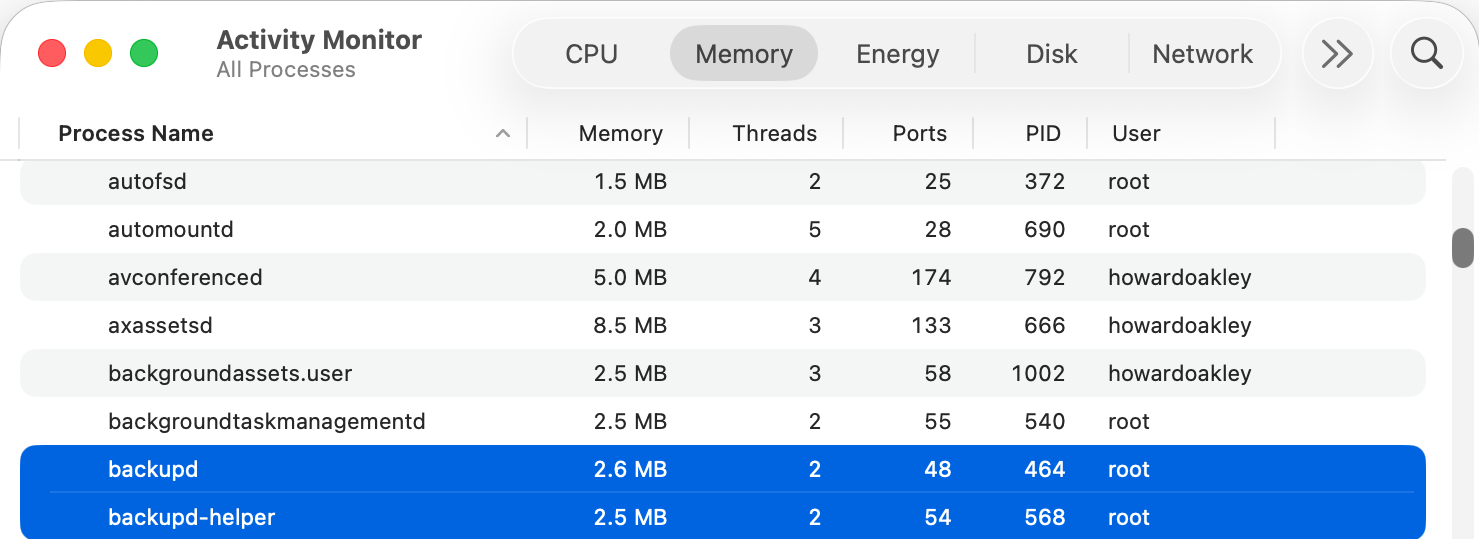
Here are backupd and backupd-helper showing they still take a little % CPU even when Time Machine is completely disabled.

They also take a little memory, here a total of 5.1 MB. While that isn’t much, added up over 500 processes it becomes worth caring about.

Those two processes are controlled by LaunchDaemons stored in /System/Library/LaunchDaemons, in property lists named com.apple.backupd-helper.plist and com.apple.backupd.plist. Here’s our first problem, as those are located in the Signed System Volume (SSV), so we can’t change them in any way. The same applies to the other 417 LaunchDaemons and 460 LaunchAgents that account for most of the processes listed by Activity Monitor. In the days before the SSV it was possible to edit their property lists to prevent them from being launched, but that isn’t possible any more when running modern macOS.

If we can’t stop the backupd-auto process from being run, is there any other way we could block it? To answer that we need to understand how it’s scheduled and dispatched.

Until macOS Sierra, Time Machine backups were run from launchd as timed events, but since then their scheduling and dispatch has been performed jointly by Duet Activity Scheduler (DAS) and Centralised Task Scheduling (CTS), using lightweight inter-process communication (XPC). DAS manages a huge list of activities including com.apple.backupd-auto, and decides when to dispatch it to CTS to run. For example, it won’t do that for the first five minutes after a Mac starts up, to allow other processes to run first.

Once that time is up, DAS decides to run the backup:
38.738 DAS 0:com.apple.backupd-auto:2052A3, Decision: CP Score: 0.949374} 38.738 DAS '0:com.apple.backupd-auto:2052A3' CurrentScore: 0.949374, ThresholdScore: 0.068531 DecisionToRun:1

38.762 DAS REQUESTING START: 0:com.apple.backupd-auto:2052A3

CTS then proceeds with the dispatch via XPC:
38.762 CTS-XPC DAS told us to run com.apple.backupd-auto (0xb671bcc80) 38.844 CTS-XPC Initiating: com.apple.backupd-auto (0xb671bcc80) 38.846 CTS-XPC _xpc_activity_dispatch: beginning dispatch, activity name com.apple.backupd-auto, seqno 0 38.846 CTS-XPC _xpc_activity_begin_running: com.apple.backupd-auto (0x7a9014280) seqno: 0. 38.878 CTS-XPC Running (PID 537): com.apple.backupd-auto (0xb671bcc80)

38.879 DAS STARTING <_DASActivity: "0:com.apple.backupd-auto:2052A3", Utility, 60s, [1/19/26, 8:50:43 PM - 1/19/26, 9:10:43 PM], Started at 1/19/26, 9:10:38 PM, Group: com.apple.dasd.default, PID: 537>

This is in a VM with Time Machine disabled, though, so Time Machine reports:
38.879 Time Machine Skipping scheduled Time Machine backup: Automatic backups disabled

However, com.apple.backupd-auto has now completed, and that’s passed back through CTS-XPC:
38.879 CTS-XPC _xpc_activity_set_state: send new state to CTS: com.apple.backupd-auto (0x7a9014280), 5
38.880 CTS-XPC Completed: com.apple.backupd-auto (0xb671bcc80)

The next run is then scheduled in DAS following an interval of at least 30 minutes, and ideally in about an hour:
38.881 CTS-XPC Rescheduling: com.apple.backupd-auto (0xb671bcc80) 38.881 DAS SUBMITTING: 0:com.apple.backupd-auto:B293AE

38.882 DAS Submitted: 0:com.apple.backupd-auto:B293AE at priority 30 with interval 1800 (Mon Jan 19 21:25:38 2026 - Mon Jan 19 21:40:43 2026)

So, even with Time Machine disabled in a VM, DAS-CTS continues to schedule automatic runs of Time Machine at hourly intervals. And, because DAS-CTS is isolated from all user controls, there’s nothing we can do to prevent that scheduling and dispatch. Does that matter, though? This whole sequence was completed in 0.144 seconds, using lightweight inter-process communication with negligible use of resources, and only repeats hourly.

To the Unix purist, this might appear wasteful and unnecessary, but macOS isn’t, and never has been, Unix. It’s a closed-source proprietary operating system designed for use by millions of consumers and regular users. Rather than configuring it using config files or its thousands of property lists, its controls are largely exposed in System Settings, with a few settings hidden away and only accessible through the defaults command.

macos914

Classic Mac OS was more modular, with optional installs that the user could pick and choose, as shown above in Mac OS 9.1. These days with the SSV, choice is more limited from the start, with the only real options being whether to install the cryptexes used in AI, and the x86 code translator Rosetta 2. The latter is transient, though, and likely to go away next year.

Like it or not, modern macOS isn’t designed or implemented to give the user much choice in which processes it runs, and architectural features including the SSV and DAS-CTS prevent you from paring its processes down to any significant degree.


Read the original article

Comments

  • By pxc 2026-01-2122:219 reply

    There's a lot of chatter here about macOS' Unix certification. But in a post shared by another user, it appears that the actual content of that Unix certification vindicates OP— macOS' official Unix compatibility requires disabling SIP:

    > So, if you want your installation of macOS 15.0 to pass the UNIX® 03 certification test suites, you need to disable System Integrity Protection, enable the root account, enable core file generation, disable timeout coalescing, mount any APFS partitions with the strictatime option, format your APFS partitions case-sensitive (by default, APFS is case-insensitive, so you’ll need to reinstall), disable Spotlight, copy the binaries uucp, uuname, uustat, and uux from /usr/bin to /usr/local/bin and the binaries uucico and uuxqt from /usr/sbin to /usr/local/bin, set the setuid bit on all of these binaries, add /usr/local/bin to your PATH before /usr/bin and /usr/sbin, enable the uucp service, and handle the mystery issues listed in the four Temporary Waivers.

    https://www.osnews.com/story/141633/apples-macos-unix-certif...

    So it seems very fair to say then, that features like SIP and the SSV are genuine turns away from Unix per se, even given the fact of the certification.

    • By pjmlp 2026-01-229:35

      It is still a UNIX nontheless, other commercial UNIXes have similar subtleties on their certification.

    • By tim-- 2026-01-225:28

      For a long time, Inspur K-UX, a Red Hat Linux derivitive was a Unix O3 certified system as well. https://www.opengroup.org/openbrand/register/brand3617.htm

    • By jajuuka 2026-01-2216:14

      It's pretty telling when the comments on the article and here have devolved into pedantic discussions of "well is it REALLY UNIX?" It's the most inconsequential question with no beneficiary except those who want to claim UNIX purity.

    • By mycall 2026-01-2212:542 reply

      If one was to do all these things, would anything break in the OS and supporting software?

      • By xmodem 2026-01-2213:47

        I've never tried it myself, but it's oft-repeated folk wisdom in Apple circles that enabling filesystem case-sensitivity breaks all manner of third-party software that has only ever been tested on the case-insensitive default.

      • By notamario 2026-01-2214:09

        I tried running with case sensitive file system. MacOS itself is fine, but a lot of software isn’t.

    • By a-french-anon 2026-01-2216:14

      You also need to change the /bin/sh symlink (to the included /bin/dash) to avoid multiple bugs in their ancient bash 3.2 showing in POSIX scripts.

    • By SllX 2026-01-225:312 reply

      > So it seems very fair to say then, that features like SIP and the SSV are genuine turns away from Unix per se

      At the end of the day UNIX is an operating system. A dead operating system that hasn’t seen a release outside of Bell Labs since the 80s and even 10th Edition was 1988, and never distributed.

      A branch of it persisted through System V and its variants, then it became a spec, then operating systems started calling themselves UNIX according to that spec whether they were Systems V offshoots or reconstructions stemming from Net/2.

      We’ve been genuine turns away from Unix per se since before I was born. The SUS and POSIX lets people pretend like we’re not.

      • By flomo 2026-01-228:271 reply

        IMO, that's a pretty poor summary of how the "Unix Wars" really ended. Bell UNIX got productized into System V, and the trademark was dumped off on TOG.

        But "Unix" was really more of an ideal. The ideal system may not have existed, but a lot of people saw the potential of the flawed heaven in there. Including Stallman and Torvalds. Imagine "Industry-standard APIs" which are actually non-negotiable, and not just some compliance-test. Well, you need the source code, right? We have a much better "unix" now than we ever had with "UNIX".

        • By SllX 2026-01-2210:071 reply

          The “Unix Wars” battle lines were drawn in 1988 with the formation of the X/Open Group and Unix International, the same year Bell Labs put together the 10th Edition’s manual, more or less demarcating its release according to their own conventions even if it wasn’t sold nor distributed. Their next project was Plan 9.

          Incidentally this was also the year of the last major version of AT&T’s System V, System V Release 4. There would be a couple more minor releases after that, but there was never a System V Release 5.

          > The ideal system may not have existed, but a lot of people saw the potential of the flawed heaven in there. Including Stallman and Torvalds.

          I don’t think Stallman nor Torvalds ever saw anything so romantic in UNIX. You could ask them, but it doesn’t jive with well anything in the historical record.

          > We have a much better "unix" now than we ever had with "UNIX".

          We have better operating systems, yes, and for a price and some elbow grease, some of them can even use the UNIX trademark which checks a box for some people who might care about that sort of thing.

          • By flomo 2026-01-249:231 reply

            Obv we have better operating systems, yes. But we also obviously have much, much better de-jure open source standards than the UNIX/unix/etc crowd could ever manage. So the world is better when all those guys gave-up or died.

            Stallman and Torvalds were not romantics, but they were tactical and strategic in targeting commercial UNIX. You could tell in the old days the Linux benchmark was Solaris.

            • By SllX 2026-01-2423:30

              > So the world is better when all those guys gave-up or died.

              I think this line is a bit harsh but otherwise I think we’re pretty much in agreement now unless there’s something else you would like to add on. Cheers!

      • By anthk 2026-01-228:222 reply

        9front it's the last 'Unix' release after Unix v8 and Unix v10.

        • By pjmlp 2026-01-229:36

          Then that would be Inferno, given how little Plan 9 shares with UNIX, and Inferno had the same authors.

        • By SllX 2026-01-229:44

          Plan 9 isn’t UNIX. 9front isn’t Plan 9 from Bell Labs.

    • By 7e 2026-01-220:222 reply

      None of those things are at all desirable. setuid uucp? Security nightmare. strictatime? Not needed. Linux doesn't do it either.

      Apple has retained the good parts of UNIX and ignored the shitty parts. In the end, it is more UNIX than Linux is.

      • By fragmede 2026-01-223:492 reply

        Yeah, like a really shitty ancient version of bash. If that's what UNIX means to you, I'm not gonna yuck your yum, but what could be more UNIX like than letting license issues make life worse for your users.

        Hey, at least it isn't *BSD! (Or, well...)

      • By bigyabai 2026-01-220:332 reply

        [flagged]

        • By subjectsigma 2026-01-220:39

          I don't disagree, but what does that possibly have to do with macOS being a Unix or not?

        • By keeganpoppen 2026-01-221:09

          fantastic point… about… what? certainly not TFA…

    • By spijdar 2026-01-221:115 reply

      The visceral response to the statement:

      > To the Unix purist, this might appear wasteful and unnecessary, but macOS isn’t, and never has been, Unix. It’s a closed-source proprietary operating system designed for use by millions of consumers and regular users. Rather than configuring it using config files or its thousands of property lists, its controls are largely exposed in System Settings, with a few settings hidden away and only accessible through the defaults command.

      Is really, really interesting to me, because so many people (including the author) are so invested in the question of whether or not "macOS is Unix". There's so much signaling happening here, people throwing around UNIX all-caps, talking about certifications, the "good parts" of UNIX, that macOS "[is] quite literally [UNIX]", while seemingly missing the author's intention entirely.

      You don't have to agree with the author, but a good faith interpretation of "macOS isn’t, and never has been, Unix" should be obvious in its meaning. Yes, macOS 26 has been certified by The Open Group to be compliant with the Single UNIX Specification.

      You know what else is UNIX certified? IBM's z/OS. Yet I don't think people would be clambering to say that z/OS's USS is "quite literally UNIX" with the same ferocity.

      The point the author is clearly attempting to make is that the idea and system of macOS is not Unix. Even if macOS is, legally speaking, "UNIX®", it was not made to be UNIX®. macOS is not built to adhere to the "UNIX® philosophy". The fact NextStep and OS X after it were BSD-compatible is an implementation detail -- a useful one at that -- but an implementation detail nonetheless. It's like Android's use of the Linux kernel underneath. Yes, Android is Linux, but there's a reason why there's a vocal community of people who champion "Real Linux smartphones". Android uses Linux, but Android isn't defined by Linux.

      I'm not trying to prove anyone right or wrong here, I just want to give my three cents on the matter. I would call macOS "unix-y" because it's close enough to being a "unix" to be comfortable on the CLI, but I've touched the unix "heart" enough to know it still smells like 2005-ish FreeBSD, largely frozen in time.

      Of course, that's good enough for most things. But then, does that make Windows a Unix-like, just because it can run Linux ELF executables via WSL1? Conceivably, if Microsoft cared, they could get UNIX® 03 certification via WSL1, WSL2, or some hacked together reincarnation of SFU with parts from WSL1.

      Yes, I know, macOS has a "real" BSD core, and a "real" unix heritage through BSD and OSF/1. The point is that it's not hard (IMO) to see where the author is coming from saying "No, macOS is not a Unix".

      (I disagree with him for different reasons -- he ambiguously implies that "Unix" means being open-source, for instance -- but I agree that macOS as a platform is not very Unix-y, even if it is UNIX®.)

      • By pxc 2026-01-222:15

        The analogy with Android and Linux is dead-on. As is the confusing language with which people talk about these things. "Android isn't Linux" and "macOS isn't Unix" aren't quite the right way to express the sentiments and thoughts behind them— even when those sentiments and thoughts are themselves clear and reasonable.

        I don't think Apple's choices to deviate from the Unix standard are necessarily for the worst; many are for the better! But their cultural deviation from the norms of the free Unices and Unix-likes is part of what makes computing on macOS feel constraining and frustrating to me. It seems like that sense of disappointment (shared by many others), and defensiveness in response to it, end up driving a lot of discussions around this.

      • By Onavo 2026-01-221:51

        > Conceivably, if Microsoft cared, they could get UNIX® 03 certification via WSL1, WSL2, or some hacked together reincarnation of SFU with parts from WSL1.

        They probably could if they really want to.

        https://en.wikipedia.org/wiki/Microsoft_POSIX_subsystem

        The Windows NT kernel was designed to extend and embrace .

      • By pjmlp 2026-01-229:381 reply

        "UNIX® philosophy" doesn't exist, that is a religion like discussion about UNIX spread by FOSS people while arguing for GNU/Linux with their endless list of command line options.

        I use UNIX in various flavours since being introduced to it in 1993 via Xenix, and cannot name a single one where this was ever true.

        • By a-french-anon 2026-01-2216:201 reply

          Well no, it does exist, but not in UNIX itself, in Plan 9.

          • By pjmlp 2026-01-2218:50

            I never found it there, and even if measures in some strange way to make it true, doesn't seem to have helped Plan 9 adoption.

            Commands still have plenty command line configurations for their executions.

      • By torginus 2026-01-227:40

        In terms of practical usage, imo it doesn't matter whether macOS is Unix - it's certainly not Linux. The shell is different, the bundled utils are different, the filesystem, configuration and tooling is different enough that if you try to run anything beyond the most basic scripts written for Linux, they will not work.

        Which means macOS is a separate platform you need to learn and support.

        By this standard, WSL2 is much more Linux than macOS.

      • By curt15 2026-01-221:193 reply

        >You know what else is UNIX certified? IBM's z/OS. Yet I don't think people would be clambering to say that z/OS's USS is "quite literally UNIX" with the same ferocity.

        Does "Unix" still carry some special cachet these days? Linux is more "Unix-like" than MacOS for the reason articulated in the article, but you'll see commenters leap to MacOS's defense by pointing out that MacOS is "literally UNIX".

        • By spijdar 2026-01-221:312 reply

          I think it's a sentimental thing, mixed with a dash of elitism/"purity seeking".

          I don't mean that harshly. In my late teens/early 20s, I went through a "phase" where I obsessed with getting "purer and purer". This was mixed with a weird obsession with non-x86 hardware, as well. Lots of NetBSD, FreeBSD and Illumos usage, some Plan9 towards the end, lots of intellectual snobbery about "it feels better", and that sort of thing.

          I'm almost 30 now, and my office has "Unix" systems from the 70s up to, well, my M1 MBP with "UNIX®" on it. PDP-11, VAX/ULTRIX, SPARC/SunOS 4, MIPS/IRIX, Alpha/OSF1, I've given them all a spin, running existing software and writing new software to kick the tires of old compilers. That's why I feel comfortable saying macOS really, really doesn't feel like any "UNIX" that I associate with "UNIX".

          Although, UNIX was always a confusing term which never really meant all that much to begin with (when talking about commercial OSes/hardware platforms), but that's a whole other conversation...

          • By pxc 2026-01-222:191 reply

            > In my late teens/early 20s, I went through a "phase" where I obsessed with getting "purer and purer". This was mixed with a weird obsession with non-x86 hardware, as well. Lots of NetBSD, FreeBSD and Illumos usage, some Plan9 towards the end

            Sounds really fun and informative!

            > lots of intellectual snobbery about "it feels better"

            How does that end up being intellectual (or snobbery, for that matter)? It sounds pretty close to "follow your heart" or "I just enjoy it" to me!

            > Although, UNIX was always a confusing term which never really meant all that much to begin with (when talking about commercial OSes/hardware platforms), but that's a whole other conversation...

            Seems like a relevant one, for this context ;)

            • By spijdar 2026-01-224:50

              That probably came off a bit too inflammatory/self-deprecating :)

              The point for me was realizing that, even though I do like all these systems and OSes, and I understand the appeal of both "pure UNIX" and (on the opposite spectrum) OSes that violently reject "UNIX", this kind of purity isn't actually... useful.

              End of the day, with most of the ways I use a computer for productivity, playing, or being social with other people, there are other things that matter a lot more than the "purity" of the OS. And this includes how much "real UNIX" it is. It's cool that Solaris/Illumos is "true blooded unix". And... it doesn't really matter that much. Whether or not a system is or isn't "unix" just doesn't matter, as long as it runs the software you want.

              (And for a lot of modern software, "being unix-like" isn't enough; if you're not Linux, Windows, or macOS, good luck!)

              The purity is also usually kind of a lie in the first place. I've got a VAX in my office running "real" 4.3BSD, before all the "POSIX-bloat" was added. But you look closely and realize there's tons of "bloat" added, for the purpose of making a more useful OS. There are mixed abstractions, redundant libc extensions, dubious system additions that look like one person needed something and added it in.

              It's just so uninteresting to me now to argue about what is or isn't "unix". I still enjoy all those old OSes, but you kind of stop seeing them as "UNIX". The ways that each isn't UNIX is far more interesting, like how ULTRIX and OSF/1 abandoned "unix style" syslogs in favor of a rich binary format via 'uerf'.

          • By icedchai 2026-01-222:431 reply

            I've experimented with all those platforms, and macOS feels to me like "Unix" as much as a Sun SparcStation or SGI Indy from 30 years ago.

            What is "Unix" to you? To me, it's the common shell commands / utilities and a POSIX API. If I can download some GNU source, run ./configure; make; make install ... it's Unix.

            Certainly, macOS is a "weird" Unix if you compare it to Solaris and look at the administrative bits. But, then again, IBM's AIX is very weird, too. And that's one of the few commercial Unix implementations still kicking.

            • By spijdar 2026-01-224:331 reply

              > Certainly, macOS is a "weird" Unix if you compare it to Solaris and look at the administrative bits. But, then again, IBM's AIX is very weird, too. And that's one of the few commercial Unix implementations still kicking.

              That's why I said that "Unix" has always been kind of confusing as a name, because a lot of "Unix"es are very different. I've never used AIX personally, but I know it's pretty funky. And there have been weirder "unix"es, Domain/OS was another weird one. At least a few others had split BSD/SysV "personalities", I've read.

              > If I can download some GNU source, run ./configure; make; make install ... it's Unix.

              On the one hand, I agree with this.

              But then, by that standard, you could call basically every OS in use today "Unix", including Windows via Cygwin, or WSL, or etc...

              To me, "Unix" is epitomized by Sun's fix for SunOS 4 for disabling Yellow Pages and using only DNS for hostname lookups.

              Their official advice? To unpack the libc shlib, delete the object code for the Yellow Page functions, then repackage it into a new libc version.

              That feels like Unix to me, in a way that macOS just never will be. Which is also perfectly okay with me.

              • By icedchai 2026-01-2214:131 reply

                So Unix has to feel like dealing with old cruft to you? ;) I remember the SunOS 4 days and the annoying setup process for DNS. Those were the first Unix systems I worked with in a professional capacity.

                I have a Sparc in my collection but it's running Solaris and too new to run SunOS 4. I'm considering getting a Sparc 10 or something so I can relive the SunOS days. That was my favorite early 90's Unix. Most open source software had first class support for SunOS.

                Linux is "Unix" in my mind, though not UNIX (TM). WSL follows, since it is really virtualization under the hood. (WSL2, at least.). Cygwin seems like a gray area... Unix-like environment maybe?

                • By spijdar 2026-01-2216:351 reply

                  > So Unix has to feel like dealing with old cruft to you? ;)

                  Well, maybe :)

                  It's something about the system being made of a lot of messy parts which can be split apart and taped back together. Reductively, all computers are like this, but SunOS and other "unixes" are more easily put back together.

                  For instance, besides enabling DNS, I've extended the libc quite a bit, to get modern OpenSSL and curl to build, as well as KDE 1 just for kicks.

                  You can do the same with almost any OS (that doesn't lock you out with security), but it feels easier with a "Unix". Linux is also very like this!

                  > I have a Sparc in my collection but it's running Solaris and too new to run SunOS 4.

                  You could always run NetBSD and use COMPAT_SUNOS to run a SunOS chroot ;) I haven't tried running Xsun this way but it'd probably go...

                  • By icedchai 2026-01-2221:031 reply

                    Do you blog about any of this? Extending SunOS libc sounds pretty cool!

                    I did install OpenBSD on the Sparc (Ultra 5) at one point, before going back to an older Solaris. Maybe I'll try NetBSD next!

                    • By spijdar 2026-01-233:31

                      Haha, I haven't yet, but I want to. Maybe soon! Though extending libc isn't that exciting, really: that's kind of the cool (Unix-y??) thing about it. You just (IIRC) extract the static archive, add whatever .o object files with whatever symbols, add the symbols to a manifest, pack it up, and any C program on the system can call it. Since all C functions were implicit at the time (header files only had structs and enums) you can use trivially add whatever.

                      > Ultra 5

                      You should give it a shot! Even NetBSD/sparc64 has support for SunOS 4 binaries... allegedly.

                      If one was so inclined, you can abuse the kernel a bit and tell the compat layers to use root as their search path. I did this to make a "Linux system" with a NetBSD kernel and full GNU/Linux userland, just for kicks.

                      In my mind, you could do the same for SunOS. There's also COMPAT_MACH and COMPAT_DARWIN... imagine NeXT/SPARC binary compatibility alongside SunOS.

                      Hmmm. :)

        • By a-french-anon 2026-01-2216:21

          Yes it does. It means: do my POSIX sh scripts using only POSIX utilities and their specified options/behaviour work here?

        • By flomo 2026-01-225:26

          Back in the early 2000s, RedHat did a study and found the UNIX brandname actually had negative value among IT managers. They saw it as "expensive, proprietary, incompatible" etc. Meanwhile Linux was seen very positively. (So yeah nobody cares, not even the Mac users who pretend to.)

    • By GrowingSideways 2026-01-2123:31

      [dead]

  • By sgjohnson 2026-01-2118:588 reply

    > Here’s our first problem, as those are located in the Signed System Volume (SSV), so we can’t change them in any way. The same applies to the other 417 LaunchDaemons and 460 LaunchAgents that account for most of the processes listed by Activity Monitor. In the days before the SSV it was possible to edit their property lists to prevent them from being launched, but that isn’t possible any more when running modern macOS.

    SSV can be disabled. It would be ill-advised to do so, but Apple intentionally allows you to do that. In fact you can strip away every single security layer of macOS, including allowing unsigned kernel extensions to be loaded. This document is a bit outdated, but it should still be possible to do all of that. https://gist.github.com/macshome/15f995a4e849acd75caf14f2e50...

    Feels like the article is just a cheap dunk on macOS. Has Apple perhaps baked in a bit too much into the SSV? Definitely. Even the Chess.app is in there.

    Does it really matter? Almost certainly no.

    • By AceJohnny2 2026-01-2119:202 reply

      > Feels like the article is just a cheap dunk on macOS.

      That blog, Howard Oakley at eclecticlight.co, is consistently the most informative on the internet about macOS behaviors and internals, that Apple does not explain. He is also the author of several useful tools [1] to help observe and understand some of its underlying details. It's maybe the closest we have to a SysInternals for macOS.

      [1] https://eclecticlight.co/free-software-menu/

      • By sbuk 2026-01-2120:111 reply

        It is. Add we all have off days. Perhaps Howard has had one here. I mean, he is defining what type of OS it is by how it's configuted. Which is just wierd.

        • By Moto7451 2026-01-2121:071 reply

          I got a chuckle out of that for my own reasons as a long time Mac user as “Mac OS X is Unix” was the brand back in the 10.0-10.3 days, to the point I believe they got a Unix certification by someone, and then again with macOS 15 they got an Open Group UNIX certification.

          https://www.osnews.com/story/140868/macos-15-0-now-unix-03-c...

          I can’t say this affects me in any way I’m aware of, but the perception presented here is interesting.

      • By sgjohnson 2026-01-2119:221 reply

        That just highlights my point about this article being a cheap dunk?

        Because I was very disappointed with it ending at “SSV doesn’t let you”. SSV can be disabled, and the author should have known (almost certainly knows) that.

        • By AceJohnny2 2026-01-2120:091 reply

          Disabling SSV may have been beyond the scope of the experiment the author was attempting. I suppose he could've been more explicit about that.

          From one of his comments on his post:

          > I wish whoever takes that project on, every success, even more so at working out how those processes can be disabled completely while keeping the SSV intact.

          • By jabwd 2026-01-221:341 reply

            The thing I find disappointing about the article is that nothing else seems to have been explored. Now no options might exist, but then again, isn't the point of such a write up to find the ones that.... do...?

            A lot of people know that modern macOS is a bit of a let down when it comes to modifying it unless you disable a bunch of security layers. So the information gained is basically 0.

            Edit: I should clarify that some of the ways they analyze how services are launched etc. are quite interesting, though I hope my prior thought makes sense to some.

            • By philistine 2026-01-2213:17

              Disabling the SSV is perhaps the worst mistake you can make to a macOS install. Howard certainly knows that this is true but has chosen not to explore the details in this article.

              His website are deep dives into the technical workings of macOS that no one else does. I’d even argue he has more insights and documentation than Apple. It might sound harsh, but he’s just very clinical about it.

    • By catoc 2026-01-2119:341 reply

      Eclecticlight and ‘cheap dunk’ ?

      No.

      This site is a class of its own, in quality of discussions, in quality of software, and in dedication… many years long, consistent quality

      • By sgjohnson 2026-01-2119:481 reply

        I didn’t claim that eclecticlight writes cheap dunk.

        But this article, which starts with

        > That’s a question I’m asked repeatedly, which this article tries to answer.

        doesn’t actually _try_ to answer the question. It just stops at SSV and draws a meaningless comparision with macOS 9. It also has several factual inaccuracies in there. Notably, the claim that macOS is not UNIX, and the implication that Unix systems must somehow be free and open-source (virtually all Unixes of the day were proprietary & closed source).

        • By catoc 2026-01-2119:59

          > I didn’t claim that eclecticlight writes cheap dunk

          Thanks - then we agree (also on the part of the argumentation about macOS being a certified UNIX OS)

    • By zbentley 2026-01-220:441 reply

      I suspect that Oakley could have explained that, but the thesis stands even without the asterisk, and explaining it would have an issue:

      This is going to piss off some Linux folks, but when communicating from a big pulpit about how to bypass parts of MacOS, it's important to be aware that the vast majority of MacOS users are casual, nontechnical users. As such, a popular blog posting "here's how to bypass SIP/SSV lock/whatever" would lead to a wave of users disabling it for less-than-great reasons (aesthetics, conviction that e.g. a given service was causing their system slowness when that service's resource usage was actually symptomatic of something else orchestrated by MacOS going wrong). Those decisions have side effects:

      - Folks brick or break their computers, potentially in a way that voids the warranty or support contracts (I hope that software bypasses don't trigger this, but I am cynical).

      - Folks chasing a "cleanliness vibe" leave a lot of the system security off once they're done. Someone else in this thread pointed out that without SSV the security of MacOS is on par with most Linux, but MacOS users are a lot bigger attack risk than Linux users: there are more of them, they're wealthier and thus identified as targets of choice by malware/people, and, again--they're casual users and don't have good security spider sense. This isn't a blanket endorsement of every restriction/security feature with no opt-out that MacOS has, just an observation that its userbase is at higher risk for attack than some others--lower than windows, but higher than Linux users.

      - Folks induce breakage that bricks their computers on a delay, e.g. during the next system update something chokes after encountering a totally unauthorized/unexpected service geometry and crashes hard enough to cause data loss.

      I'm not saying that stuff like SSV-rw should be secret, just that it's probably for the best to not discuss it front and center in a widely-read informational blog whose content is geared towards (power) users rather than technicians. To phrase it with a different example: if someone Googles "how to disable XProtect (antimalware)", great, go nuts. But it's probably for the best that a popular article about "can you reduce resource usage by shutting down system launchd services" doesn't have a "here's how to elevate your permissions and disable whatever you like" blurb, and instead settles for an answer of "no, that's not supported."

      • By pjmlp 2026-01-2211:402 reply

        If you want to piss off even more, those that buy Apple only because they want a shinny UNIX, but don't buy into Apple's culture since Mac OS Classic days, you only need to remind them that Steve Jobs was hardly a UNIX fanboy.

        Just like with Microsoft strategies, for NeXT, having NeXTSTEP being based on UNIX was more to check boxes against Sun, and bring software into the platform, not to make it easy to go out, hence the whole userspace stack, even drivers, are based on Objective-C frameworks.

        "Why We Have to Make UNIX Invisible."

        https://www.usenix.org/blog/vault-steve-jobs-keynotes-1987-u...

        > They said a Unix weenie was code for software engineers who hated what we were doing to Unix (the operating system we licensed)—putting a graphical user interface on it to dumb it down for grandmothers. They heckled Steve about his efforts to destroy it. His nightmare would be to speak to a crowd of them.

        https://web.archive.org/web/20180628214613/https://www.cake....

        "NeXT marketing strategy video (1991)"

        https://www.youtube.com/watch?v=KRBIH0CA7ZU

        • By zbentley 2026-01-2213:061 reply

          You sure you're replying to the right post? I wasn't really engaging with the "is it UNIX or not" debates elsewhere in the parent threads; just talking about why security bypass wasn't mentioned in TFA.

          • By pjmlp 2026-01-2213:091 reply

            Yes I am,

            > This is going to piss off some Linux folks, but when communicating from a big pulpit about how to bypass parts of MacOS, it's important to be aware that the vast majority of MacOS users are casual, nontechnical users.

            See Steve Jobs remark about grandmothers.

            • By zbentley 2026-01-2220:41

              Ah, I see now, thanks.

              I think "people who want a UNIX" are pretty rare. Most of the folks who say things that rhyme with that at FOSDEM (as you mentioned in an adjacent thread) are, I'd bet, more likely to be "people who want something Unix-adjacent and similar enough to Linux that behavior of some tools is familiar".

              They're still likely to be tilted by the idea that it might be less-than-ethical for hoakley to share security bypass techniques on a popular blog, though. Nobody likes to be told "no", and nobody likes to be reminded they're not the target demographic.

        • By philistine 2026-01-2213:211 reply

          > those that buy Apple only because they want a shinny UNIX

          Those people don’t exist. People buy Apple for many good reasons; this isn’t one of them.

          • By pjmlp 2026-01-2214:381 reply

            Yes they do, you only have to walk FOSDEM corridors to find them.

    • By lapcat 2026-01-223:591 reply

      The problem is that Oakley is actually wrong. You don't need to edit the property lists. You can simply use the launchctl command-line tool to disable system launchd services after you disable SIP, without having to disable the SSV.

      • By DrBurrito 2026-01-2210:48

        this.

        sudo launchctl unload -w /System/Library/LaunchDaemons/com.apple.backupd.plist

        sudo launchctl unload -w /System/Library/LaunchDaemons/com.apple.backupd-auto.plist

        sudo launchctl unload -w /System/Library/LaunchDaemons/com.apple.backupd-helper.plist

    • By eviks 2026-01-228:551 reply

      > Has Apple perhaps baked in a bit too much into the SSV? Definitely. Even the Chess.app is in there. > Does it really matter? Almost certainly no.

      Why does waste and broken customization not matter?

      • By sgjohnson 2026-01-229:331 reply

        Broken customization is entirely subjective.

        As for waste - for the past decade or so, the consumer computing world has been in an almost unanimous consensus that computing power is cheap, and that it's not worth optimizing away a few hundred megabytes of storage or RAM. And macOS is _nowhere_ near being the worst offender here. If you really need to point a finger at waste, look no further than Windows, where just about everything these days is a WebView. Now that's waste.

        I'm pretty confident that the taskbar on Windows 11 alone eats up more RAM and CPU time than every single macOS service that's running but not actually being used combined.

        • By eviks 2026-01-229:381 reply

          What is subjective about objectively saving time in your workflow? Or saving space that you can save more of your precious photos?

          Also why should I care about worst offenders, that's not a coherent argument when discussing this specific offender.

          P.S. Also, in what kind of world subjective perspective doesn't matter for the subject?

          • By sgjohnson 2026-01-2210:041 reply

            > What is subjective about objectively saving time in your workflow?

            What part of your workflow requires modifying the system volume on macOS? As a long-time power user of macOS, I don't even need to disable SIP. I've worked my workflow around the limitations.

            macOS and Linux power users are two different species. One will work around the restrictions imposed by the overlords, the other will beat the system into submission.

            Of course you can also beat macOS into submission, but then you're in for a bad time.

            • By eviks 2026-01-2210:261 reply

              The part where I can eliminate the workflow of investigating and killing some misbehaving background process by preventing it from launching.

              Or when I changed popup symbol pickers to insert symbols faster, which you can't do now since those symbol files became protected.

              A few I don't remember whether it was SIP or SSV, and then many I'm not even aware of, they just haven't been implemented by other people due to these restrictions.

              > As a long-time power user of macOS, I don't even need to disable SIP.

              Ok, so you're just not that power, but this is not about you, can you imagine other people can do different customizations?

              Your defeatist attitude to customization is common, but that still doesn't explain why you think it doesn't matter

              • By philistine 2026-01-2213:24

                The argument is that your customization is fighting against the tide. If you want to remain happy using macOS, it’s better to go in the same direction as Apple. And Apple really doesn’t want you to disable SIP.

    • By sneak 2026-01-2120:251 reply

      Disabling SSV puts your system security on par with any stock linux distro. Most OSes don’t do a cryptographically verified read only root.

      • By sgjohnson 2026-01-2121:04

        The bigger problem with disabling SSV and making changes to it is entirely practical - any macOS update will overwrite them.

        Which can be worked around by writing a provisioning script, but in either case will be a significant headache if one would come to rely on the modifications they were to make to the volume.

    • By userbinator 2026-01-222:54

      Does it really matter? Almost certainly no.

      ...until they start including things you don't want (remember the CSAM scanning debacle?)

    • By wepaean 2026-01-224:37

      [dead]

  • By Luc 2026-01-2110:054 reply

    > To the Unix purist, this might appear wasteful and unnecessary, but macOS isn’t, and never has been, Unix.

    I get what they mean, but macOS is even Unix certified. https://www.opengroup.org/openbrand/register/

    • By 1vuio0pswjnm7 2026-01-2119:136 reply

      "I get what they mean, but macOS is even Unix certified."

      What do they mean?

      To me the blog author is primarily focused on the issue of _control_, i.e., being able to control the hardware that he purchased as opposed to letting a company control it, e.g., through pre-installed software, remotely installed "updates", default settings, etc.

      He cannot control its default behaviour hence he wants to "slim MacOS down"

      "UNIX" was a pun on the name of another OS that allegedly was accused of being too large and complex. That OS, Multics, was designed to run only on specific hardware from GE and later Honeywell

      UNIX was a smaller, less complex alternative that, after its rewrite in C, could more easily run on a variety of hardware and be modified by the people using it

      Apple does not allow people using MacOS to modify it

      MacOS is proprietary; unlike AT&T's UNIX it has not been released into the research community resulting in non-commercial, open source "MacOS-like" OS projects (HackIntosh notwithstanding)

      A user cannot write programs for MacOS without restriction by the company, e.g., prior approval, "developer" fees, etc.

      MacOS cannot easily be used on a variety of hardware, only on Apple's proprietary hardware

      Compared to non-commercial UNIX-like OS, MacOS is larger and more complex

      https://eclecticlight.co/2023/12/04/macos-sonoma-is-setting-...

      • By kergonath 2026-01-2119:37

        > To me the blog author is primarily focused on the issue of _control_, i.e., being able to control the hardware that he purchased as opposed to letting a company control it, e.g., through pre-installed software, remotely installed "updates", default settings, etc.

        Which has absolutely nothing to do with the OS being an UNIX or not. It's a bit weird to see the allusion to UNIX to be fair: Howard Oakley is deep enough down the rabbit hole that I would expect him to know that History is full of proprietary and closed UNIXes.

      • By 1vuio0pswjnm7 2026-01-2120:522 reply

        NB. The blog refers to (a) the "Unix purist" and (b) MacOS not being Unix. Arguably, (a) is more important, irrespective of whether (b) is true (IMO it's ambiguous)

        For example, the "Unix purist" might refer to someone who identifies with the "ideals" associated with that OS, e.g., relatively small, portable to potentially any hardware, free to study and modify, etc. And (b) might refer to MacOS not conforming to those "ideals" (despite having a limited license to use a "UNIX" trademark)

        At this point, (b) is ambiguous; what is "Unix". It might mean different things to different people

        Ironically, Apple took the "Unix" parts of MacOS from open source, non-commercial "UNIX-like" OS projects such as NetBSD and FreeBSD that are not "Certified UNIX"

        • By nikanj 2026-01-2121:511 reply

          HP-UX and IBM AIX are probably shocked to learn that they, too, are not Unix

          • By nxobject 2026-01-2122:22

            Sadly, HP-UX just reached EOL. I think their Integrity servers let you choose between RHEL and SLES now?

        • By 1vuio0pswjnm7 2026-01-2214:44

          Perhaps the reason Apple sought the "Certified UNIX" label was to please business customers

      • By 1vuio0pswjnm7 2026-01-2323:05

        A user cannot write programs for MacOS without restriction by the company, e.g., prior approval, "developer" fees, etc.

        Adding emphasis on "without restriction"

        Opinions may differ but to me using Apple's "Darwin OS" is different from using a BSD project OS

        For one, I cannot install Darwin without also installing a gigantic GUI

        XNU, or XINU, stands for "X Is Not UNIX"

        To me, that giant Apple GUI is not UNIX

      • By 1vuio0pswjnm7 2026-01-2120:54

        NB. I do not use a graphical layer or "terminal emulator". I only use textmode

      • By Synaesthesia 2026-01-2212:28

        You can write a UNIX program for MacOS though.

      • By 9rx 2026-01-2119:281 reply

        > MacOS is proprietary

        Some of the drivers are. The core is open source, though. macOS' particular choice for its graphical user land is proprietary as well, but AT&T's UNIX had no such equivalent, aside from some experiments, so that doesn't make sense to use as a point of comparison. Not to mention similar systems in the UNIX-esq space, like SunView, NeWS, VUE, NeXTSTEP, etc. were proprietary too. That has always been par for the course in the world of "graphical UNIX". The so-called "Linux desktop" is the aberration.

        You can, of course, run an open source graphical user land, like Gnome, instead on top of macOS' UNIX-y fashioned bits if you so wish.

        • By TheDong 2026-01-224:562 reply

          > The core is open source, though. macOS' particular choice for its graphical user land is proprietary as well

          I ran into a kernel panic specific to my macbook's hardware. How do I compile a new kernel with some extra debug printlns and boot it to figure out the panic?

          On any actually open source operating system, this is doable, but I'm not holding my breath for any working instruction here. As far as I know, there's no way to modify the source code of, and then boot, the macOS kernel.

          Perhaps "the core is open source" doesn't mean that I can run a modified kernel to you?

          • By 9rx 2026-01-225:331 reply

            > How do I compile a new kernel with some extra debug printlns and boot it to figure out the panic?

            First, explain how you are doing it with the AT&T UNIX kernel. We can then help you adapt the process to Darwin.

            > On any actually open source operating system, this is doable

            I suspect you forgot to read the thread. While the grandparent comment considered AT&T UNIX to be "open source", that doesn't mean open source in the way we think of the term today. AT&T UNIX was very much proprietary in its own right. Today, we'd probably say "source available". Whether or not that is doable was dependent on what kind of agreement you had with the owner. They might have let you for a substantial fee, but Apple might let you for a substantial fee too. Have you asked?

            • By inkyoto 2026-01-228:50

              AT&T did not ship with the kernel source code, but they often shipped with the compiled object files of the kernel and a command line utility that allowed to change the kernel configuration parameters, after which the kernel would get re-linked into a new one.

              Not open source by any definition, but it was a viable way to obtain a new kernel image. The practice has become obsolete after the adoption of loadable kernel modules across nearly all UNIX flavours, with the exception being OpenBSD (if my memory serves me well).

          • By WesolyKubeczek 2026-01-2210:11

            > I ran into a kernel panic specific to my macbook's hardware. How do I compile a new kernel with some extra debug printlns and boot it to figure out the panic?

            1. You can find panic logs in Console.app. macOS writes them into NVRAM and stows away into files on its next boot. That will give you the process and kernel extension that was the culprit, and a stack trace.

            2. sudo nvram boot-args="debug=0x122" or something like this will increase log output from the kernel. Those debug prints are probably there already. You can even attach a debugger running from somewhere else, presumably over Thunderbolt on newer machines.

    • By sgjohnson 2026-01-2118:421 reply

      The next sentence is also interesting actually.

      > It’s a closed-source proprietary operating system

      Most UNIX systems were proprietary & closed source though?

      • By MisterTea 2026-01-2119:342 reply

        All of the commercial Unix operating systems were closed source.

        The first open Unix-like is 386BSD which predates Linux. It was said that if 386BSD didn't get mired in a lawsuit, Torvalds would have used it and Linux would not exist.

        • By pjmlp 2026-01-2211:47

          Same applies to Windows NT POSIX subsystem, had Microsoft been serious about UNIX support on Windows, similar to how IBM and Unisys do on their mainframes and micros, there would be no reason to bother with Linux.

          My case was exactly that, I got Slackware in 1995's Summer because that subsystem wasn't enough to do the DG/UX assignments at home.

        • By kps 2026-01-2121:46

          And the reason BSD survived is the maligned ‘advertising clause’ that most later BSD-type licenses dropped. Berkeley countersued that AT&T had promoted that System V included vi, without the required attribution.

    • By paulddraper 2026-01-2120:581 reply

      > macOS isn’t, and never has been, Unix.

      MacOS is the most UNIXy of the UNIXes

      1. Comparatively heavyweight

      2. Proprietary

      3. UNIX APIs

      • By nxobject 2026-01-2122:15

        To beef up the historical comparisons, "creates their own workstations on RISC-derived processors" is also (historically) a sign of a (commerical) UNIX, too. It isn't to jarring to mentally replace "macOS Tahoe" with "NeXTSTEP 26".

    • By timeon 2026-01-2110:302 reply

      Yes on paper. Submitted version differs from what customers run at home/work.

      • By greggsy 2026-01-2111:101 reply

        The compliance trope that a point-in-time-assessment can't be used to support a claim is kind of a lazy take. The certification explicitly states macOS v26.0 Tahoe.

        While it's true that it wasn't always truly UNIX compliant, they put in the hard yards to become so (albeit to avoid a $200M lawsuit from The Open Group) [1]

        [1] https://www.quora.com/What-goes-into-making-an-OS-to-be-Unix...

        • By p_ing 2026-01-2117:422 reply

          To certify any version of macOS as UNIX, the security had to be significantly altered (disabling SIP) among a few other things. This is why what is shipped is not what is certified as UNIX. You can /make/ it match what is certified as an administrator, but that would be inadvisable.

          https://www.osnews.com/story/141633/apples-macos-unix-certif...

          EDIT: And really, UNIX certification means nothing except to potentially government agencies and people who don't understand what UNIX and/or UNIX certification is. Or why being "certified UNIX" is generally meaningless: see the BSDs, which are much closer to "UNIX" origins than macOS will ever be.

          Or Windows, which is frankly just has better architected internals and abandons legacy UNIX ;-)

          • By rayiner 2026-01-2118:071 reply

            > is. Or why being "certified UNIX" is generally meaningless: see the BSDs, which are much closer to "UNIX" origins than macOS will ever be

            MacOS is BSD over Mach, which is itself derived from BSD.

            • By p_ing 2026-01-2118:163 reply

              Yes, that's the point. It's further removed from UNIX than the BSDs are.

              macOS contains BSD userland, networking, file system, POSIX, and a couple of other things. But XNU, the kernel, is "X is Not UNIX", if there ever was a statement to be made about the underpinnings of macOS.

              https://developer.apple.com/library/archive/documentation/Da...

              • By inkyoto 2026-01-2121:49

                You have just described OSF/1 (and later – Tru64) – a certified UNIX with a hybrid kernel operating over a Mach microkernel, BSD userland, POSIX conformance etc.

                What is the point that you are making?

              • By KerrAvon 2026-01-2120:12

                This is a very silly argument.

                There were several actual Unixes released based on Mach, and some of them more purely Mach than macOS/NeXT ever have been.

              • By sbuk 2026-01-2120:181 reply

                The people that certify it say that you are wrong. What you think and what actually is are two entirely different things in this case. The fact remains that, according to the OpenGroup (and they are the one that matter here), macOS 26 is UNIX.

                • By p_ing 2026-01-2122:032 reply

                  macOS 26 that is /altered/ is UNIX. macOS that ships on every Mac is not certified UNIX -- but it can be made to match if you're willing to give up security.

                  You should read through the actual certification - https://www.opengroup.org/csq/repository/noreferences=1&RID=... (there are a couple more in the repo).

                  To run the VSX conformance test suite we first disable SIP as follows: [...]

                  Feel free to disable SIP on your Mac. I certainly won't be doing so on mine.

                  • By sbuk 2026-01-221:481 reply

                    You’re confusing operating mode with operating system.

                    SIP/SSV don’t create a different macOS, they restrict mutation and introspection. They don’t change the POSIX surface, the SUS semantics, or the kernel interfaces being certified. They just stop test harnesses from instrumenting the system without elevated privilege.

                    By your logic, no modern OS is anything it claims to be unless you run it in an insecure debug configuration. Linux isn’t POSIX because you need root. Windows isn’t Windows because kernel debugging exists. That’s obviously nonsense.

                    The Open Group certifies macOS 26 as shipped. Temporarily relaxing protections to run a conformance suite does not produce a “different OS”, it produces a different trust configuration of the same one.

                    Saying “it’s not really UNIX because SIP is on” is like saying a container isn’t Linux because it doesn’t let you mount /proc without extra privileges.

                    • By p_ing 2026-01-2213:522 reply

                      You didn't read the article, did you? SIP isn't the only alteration. And we don't know all of the changes required due to the waivers.

                      > if you want your installation of macOS 15.0 to pass the UNIX® 03 certification test suites, you need to disable System Integrity Protection, enable the root account, enable core file generation, disable timeout coalescing, mount any APFS partitions with the strictatime option, format your APFS partitions case-sensitive (by default, APFS is case-insensitive, so you’ll need to reinstall), disable Spotlight, copy the binaries uucp, uuname, uustat, and uux from /usr/bin to /usr/local/bin and the binaries uucico and uuxqt from /usr/sbin to /usr/local/bin, set the setuid bit on all of these binaries, add /usr/local/bin to your PATH before /usr/bin and /usr/sbin, enable the uucp service, and handle the mystery issues listed in the four Temporary Waivers.

                      • By sbuk 2026-01-233:28

                        Don't be rude. I did read TFA, hence my comments. You didn't understand my comment, did you?

                        Whether it disabling SIP, enabling root (see the bit about Linux and Posix in my previous comment), enabling case sensitivity in APFS (done for backwards compatibility), or any of the other stuff, the OS shipped remains the same as the tested one, and pay attention because this is the bit you seem to be incapable of grasping, with the extra bits turned on! Some are dumb, some for backwards compatibility and some are genuinely useful.

                        A Kia Ceed is still the same Kia Seed if the showroom add their stickers, changed the tyres and put some registration plates on it.

                      • By icedchai 2026-01-2219:39

                        The certification test suites are clearly a superset of what most "Unix" applications require.

                        I haven't used UUCP since the 90's, have you? I ran a UUCP node for about 5 years. Fun times, but not exactly useful today.

          • By runjake 2026-01-2118:441 reply

            > Or Windows, which is frankly just has better architected internals and abandons legacy UNIX ;-)

            Current macOS user, and former NT kernel dabbler and VMS user here. That's highly debatable.

            On the kernel side, Windows is still filled with legacy VMS-isms. Eg: Object Manager (object/resource model), named objects, handles, how processes and threads work, vmem, scheduling etc etc

            On the userspace side, Windows is still filled with legacy DOS-isms.

            Don't me wrong, I love the underlying Windows OS, despite its many quirks, but it's filled with perhaps even more legacy cruft and definitely isn't any sort of step above anything else.

            I also don't believe anyone actually runs macOS in a UNIX-compliant configuration. Rather, it's a checkbox on some RFP and nobody is clued into why it's actually there, because all the people that did know have since retired.

            • By p_ing 2026-01-2120:001 reply

              What lineage of OS predates both DOS and VMS? :-)

              • By runjake 2026-01-2120:571 reply

                As the popular phrase goes: "It's legacy, all the way down". What matters is what's left of those legacies in current revs.

                In both cases: "Quite a bit", but I wish the base Windows OS would evolve away from legacy as much as macOS has. Start with eliminating drive letters.

      • By yokoprime 2026-01-2110:411 reply

        Im sorry, but i dont buy that. Unix certification has nothing to do with number of processes running or "efficiency"! The OS must be SUS compliant, i.e have all the core interfaces in place, all the correct utilities (awk, grep, vi, sed etc) and theres something about header files, filesystem requirements etc. even if the macOS submitted for certification is super trimmed down, it does not matter as long as its a true subset of what is shipped to consumers.

        MacOS is certified UNIX i.e its "UNIX", like it or not. On this point the article is just wrong.

        • By timetopay 2026-01-2110:542 reply

          Unix is both a family of operating systems and also a trademark. The name is overloaded - "Unix" is more than one thing at the same time. In addition, the trademark is "UNIX" and the operating system family is "Unix"

          MacOS is both UNIX and also not Unix at the same time.

          If the trademark holders decided to UNIX certify my cat, which is well within their legal right to do so, would that make her UNIX?

          • By greggsy 2026-01-2111:243 reply

            Unlike macOS, your cat does not, and will not, meet the industry-accepted standard that describes unix as we know it today.

            https://www.opengroup.org/openbrand/register/xym0.htm

            • By bigyabai 2026-01-2118:06

              Like macOS, my cat does not qualify for the UNIX standard out-of-the-box and I'm far too lazy to configure my cat for an OS standard that's 25 years obsolete.

            • By shiomiru 2026-01-2120:04

              > as we know it today

              An important nuance you seem to be missing is that SUSv3 is equivalent to "IEEE Std 1003.1-2001" (that is, POSIX 2001).

              In practice, I've had to work around more POSIX compatibility issues in macOS than in all other actively developed (Free) Unix-likes, combined.

            • By remix2000 2026-01-2111:30

              Mayhaps not with a `cat(1)` alone, but really they just need to expand their menagerie now.

          • By remix2000 2026-01-2111:26

            Or perhaps they just won't certify your cat just as Apple won't start making Windows PCs…?

HackerNews