
My Homelab Setup

2026-03-0816:46347215bryananthonio.com

How I repurposed my old gaming PC to set up a home server for data storage, backups, and self-hosted apps.

For the longest time, I’ve procrastinated on finding a good backup and storage solution for my Fujifilm RAW files. My solution up until recently involved manually copying my photos across two external SSD drives. This was quite a hassle and I hadn’t yet figured out a good off-site backup strategy.

After hearing constant news updates of how hard drive prices have been surging due to AI data center buildouts, I finally decided to purchase some hard drives and set up a homelab to meet my storage and backup needs. I also used this opportunity to explore self-hosting some apps I’ve been eager to check out.

Contents#

Hardware#

I repurposed my old gaming PC I built back in 2018 for this use case. This machine has the following specs:

I purchased the Western Digital hard drives over the winter holiday break. The other components were already installed on the machine when I originally built it.

TrueNAS Operating System#

On this machine I installed TrueNAS Community Edition on my NVMe drive. It’s a Linux-based operating system that is well-tailored for network-attached storage (NAS), file storage that is accessible to any device on your network.
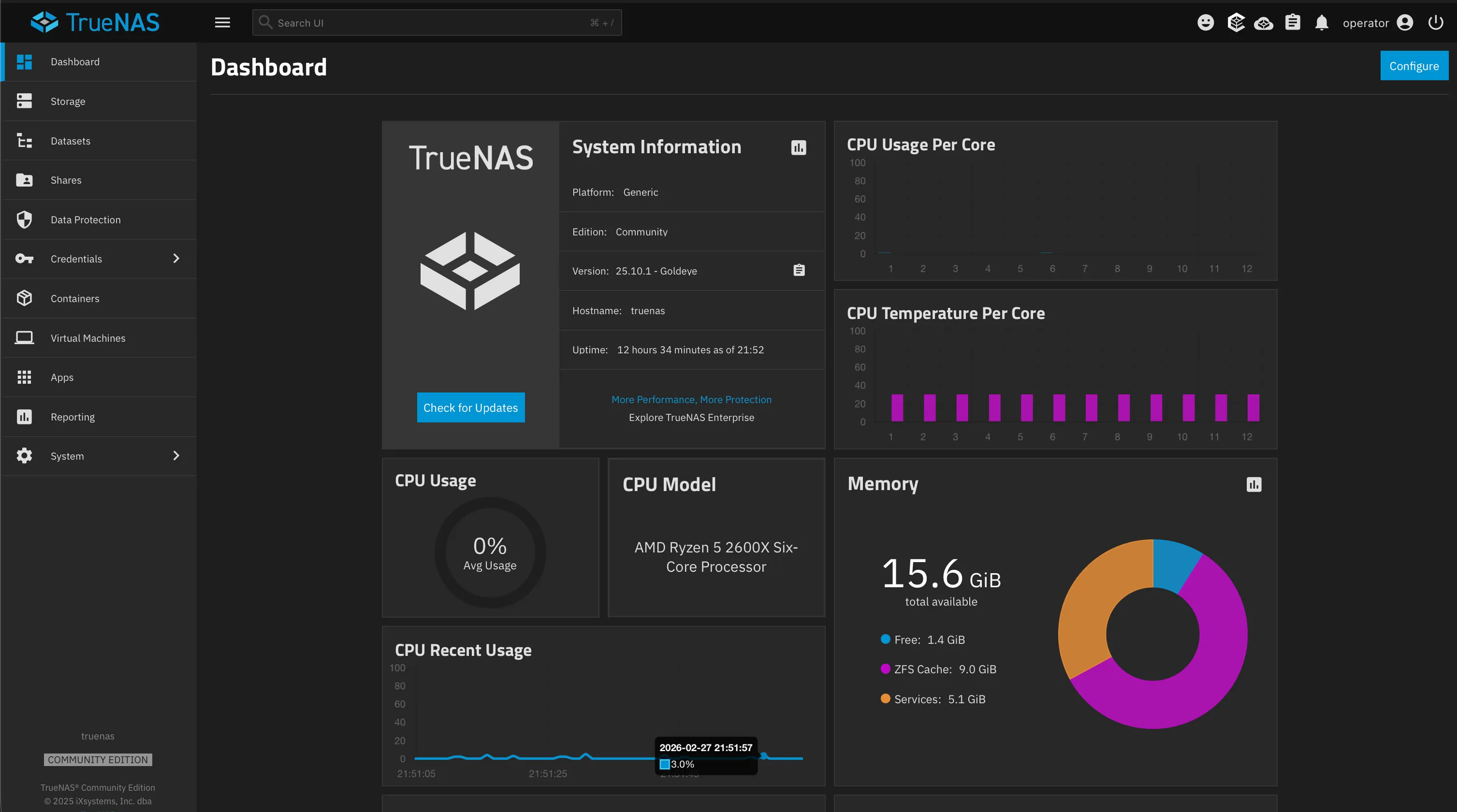
The TrueNAS Community Edition dashboard showing system information, CPU usage, and memory stats
My TrueNAS dashboard running version 25.10.1 (Goldeye)

For instance, TrueNAS allows you to create snapshots of your data. This is great for preventing data loss. If, for example, you accidentally deleted a file, you could recover it from a previous snapshot containing that file. In other words, a file is only truly deleted if and only if the system has no snapshots containing that file.

I’ve set up my machine to take hourly, daily, and even weekly snapshots. I’ve also configured it to delete old snapshots after a given period of time to save storage space.

Most of my data is mirrored across the two 8 TB hard disks in a RAID 1 setup. This means that if one drive fails, the other drive will still have all of my data intact. The SSD is used to store data from services that I self-host that benefit from having fast read and write speeds.

Apps I’m Currently Self-hosting#

Not only is TrueNAS good for file storage, you can also host apps on it! TrueNAS offers a catalog of apps, supported by the community, that you can install on your machine.

Scrutiny#

Scrutiny is a web dashboard for monitoring the health of your storage drives. Hard drives and SSDs have built-in firmware called S.M.A.R.T. (Self-Monitoring, Analysis, and Reporting Technology) that continuously tracks health metrics like temperature, power-on hours, and read errors.

Scrutiny reads this data and presents it in a dashboard showing historical trends, making it easy to spot warning signs that a drive may fail soon.

Scrutiny drive health dashboard showing four drives — two 7.3 TiB HDDs, one SSD, and one NVMe — all with a passed status
Scrutiny monitoring all four of my drives

Backrest#

Backrest is a web frontend for restic, a command-line tool used for creating file backups. I’ve set this up to save daily backups of my data to an object storage bucket on Backblaze B2.

The Backrest dashboard summary showing backup stats for a media-backup repository and plan
My Backrest configuration

Immich#

Immich is one of the most popular open-source self-hosted apps for managing photos and videos. I love that it also offers iOS and Android apps that allow you to back up photos and videos from your mobile devices. This is great if you want to rely less on services like Google Photos or iCloud. I’m currently using this to back up photos and videos from my phone.

Immich photo library showing a grid of bird photos.
A sample of my Immich photo library

Mealie#

Mealie is a recipe management tool that has made my meal prepping experience so much better! I’ve found it great for saving recipes I find on sites like NYT Cooking.

When importing recipes, you can provide the URL of the recipe and Mealie will scrape the ingredients and instructions from the page and save it in your recipe library. This makes it easier to keep track of recipes you find online and want to try out later.

Mealie’s recipe library showing six saved recipes in a grid layout
A few of my saved recipes in Mealie

Ollama#

Ollama is a backend for running various AI models. I installed it to try running large language models like qwen3.5:4b and gemma3:4b out of curiosity. I’ve also recently been exploring the world of vector embeddings such as qwen3-embedding:4b. All of these models are small enough to fit in the 8GB of VRAM my GPU provides. I like being able to offload the work of running models on my homelab instead of my laptop.

Remote Access#

When I’m not at home, I use Tailscale, a plug-and-play VPN service, to access my data and self-hosted apps remotely from any device. Tailscale builds on top of another tool called WireGuard to provide a secure tunnel into my home network.

The advantage here is that my homelab PC doesn’t need to be exposed to the public internet for this to work. Any device I want to use to access my homelab remotely needs to install the Tailscale app and be authenticated to my Tailscale network.

Next Steps#

Right now, accessing my apps requires typing in the IP address of my machine (or Tailscale address) together with the app’s port number. Because all of my services share the same IP address, my password manager has trouble distinguishing which login to use for each one.

In the future I’ll look into figuring out how to assign custom domain names to all of my services.


Read the original article

Comments

  • By linsomniac 2026-03-0817:4211 reply

    >Because all of my services share the same IP address, my password manager has trouble distinguishing which login to use for each one.

    In Bitwarden they allow you to configure the matching algorithm, and switching from the default to "starts with" is what I do when I find that it is matching the wrong entries. So for this case just make sure that the URL for the service includes the port number and switch all items that are matching to "starts with". Though it does pop up a big scary "you probably didn't mean to do this" warning when you switch to "starts with"; would be nice to be able to turn that off.

    • By PunchyHamster 2026-03-090:233 reply

      Just giving them hostnames is easier.

      In homelab space you can also make wildcard DNS pretty easily in dnsmasq, assuming you also "own" your router. If not, hosts file works well enough.

      There is also option of using mdns for same reason but more setup

      • By overfeed 2026-03-0912:004 reply

        > Just giving them hostnames is easier

        Bitwarden annoyingly ignores subdomains by default. Enabling per-sudomain credential matching is a global toggle, which breaks autocomplete on other online service that allow you to login across multiple subdomains.

        • By danparsonson 2026-03-0912:47

          You can override the matching method on an individual basis though, just using the setting button next to the URL entry field.

        • By rodolphoarruda 2026-03-0912:25

          Tell me about it... that infinite Ctrl + Shift + L sequence circling through all credentials from all subdomains. Then you brain betrays you making you skip the right credential... ugh, now you'll circle the entire set again. Annoying.

        • By freeplay 2026-03-0916:54

          You can set that globally but override at the individual entry.

        • By Groxx 2026-03-0914:25

          Seriously? That sounds incredibly awful - my keepass setup has dozens of domain customizations, there's no way in hell you could apply any rule across the entire internet.

      • By c-hendricks 2026-03-090:541 reply

        How do I edit the hosts file of an iPhone?

        • By nerdsniper 2026-03-091:082 reply

          You don't have to if you use mDNS. Or configure the iPhone to use your own self-hosted DNS server which can just be your router/gateway pointed to 9.9.9.9 / 1.1.1.1 / 8.8.8.8 with a few custom entries. You would need to jailbreak your iPhone to edit the hosts file.

          • By simondotau 2026-03-094:38

            I have a real domain name for my house. I have a few publicly available services and those are listed in public DNS. For local services, I add them to my local DNS server. For ephemeral and low importance stuff (e.g. printers) mDNS works great.

            For things like Home Assistant I use the following subdomain structure, so that my password manager does the right thing:

              service.myhouse.tld
              local.service.myhouse.tld

          • By c-hendricks 2026-03-0914:15

            Exactly, you don't. My qualm was with the "hosts file works well enough" claim of the person I responded to.

      • By tehlike 2026-03-096:46

        This is what i do.

    • By gerdesj 2026-03-090:062 reply

      "Because all of my services share the same IP address"

      DNS. SNI. RLY?

      • By sv0 2026-03-097:191 reply

        That's a bit weird to read for me as well. DNS and local DNS were the first services I've been self-hosting since 2005.

        On Debian/Ubuntu, hosting local DNS service is easy as `apt-get install dnsmasq` and putting a few lines into `/etc/dnsmasq.conf`.

        • By merpkz 2026-03-097:28

          These modern-day homelabbers will do anything to avoid DNS, looks like to them it's some kind of black magic where things will inevitably go wrong and all hell will break loose.

      • By tbyehl 2026-03-0911:36

        Not to diminish having names for everything but that just shifts the Bitwarden problem to "All of my services share the same base domain."

    • By predkambrij 2026-03-092:251 reply

      One cool trick is having (public) subdomains pointing to the tailscale IP.

      • By timwis 2026-03-096:15

        This is what I do. Works great! And my caddy setup uses the DNS mode to provision TLS certs (using my domain provider's caddy plugin).

    • By brownindian 2026-03-0821:593 reply

      Could also use Cloudflare tunnels. That way:

      1. your 1password gets a different entry each time for <service>.<yourdomain>.<tld>

      2. you get https for free

      3. Remote access without Tailscale.

      4. Put Cloudflare Access in front of the tunnel, now you have a proper auth via Google or Github.

      • By lukevp 2026-03-0823:363 reply

        You can also use cloudflare to create a dns record for each local service (pointed to the local IP) and just mark it as not proxied, then use Wireguard or Tailscale on your router to get VPN access to your whole network. If you set up a reverse proxy like nginx proxy manager, you can easily issue a wildcard cert using DNS validation from your NAS using ACME (LetsEncrypt). This is what I do, and I set my phone to use Wireguard with automatic VPN activation when off my home WiFi network. Then you’re not limited by CF Tunnel’s rules like the upload limits or not being able to use Plex.

        • By organsnyder 2026-03-0916:41

          This is exactly what I do. I have a few operators set up in k8s that handle all of this with just a couple of annotations on the Ingress resource (yeah, I know I need to migrate to Gateway). For services I want to be publicly-facing, I can set up a Cloudflare tunnel using cloudflare-operator.

        • By johnmaguire 2026-03-090:42

          Yup doing this with Caddy and Nebula, works great!

        • By sylens 2026-03-0915:15

          This is the way

      • By QGQBGdeZREunxLe 2026-03-0823:261 reply

        Tunnels go through Cloudflare infrastructure so are subject to bandwidth limits (100MB upload). Streaming Plex over a tunnel is against their ToS.

        • By miloschwartz 2026-03-0823:542 reply

          Pangolin is a good solution to this because you can optionally self-host it which means you aren't limited by Cloudflare's TOS / limits.

          • By somehnguy 2026-03-0915:32

            Also achievable with Tailscale. All my internal services are on machines with Tailscale. I have an external VPS with Tailscale & Caddy. Caddy is functioning as a reverse proxy to the Tailscale hosts.

            No open ports on my internal network, Tailscale handles routing the traffic as needed. Confirmed that traffic is going direct between hosts, no middleman needed.

          • By arvid-lind 2026-03-0913:08

            Another vote for Pangolin! Been using it for a month or so to replace my Cloudflare tunnels and it's been perfect.

      • By mvdtnz 2026-03-0822:47

        Yeesh, the last thing I want is remote access to my homelab.

    • By dpoloncsak 2026-03-0916:48

      For my homelab, I setup a Raspberry Pi running PiHole. PiHole includes the ability to set local DNS records if you use it as your DNS resolver.

      Then, I use Tailscale to connect everything together. Tailscale lets you use a custom DNS, which gets pointed to the PiHole. Phone blocks ads even when im away from the house, and I can even hit any services or projects without exposing them to the general internet.

      Then I setup NGINX reverse proxy but that might not be necessary honestly

    • By lloydatkinson 2026-03-0818:302 reply

      I wonder why each service doesn’t have a different subdomain.

      • By cortesoft 2026-03-0822:101 reply

        That's what I do, but you still have to change the default Bitwarden behavior to match on host rather than base domain.

        Matching on base domain as the default was surprising to me when I started using Bitwarden... treating subdomains as the same seems dangerous.

        • By akersten 2026-03-091:34

          It's probably a convenience feature. Tons of sites out there that start on www then bounce you to secure2.bank.com then to auth. and now you're on www2.bank.com and for some inexplicable reason need to type your login again.

          Actually it's mostly financial institutions that I've seen this happen with. Have to wonder if they all share the same web auth library that runs on the Z mainframe, or there's some arcane page of the SOC2 guide that mandates a minimum of 3 redirects to confuse the man in the middle.

      • By tylerflick 2026-03-0819:26

        This is the way. You can even do it with mDNS.

    • By techcode 2026-03-0821:23

      Setup AdGuard-Home for both blocking ads and internal/split DNS, plus Caddy or another reverse proxy and buy (or recycle/reuse) a domain name so you can get SSL certificates through LetsEncrypt.

      You don't need to have any real/public DNS records on that domain, just own the domain so LetsEncrypt can verify and give you SSL certificate(s).

      You setup local DNS rewrites in AdGuard - and point all the services/subdomains to your home servers IP, Caddy (or similar) on that server points it to the correct port/container.

      With TailScale or similar - you can also configure that all TailScale clients use your AdGuard as DNS - so this can work even outside your home.

      Thats how I have e.g.: https://portainer.myhome.top https://jellyfin.myhome.top ...etc...

    • By dewey 2026-03-0818:195 reply

      This is always annoying me with 1Password, before that I just always added subdomains but now I'm usually hosting everything behind Tailscale which makes this problem even worse as the differentiation is only the port.

      • By domh 2026-03-0819:091 reply

        You can use tailscale services to do this now:

        https://tailscale.com/docs/features/tailscale-services

        Then you can access stuff on your tailnet by going to http://service instead of http://ip:port

        It works well! Only thing missing now is TLS

        • By avtar 2026-03-0820:172 reply

          This would be perfect with TLS. The docs don't make this clear...

          > tailscale serve --service=svc:web-server --https=443 127.0.0.1:8080

          > http://web-server.<tailnet-name>.ts.net:443/ > |-- proxy http://127.0.0.1:8080

          > When you use the tailscale serve command with the HTTPS protocol, Tailscale automatically provisions a TLS certificate for your unique tailnet DNS name.

          So is the certificate not valid? The 'Limitations' section doesn't mention anything about TLS either:

          https://tailscale.com/docs/features/tailscale-services#limit...

          • By domh 2026-03-0910:00

            I think maybe TLS would work if you were to go to https://service.yourts.net domain, but I've not tried that.

          • By nickdichev 2026-03-0911:221 reply

            It works, I’m using tailscale services with https

            • By avtar 2026-03-0915:19

              Thanks for clarifying :) I'll try it out this weekend.

      • By altano 2026-03-096:293 reply

        In the 1Password entry go to the "website" item. To right right there's an "autofill behavior" button. Change it to "Only fill on this exact host" and it will no longer show up unless the full host matches exactly

        • By oarsinsync 2026-03-0915:221 reply

          Is this a per-item behaviour or can this be set as a global default?

          I'm guessing this is 1Password 8 only, as I can't see this option in 1Password 7.

          • By vladvasiliu 2026-03-0915:55

            I've looked in the settings on 1p8, and didn't find a setting for a global default.

        • By jorvi 2026-03-0913:541 reply

          Not entirely true. It can't seem to distinguish between ports..

          • By mhurron 2026-03-0915:24

            because ports don't indicate a different host.

        • By karlshea 2026-03-0914:06

          Omg thank you, I had no idea they added this feature!

      • By miloschwartz 2026-03-0823:53

        Pangolin handles this nicely. You can define alias addresses for internal resources and keep the fully private and off the public internet. Also based on WireGuard like Tailscale.

      • By wrxd 2026-03-0818:461 reply

        You can still have subdomains with Tailscale. Point them at the tailscale IP address and run a reverse proxy in front of your services

        • By dewey 2026-03-0819:14

          Good point, but for simplicity i'd still like 1Password to use the full hostname + port a the primary key and not the hostname.

      • By zackify 2026-03-0819:48

        tailscale serve 4000 --BG

        Problem solved ;)

    • By photon_collider 2026-03-0821:22

      Ah nice! Didn’t know that. I’ll try that out next time.

    • By m463 2026-03-094:391 reply

      or just use the same password for everything. ;)

      • By ozim 2026-03-097:48

        If it is like 12 characters non dictionary and PW you use only in your homelab - seems like perfectly fine.

        If you expose something by mistake still should be fine.

        Big problem with PW reuse is using the same for very different systems that have different operators who you cannot trust about not keeping your PW in plaintext or getting hacked.

    • By harrygeez 2026-03-0914:11

      not really a solution (as others have pointed out already) but it also tells me you are missing a central identity provider (think Microsoft account login). You can try deploying Kanidm for a really simple and lightweight one :)

  • By acidburnNSA 2026-03-0817:544 reply

    I have something like this, in the same case. I have beefier specs b/c I use it as a daily workstation in addition to running all my stuff.

    * nginx with letsencrypt wildcard so I have lots of subdomains

    * No tailscale, just pure wireguard between a few family houses and for remote access

    * Jellyfin for movies and TV, serving to my Samsung TV via the Tizen jellyfin app

    * Mopidy holding my music collection, serving to my home stereo and numerous other speakers around the house via snapcast (raspberry pi 3 as the client)

    * Just using ubuntu as the os with ZFS mirroring for NAS, serving over samba and NFS

    * Home assistant for home automation, with Zigbee and Z-wave dongles

    * Frigate as my NVR, recording from my security cams, doing local object detection, and sending out alerts via Home Assistant

    * Forgejo for my personal repository host

    * tar1090 hooked to a SDR for local airplane tracking (antenna in attic)

    This all pairs nicely with my two openwrt routers, one being the main one and a dumb AP, connected via hardwire trunk line with a bunch of VLANs.

    Other things in the house include an iotawatt whole-house energy monitor, a bunch of ESPs running holiday light strips, indoor and outdoor homebrew weather stations with laser particulate sensors and CO2 monitors (alongside the usual sensors), a water-main cutoff (zwave), smart bulbs, door sensors, motion sensors, sirens/doorbells, and a thing that listens for my fire alarm and sends alerts. Oh and I just flashed the pura scent diffuser my wife bought and lobotomized it so it can't talk to the cloud anymore, but I can still automate it.

    I love it and have tons of fun fiddling with things.

    • By VladVladikoff 2026-03-090:493 reply

      For anyone considering this, it's not a good plan to do it this way, if you have any family members relying on these services, you have to kill them all every time you reboot your workstation. It's really not great to mix destop and server like this. (speaking from experiance and I really need to get a separate box setup for this self hosted stuff)

      • By zem 2026-03-094:001 reply

        > if you have any family members relying on these services, you have to kill them all every time you reboot your workstation

        yikes!

        • By Pooge 2026-03-096:202 reply

          Yeah I can't imagine killing my family members every time I'm shutting down my computer

          • By altano 2026-03-096:34

            It's better than having to hear them complain every time plex goes down

          • By giwook 2026-03-0913:55

            And yet sometimes you just need to pull the plug.

      • By bjackman 2026-03-0910:052 reply

        You are always gonna have some downtime in a homelab setup I think. Unless you go all in with k8s I think the best you can do is "system reboots at 4AM, hopefully all the users are asleep".

        (Probably a lot of the services I run don't even really support HA properly in a k8s system with replicas. E.g. taking global exclusive DB locks for the lifetime of their process)

        • By embedding-shape 2026-03-0914:232 reply

          > You are always gonna have some downtime in a homelab setup I think. Unless you go all in with k8s I think the best you can do is "system reboots at 4AM, hopefully all the users are asleep".

          Huh, why? I have a homelab, I don't have any downtime except when I need to restart services after changing something, or upgrading stuff, but that happens what, once every month in total, maybe once every 6 months or so per service?

          I use systemd units + NixOS for 99% of the stuff, not sure why you'd need Kubernetes at all here, only serves to complicate, not make things simple, especially in order to avoid downtime, two very orthogonal things.

          • By bjackman 2026-03-0914:431 reply

            > I don't have any downtime except when I need to restart services

            So... you have downtime then.

            (Also, you should be rebooting regularly to get kernel security fixes).

            > not sure why you'd need Kubernetes at all here

            To get HA, which is what we are talking about.

            > only serves to complicate

            Yes, high-availability systems are complex. This is why I am saying it's not really feasible for a homelabber, unless we are k8s enthusiasts I think the right approach is to tolerate downtime.

            • By embedding-shape 2026-03-0915:401 reply

              > So... you have downtime then.

              5 seconds of downtime as you change from port N to port N+1 is hardly "downtime" in the traditional sense.

              > To get HA, which is what we are talking about.

              Again, not related to Kubernetes at all, you can do it easier with shellscripts, and HA !== orchestration layer.

          • By flipped 2026-03-0916:21

            [dead]

        • By furst-blumier 2026-03-0911:51

          I run my stuff in a local k8s cluster and you are correct, most stuff runs as replica 1. DBs actually don't because CNPG and mariadb operator make HA setups very easy. That being said, the downtime is still lower than on a traditional server

      • By ryukoposting 2026-03-0915:401 reply

        It's also worth noting you don't need sophisticated hardware to run anything listed in the parent comment. 8GB of RAM and a Celeron would be adequate. More RAM might be nice if you use the NAS a lot.

    • By wbjacks 2026-03-0822:50

      Have you tried using snapcast to broadcast sound from your Samsung tv? I gave it a shot and could never get past the latency causing unacceptable A/V delay, did you have any luck?

    • By pajamasam 2026-03-0818:525 reply

      Impressive that all that can run on one machine. Mind sharing the specs?

      • By c-hendricks 2026-03-0819:502 reply

        I run similar (gitea, scrypted+ffmpeg instead of frigate, plex instead of jellyfin) plus some Minecraft servers, *arr stack, notes, dns, and my VM for development.

        It's an i7-4790k from 12 years ago, it barely breaks a sweat most hours of the day.

        It's not really that impressive, or (not to be a jerk) you've overestimated how expensive these services are to run.

        • By hypercube33 2026-03-0822:17

          Video is usually offloaded too to the igpu on these. I have like 13 vms running on a AMD 3400g with 32gb

        • By pajamasam 2026-03-0820:122 reply

          Fair enough. How much RAM though?

          • By decryption 2026-03-0821:221 reply

            16GB would be plenty. I've got like a dozen services running on an 8GB i7-4970 and it's only using 5GB of RAM right now.

            • By shiroiuma 2026-03-096:522 reply

              If you're running ZFS, it's advisable to use more RAM. ZFS is a RAM hog. I'm using 32GB on my home server.

              • By renehsz 2026-03-0913:52

                ZFS doesn't really need huge amounts of RAM. Most of the memory usage people see is the Adaptive Replacement Cache (ARC), which will happily use as much memory as you throw at it, but will also shrink very quickly under memory pressure. ZFS really works fine with very little RAM (even less than the recommended 2GB), just with a smaller cache and thus lower performance. The only exception is if you enable deduplication, which will try to keep the entire Deduplication Table (DDT) in memory. But for most workloads, it doesn't make sense to enable that feature anyways.

              • By hombre_fatal 2026-03-0913:231 reply

                That + full-disk encryption is why I went with BTRFS inside LUKS for my NAS.

                They recommend 1GB RAM per 1TB storage for ZFS. Maybe they mean redundant storage, so even 2x16TB should use 16GB RAM? But it's painful enough building a NAS server when HDD prices have gone up so much lately.

                The total price tag already feels like you're about to build another gaming PC rather than just a place to back up your machines and serve some videos. -_-

                That said, you sure need to be educated on BTRFS to use it in fail scenarios like degraded mode. If ZFS has a better UX around that, maybe it's a better choice for most people.

          • By c-hendricks 2026-03-090:15

            32gb for me because half of that is given to the development VM

      • By TacticalCoder 2026-03-0822:501 reply

        > Impressive that all that can run on one machine. Mind sharing the specs?

        Not GP but I have lots of fun running VMs and lots of containers on an old HP Z440 workstation from 2014 or so. This thing has 64 GB of ECC RAM and costs next to nothing (a bit more now with RAM that went up). Thing is: it doesn't need to be on 24/7. I only power it up when I first need it during the day. 14 cores Xeon for lots of fun.

        Only thing I haven't moved to it yet is Plex, which still runs on a very old HP Elitedesk NUC. Dunno if Plex (and/or Jellyfin) would work fine on an old Xeon: but I'll be trying soon.

        Before that I had my VMs and containers on a core i7-6700K from 2015 IIRC. But at some point I just wanted ECC RAM so I bought a used Xeon workstation.

        As someone commented: most services simply do not need that beefy of a machine. Especially not when you're strangled by a 1 Gbit/s Internet connection to the outside world anyway.

        For compilation and overall raw power, my daily workstation is a more powerful machine. But for a homelab: old hardware is totally fine (especially if it's not on 24/7 and I really don't need access to my stuff when I sleep).

        • By leptons 2026-03-091:443 reply

          Cheap to buy old hardware, but electricity to run those old rigs isn't really cheap in many areas now. My server is costing me about $100/month in electricity costs.

          It does have 16 spinning disks in it, so I accept that I pay for the energy to keep them spinning 24/7, but I like the redundancy of RAID10, and I have two 8-disk arrays in the machine. And a Ryzen-7 5700G, 10gbit NIC, 16 port RAID card, and 96GB of RAM.

          • By shellwizard 2026-03-096:39

            It depends on the type of hardware that you use for your server. If it's really server grade you're totally right. For example cheap memory+CPU+MB x99 off AliExpress are cheap but they're not very efficient.

            In my case I fell in love with the tiny/mini/micros and have a refurbish Lenovo m710q running 24/7 and only using 5W when idling. I know it doesn't support ECC memory or more than 8 threads, but for my use case is more than enough

          • By gessha 2026-03-0912:361 reply

            I’ve been watching some storage and homelab-themed videos and I heard there’s a lot of optimizations you can do to lower power usage - spinning the disks down, turning the machine on for a limited time, etc.

            • By leptons 2026-03-0918:13

              That doesn't work for me. The main server is constantly using the disks to record security cameras, run VMs 24/7, Plex, a web server, a VPN (so I can dial in to my local network remotely), and a lot more.

          • By matja 2026-03-0913:371 reply

            How have you measured the power usage/cost? That seems like a incredibly high price for electricity, similar to a 600W constant load in my part of the world.

            • By leptons 2026-03-0918:12

              All of my IT equipment in my office is running through a single UPS that measures power consumption.

              I do have a bit more than just that server hooked up to it. There's also a Dell i5 running DDWRT as my main gateway/router, the fiber internet modem, a small Synology NAS, a couple of WIFI routers, etc. It all adds up.

              That doesn't include my backup server out in the garage with another 8-disk RAID10 array and an LTO tape drive that is often backing up data, 5 more WIFI routers around the property, and 10 or so security cameras. So I'm probably well over $100/mo for all my tech stuff.

      • By acidburnNSA 2026-03-0911:07

        Ryzen 5950x cpu, 64 gb ecc ram, dual 16 tb drives for zfs, Nvidia 5070 gpu.

        Way way overspeced for what I listed, but I use it for lots of video processing, numerical simulations, and some local AI too.

        I have a similar subset of this stuff running at my mom's house on a 16 GB ram Beelink minicomputer. With openvino frigate can still do fully local object detection on the security case, whish is sweet.

      • By drnick1 2026-03-0819:201 reply

        Not impressive at all. I run just about as many services, plus several game servers, on a Ryzen 5, and most of the time CPU usage is in the low single digits. Most stuff is idle most of the time. Something like a Home Assistant instance used by a single household is basically costless to run in terms of CPU.

        • By pajamasam 2026-03-0821:132 reply

          Not costless in terms of RAM though, surely?

          • By embedding-shape 2026-03-0914:26

            Ultimately, basically. I have two servers in my homelab, one that is more beefy, which hosts a bunch of stuff (basically everything parent outlined + ), including a DHT crawler, download clients, indexers, databases and a lot more. It's sitting and using 16GB (out of available 126GB) right now. Then I have another which only runs the security system + Frigate + Home Assistant, it's using 2.3GB out of 32GB available.

          • By drnick1 2026-03-090:03

            Web apps like Home Assistant are very light, things like game servers are heavier since they have to load maps etc.

      • By cyberpunk 2026-03-0819:122 reply

        You could easily run all of that on a rpi…

    • By jamiemallers 2026-03-0915:05

      [dead]

  • By xoa 2026-03-0818:006 reply

    I'll admit I've still stuck with the original FreeBSD based TrueNAS, and still am kinda bummed they swapped it. So it's interesting to see a direct example of someone for whom the new Linux based version is clearly superior. I'm long since far, far more at the "self-hosted" vs "homelab" end of the spectrum at this point, and in turn have ended up splitting my roles back out again more vs all-in-one boxes. My NAS is just a NAS, my virtualization is done via proxmox on separate hardware with storage backing to the NAS via iSCSI, and I've got a third box for OPNsense to handle the routing functions. When I first compared, the new TrueNAS was slower (presumably that is at parity or better now?) and missing certain things of the old one, but already was much easier to have Synology or Docker style or the like "apps" AIO. That didn't interest me because I didn't want my NAS to have any duty but being a NAS, but I can see how it'd be far more friendly to someone getting going, or many small business setups. A sort of better truly open and supported "open Synology" (as opposed the xpenology project).

    Clearly it's worked for them here, and I'm happy to see it. Maybe the bug will truly bite them but there's so much incredibly capable hardware now available for a song and it's great to see anyone new experiment with bringing stuff back out of centralized providers in an appropriately judicious way.

    Edit: I'll add as well, that this is one of those happy things that can build on itself. As you develop infrastructure, the marginal cost of doing new things drops. Like, if you already have a cheap managed switch setup and your own router setup whatever it is, now when you do something like the author describes you can give all your services IPs and DNS and so on, reverse proxy, put different things on their own VLANs and start doing network isolation that way, etc for "free". The bar of giving something new a shot drops. So I don't think there is any wrong way to get into it, it's all helpful. And if you don't have previous ops or old sysadmin experience or the like then various snags you solve along the way all build knowledge and skills to solve new problems that arise.

    • By ryandrake 2026-03-0821:483 reply

      One of the most helpful realizations I had as I played around with self-hosting at home is that there is nothing magical about a NAS. You don't need special NAS software. You generally don't need wild filesystems, or containers or VMs or this-manager or that-webui. Most people just need Linux and NFS. Or Linux and SMB. And that's kind of it. The more layers running, the more that can fail.

      Just like you don't really need the official Pi-hole software. It's a wrapper around dnsmasq, so you really just need dnsmasq.

      A habit of boiling your application down to the most basic needs is going to let you run a lot more on your lab and do so a lot more reliably.

      • By rpcope1 2026-03-090:312 reply

        Kind of expanding on this, it feels like a huge chunk of specialized operating systems are just someone just putting their own skin over Debian. The vast majority of services and tools they wrap aren't any more complicated than the wrapper.

        Hardware is kind of the same deal; you can buy weird specialty "NAS hardware" but it doesn't do well with anything offbeat, or you can buy some Supermicro or Dell kit that's used and get the freedom to pick the right hardware for the job, like an actual SAS controller.

        • By shiroiuma 2026-03-096:59

          >it feels like a huge chunk of specialized operating systems are just someone just putting their own skin over Debian. The vast majority of services and tools they wrap aren't any more complicated than the wrapper.

          That's exactly what TrueNAS is these days: it's Debian + OpenZFS + a handy web-based UI + some extra NAS-oriented bits. You can roll your own if you want with just Debian and OpenZFS if you don't mind using the command line for everything, or you can try "Cockpit".

          The nice thing about TrueNAS is that all the ZFS management stuff is nicely integrated into the UI, which might not be the case with other UIs, and the whole thing is set up out-of-the-box to do ZFS and only ZFS.

        • By dizhn 2026-03-0911:12

          There are exceptions to this such as Proxmox which can actually be added to an existing Debian install. I must admit that when I first encountered it I didn't expect much more than a glorified toy. However it is so much more than that and they do a really good job with the software and the features. If anybody is on the fence about it I recommend giving it a go. If you do, I recommend using the ISO to install, pick ZFS as the filesystem (much much more flexible), and run pbs (proxmox backup server) somewhere (even on the same box as an lxc host with zfs backed dir).

      • By globular-toast 2026-03-0822:311 reply

        Same with a router. Any Linux box with a couple of (decent) NICs is a powerful router. You just need to configure it.

        But for my own sanity I prefer out of the box solutions for things like my router and NAS. Learning is great but sometimes you really just need something to work right now!

      • By flipped 2026-03-0916:29

        [dead]

    • By lostlogin 2026-03-0818:071 reply

      > splitting my roles back out again more

      The fiasco you can cause when you try fix, update, change etc makes this my favourite too.

      Household life is generally in some form of ‘relax’ mode in evening and at weekends. Having no internet or movies or whatever is poorly tolerated.

      I wish Apple was even slightly supportive of servers and Linux as the mini is such a wicked little box. I went to it to save power. Just checked - it averaged 4.7w over the past 30 days. It runs Ubuntu server in UTM which notably raises power usage but it has the advantage that Docker desktop isn’t there.

      • By xoa 2026-03-0818:302 reply

        >The fiasco you can cause when you try fix, update, change etc makes this my favourite too.

        I think some of the difference between "self-hosted" vs "homelab" is in the answer to the question of "What happens if this breaks end of the day Friday?" An answer of "oh merde of le fan, immediate evening/weekend plans are now hosed" is on the self-hosted end of the spectrum, whereas "eh, I'll poke at it on Sunday when it's supposed to be raining or sometime next week, maybe" is on the other end. Does that make sense? There are a few pretty different ways to approach making your setup reliable/redundant but I think throwing more metal at the problem features in all of them one way or another. Plus if someone moves up the stack it can simply be a lot more efficient and performant, the sort of hardware suited for one role isn't necessarily as well suited for another and trying to cram too much into one box may result in someone worse AND more expensive then breaking out a few roles.

        But probably a lot of people who ended up doing more hosting started pretty simple, dipping their toes in the water, seeing how it worked out and building confidence. And having everything virtualized on a single box is a pretty easy and highly flexible way get going and experiment. Also if it's on a ZFS backing makes "reset/rollback world" quite straight forward with minimal understanding given you can just use the same snapshot mechanism for that as you do for all other data. Issues with circular dependencies and the like or what happens if things go down when it's not convenient for you to be around in person don't really matter that much. I think anything that lowers the barrier to entry is good.

        Of course, someone can have some of each too! Or be somewhere along the spectrum, not at one end or another.

        • By lostlogin 2026-03-0820:01

          > And having everything virtualized on a single box is a pretty easy and highly flexible way get going and experiment. Also if it's on a ZFS backing makes "reset/rollback world" quite straight forward with minimal understanding given you can just use the same snapshot mechanism for that as you do for all other data.

          Docker-compose isn’t a backup, but from a fresh ubuntu server install, it’ll have me back in 20 mins. Backing up the entire VM isn’t too hard either.

          I was in a really sweet spot and then ESXi became intolerable. Though in fairness their website was alway pure hell.

        • By lostlogin 2026-03-0819:12

          > And having everything virtualized on a single box is a pretty easy and highly flexible way get going and experiment. Also if it's on a ZFS backing makes "reset/rollback world" quite straight forward with minimal understanding given you can just use the same snapshot mechanism for that as you do for all other data.

          Docker-compose isn’t a backup, but from a fresh ubuntu server install, it’ll have me back in 20 mins. Backing up the entire VM isn’t too hard either.

          I was n a really sweet spot and then ESXi became intolerable. Though in fairness their website was alway pure hell.

    • By globular-toast 2026-03-0822:27

      I'm similar to you[0]. I still run FreeBSD TrueNAS, and it's just a NAS. Although I do run the occasional VM on it as the box is fairly overprovisioned. I run all my other stuff on an xcp-ng box. I'm a little more homelab-y as I do run stuff on a fairly pointless kubernetes cluster, but it's for learning purposes.

      I really prefer storage just being storage. For security it makes a lot of sense. Stuff on my network can only access storage via NFS. That means if I were to get malware on my network and it corrupted data (like ransomware), it won't be able to touch the ZFS snapshots I make every hour. I know TrueNAS is well designed and they are using Docker etc, but it still makes me nervous.

      I guess when I finally have to replace my NAS I'll have to go Linux, but it'll still be just a NAS for me.

      [0] https://blog.gpkb.org/posts/homelab-2025/

    • By vermaden 2026-03-0820:09

      I also regret that change.

      Big downgrade after moving to Linux:

      - https://vermaden.wordpress.com/2024/04/20/truenas-core-versu...

    • By photon_collider 2026-03-091:08

      Fair point! When I first started on this I went down a deep rabbit hole exploring all the ways I could set this up. Ultimately, I decided to start simple with hardware that I had laying around.

      I definitely will want to have a dedicated NAS machine and a separate server for compute in the future. Think I'll look more into this once RAM prices come back to normal.

    • By PunchyHamster 2026-03-0818:15

      There was just not a good reason to stay with BSD, especially with NAS -> homeserver evolution.

      Really, we should rename that kind of devices to HSSS (Home Service Storage Server)

HackerNews